MCP server · Developer tools
SAGE command wrapper
by PsYcGoD
Lets your AI run terminal commands and see a short summary instead of pages of noisy output.
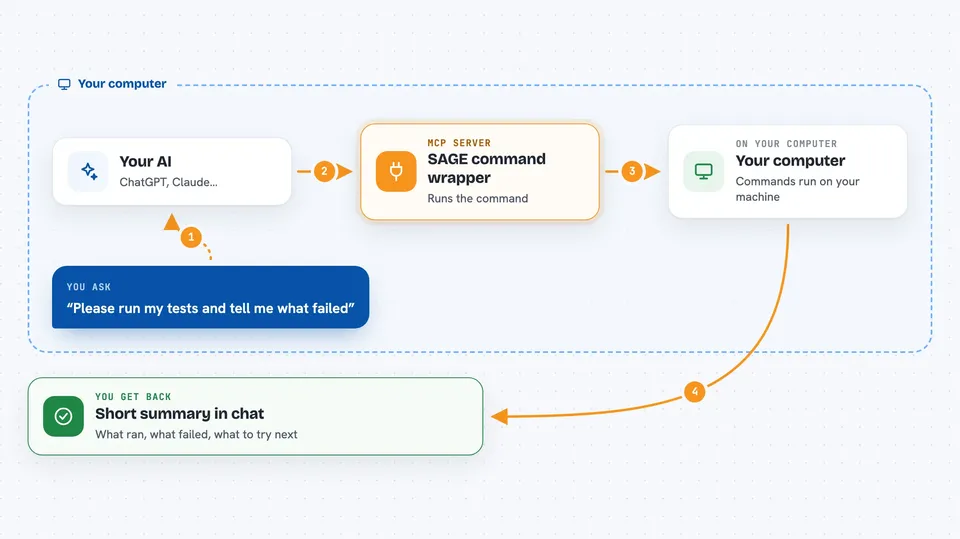
SAGE is a small helper that sits between your AI coding agent and your computer's terminal. When the AI needs to run a command, SAGE runs it, keeps the full messy output on your machine, and hands the AI a short clean summary. It is handy for anyone who uses an AI agent to write or fix code and keeps running out of room in the conversation.
What is an MCP server? The 30-second version
On its own, your AI can only chat with you. An MCP server is a small helper program that gives your AI a new skill or a connection to another tool. This one, SAGE, connects your AI to your own terminal, so it can run commands like tests or builds for you. You ask in plain words, the AI uses SAGE, and SAGE does the work on your computer.
What this MCP server does
You ask your AI to run something, like your tests or a build. The AI passes that command to SAGE instead of running it directly. SAGE runs the command on your machine, saves the full output locally, and sends back a short summary with the useful parts. Errors get grouped so the AI can see what went wrong without wading through noise. Your raw logs never leave your computer unless you turn on a feature that sends data.
 Click to zoom
What you can do with it
- Run terminal commands through your AI agent and get short summaries back
- Keep full command output on your own machine instead of in the chat
- See grouped and explained errors from failed commands
- Ask for a suggestion on what to try next after a failure
- Check how much context and money SAGE has saved you
- Look back at your recent command history
- Open a local dashboard to see your stats
Try asking your AI
- “Please run my tests and tell me what failed.”
- “Run the build and summarize any errors.”
- “Check git status and let me know what changed.”
- “Run the install and tell me if anything went wrong.”
What it gives back to you
You get a short, readable summary in the chat: what ran, whether it worked, and the important errors or warnings. Full raw output stays on your machine, so you can ask for more detail if you need it. SAGE can also show you stats like how many tokens it saved and your recent command history. If a command failed, it can explain the failure and suggest a next step.
Before you start
What you need
- Python installed on your computer (for the pip install path)
- Node.js installed (if you prefer the npm path)
- A terminal or command prompt
- An AI coding agent like Claude Code, Codex, Cursor, Windsurf, OpenCode, or Cline
Good to know
SAGE runs real commands on your computer, so only use it with commands you trust, and remember it can change or delete files if the command does.
Install it with your AI
Add SAGE command wrapper to your AI, no technical skills needed
You don't install anything by hand. You copy one prompt, paste it into an AI that can work on your computer, and it checks, installs and connects the server for you, asking you when it needs something.
Sign in to get the install prompt
Members get a ready-made prompt that lets the Claude desktop app check SAGE command wrapper, install it and connect it for them, step by step. You don't need any technical skills: you copy, paste and answer a few questions. Your connected AI can also find and install any of the 4,361 MCP servers here for you.
Who it's for
Developers and technical folks who use AI coding agents and want to keep their chat context clean while running commands.