MCP server · Design tools
build123d MCP server
by pzfreo
Let your AI build and check 3D CAD models, render previews, and export STEP or STL files.
This is a helper for AI apps that lets your assistant create 3D CAD models using build123d, a Python-based design tool. It is handy if you need simple mechanical parts, mounting plates, or brackets and you would rather describe them in plain words than learn CAD software. You do not need to be a programmer, but your AI app does need to support MCP.
What is an MCP server? The 30-second version
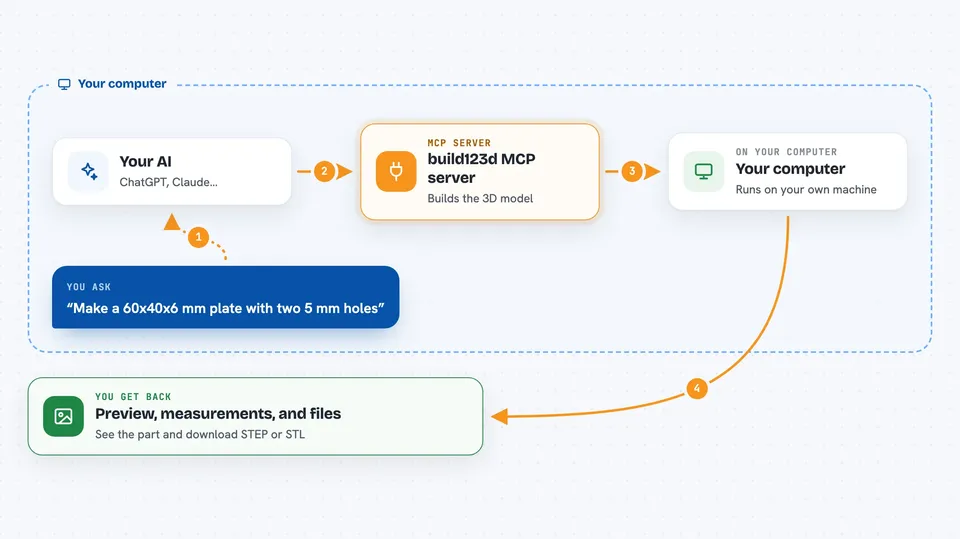
On its own, your AI can only chat and write text. An MCP server is a small helper program that gives your AI a new skill or a connection to another tool. This server connects your AI to build123d, a CAD engine, so the AI can actually build 3D shapes, measure them, and save files. When you ask for a part, the AI calls this helper behind the scenes and shows you the result.
What this MCP server does
You describe the part you want in the chat, like a plate with two holes. The AI writes build123d code and sends it to this server. The server runs the code in a CAD session, builds the 3D model, and can render a picture or measure it. The AI checks the result, fixes mistakes if needed, and can export the final part as a STEP or STL file. You see previews, measurements, and file links right in the chat.
 Click to zoom
What you can do with it
- Create 3D parts from a written description
- Render PNG or SVG previews of your model
- Measure volume, area, and dimensions
- Find holes, bosses, and patterns in a part
- Check if a part is printable or fits together
- Export STEP, STL, DXF, or SVG files
- Import an existing STEP or STL file to compare
- Save and restore your work session
Try asking your AI
- “Use build123d-mcp to make a 60 mm x 40 mm x 6 mm mounting plate with two 5 mm through holes 40 mm apart. Render it, measure it, then export STEP and STL.”
- “Build a simple L-bracket 50 mm tall with 4 mm thick walls and show me a preview.”
- “Measure the volume and bounding box of the part we just made.”
- “Export the current model as an STL file I can 3D print.”
What it gives back to you
You get back chat messages with preview images, measurements like volume or hole positions, and confirmation when files are saved. The AI can show you a picture of the part and tell you if it passed validation. Exported files appear as links or paths you can download. If something fails, the AI can show you the error and try to fix it.
Before you start
What you need
- uv installed on your computer (a free tool that runs Python programs)
- An AI app that supports MCP, such as Claude Desktop, Cursor, VS Code, or Codex CLI
- Python 3.11 to 3.14 (uv can download this for you if needed)
Good to know
This server runs code and creates files on your computer, so only use it with an AI app you trust, and check exported files before sharing or printing them.
Install it with your AI
Add build123d MCP server to your AI, no technical skills needed
You don't install anything by hand. You copy one prompt, paste it into an AI that can work on your computer, and it checks, installs and connects the server for you, asking you when it needs something.
Sign in to get the install prompt
Members get a ready-made prompt that lets the Claude desktop app check build123d MCP server, install it and connect it for them, step by step. You don't need any technical skills: you copy, paste and answer a few questions. Your connected AI can also find and install any of the 4,361 MCP servers here for you.
Who it's for
Anyone who needs simple 3D parts made without learning CAD software, like hobbyists, engineers, or makers who already chat with an AI assistant.