MCP server · Customer communication
Quackback MCP server
by QuackbackIO
Lets your AI search, sort, and update customer feedback in Quackback for you.
Quackback is a place where your team collects customer feedback, ideas, and feature requests in one spot. This MCP server connects your AI assistant to that Quackback workspace, so you can ask it to look things up or make changes for you. It is handy if you work with support, product, or customer success and deal with a lot of feedback every day.
What is an MCP server? The 30-second version
On its own, your AI can only chat with you. An MCP server is a small helper program that gives your AI a new skill or a connection to an app or service. This one connects your AI to Quackback, so it can search posts, check statuses, and act on feedback when you ask. You do not need to know how it works under the hood. You just talk to your AI like normal.
What this MCP server does
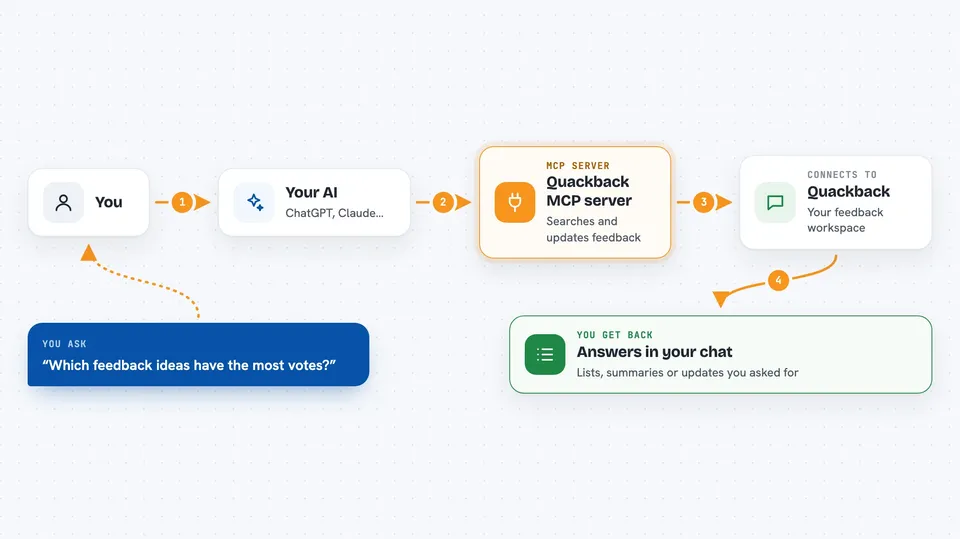
You ask your AI something about your Quackback feedback, like which ideas are getting the most votes. Your AI sends that request to this helper program. The helper talks to your Quackback workspace and pulls back what you asked for. Then your AI shows you the answer in the chat, or makes the change you wanted, like updating a status or adding a comment. It works the same way whether you are on the cloud version or running Quackback yourself.
 Click to zoom
What you can do with it
- Search feedback posts by keyword, status, or topic
- Triage incoming posts and update their status
- Comment on a post or vote on behalf of a customer
- Find and merge duplicate feedback posts
- Check what is on the roadmap or in the changelog
- Summarize themes across many feedback posts
- Publish or schedule a changelog update
Try asking your AI
- “Show me the top 10 feature requests from this month that are still open”
- “Find any duplicate posts about dark mode and merge them”
- “Update the status of the post about CSV export to In Progress”
- “Summarize what customers are saying about the new dashboard”
What it gives back to you
You get answers right in your chat, like a list of posts, a short summary, or a count of votes. If you asked it to change something, it tells you what it updated. You can also ask for a quick overview of themes across many posts. Everything shows up as normal text in the conversation.
Before you start
What you need
- A Quackback account (free to start on the cloud version, or your own self-hosted install)
- Your Quackback workspace URL and an access token from your Quackback settings
- An AI assistant that supports MCP servers, like Claude Desktop or another MCP-ready app
Good to know
It can change things in your Quackback workspace, like statuses, comments, and merges, so double-check before letting it make bulk edits.
Install it with your AI
Add Quackback MCP server to your AI, no technical skills needed
You don't install anything by hand. You copy one prompt, paste it into an AI that can work on your computer, and it checks, installs and connects the server for you, asking you when it needs something.
Sign in to get the install prompt
Members get a ready-made prompt that lets the Claude desktop app check Quackback MCP server, install it and connect it for them, step by step. You don't need any technical skills: you copy, paste and answer a few questions. Your connected AI can also find and install any of the 4,361 MCP servers here for you.
Who it's for
Support teams, product managers, and customer success folks who handle a lot of feedback and want their AI to help sort through it.