
MCP server · Developer tools
Docker MCP server
by QuantGeekDev
Lets your AI start containers, deploy Docker Compose stacks, and read logs for you.
This is a small helper that connects your AI assistant to Docker, the tool many teams use to run apps in tidy little boxes called containers. Once it is set up, you can ask your AI in plain words to start a container, launch a whole stack, or show you the logs. It is handy for developers and anyone who runs apps with Docker but does not want to memorize all the commands.
What is an MCP server? The 30-second version
On its own, your AI can only chat. An MCP server is a small helper program that gives your AI a new skill or a connection to another tool. This one connects your AI to Docker on your computer, so when you ask it to start a container or check what is running, it can actually go and do that for you. You do not need to learn any special syntax; you just ask in normal words.
What this MCP server does
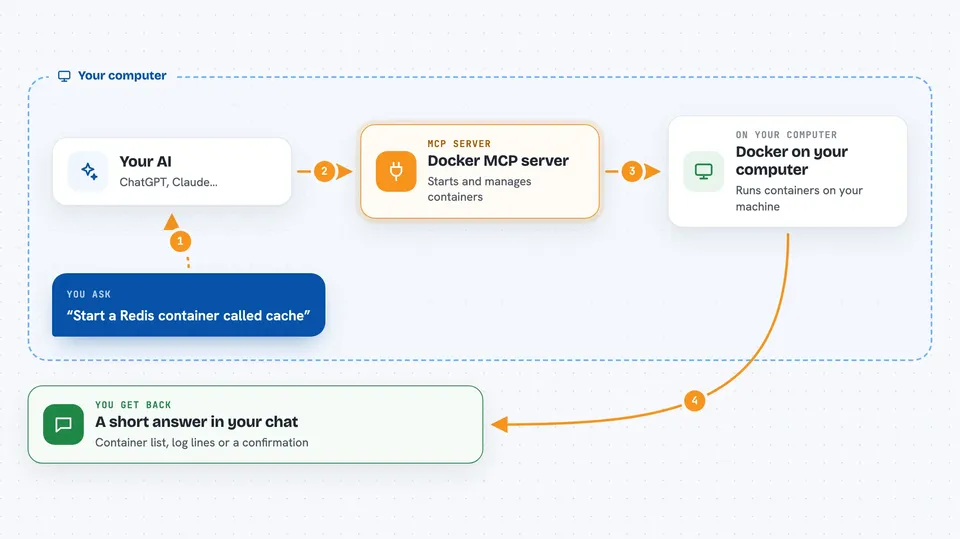
You tell your AI what you want, for example that you want to run a small web server in a container. The AI passes that request to this helper. The helper then talks to Docker on your machine and creates the container, deploys a Compose stack, or fetches logs. When it is done, the result comes back to you in the chat as a short answer or a list.
 Click to zoom
What you can do with it
- Start a new container from an image you name
- Deploy a Docker Compose stack from a YAML you paste
- Fetch the logs from a specific container
- List all containers and see which are running
- Give a container a name and open ports for it
- Pass simple environment values into a new container
Try asking your AI
- “Start a Redis container called cache and open port 6379”
- “Deploy this Compose stack for me and call the project my-stack”
- “Show me the last logs from the container named web”
- “List all my Docker containers and tell me which ones are running”
What it gives back to you
You get back short, readable answers in the chat. For example, a list of containers with their names and status, the log lines from a container you asked about, or a confirmation that a container or stack was created. It does not dump huge walls of text unless the logs themselves are long.
Before you start
What you need
- Docker Desktop or Docker Engine installed and running on your computer
- Python 3.12 or newer
- UV, a small tool that runs Python programs (the README calls it a package manager)
- The Claude desktop app if you want to add it there
Good to know
This helper can start and change things on your Docker setup, so be careful about what you ask it to run, especially with images you do not trust.
Install it with your AI
Add Docker MCP server to your AI, no technical skills needed
You don't install anything by hand. You copy one prompt, paste it into an AI that can work on your computer, and it checks, installs and connects the server for you, asking you when it needs something.
Sign in to get the install prompt
Members get a ready-made prompt that lets the Claude desktop app check Docker MCP server, install it and connect it for them, step by step. You don't need any technical skills: you copy, paste and answer a few questions. Your connected AI can also find and install any of the 4,609 MCP servers here for you.
Who it's for
Developers and technical folks who already use Docker and want to control it by chatting instead of typing commands.



