
MCP server · Finance and crypto
Braintree MCP server
by QuentinCody
Lets your AI look up and manage Braintree payments, customers and transactions for you.
This is a helper that connects your AI assistant to Braintree, the payment system owned by PayPal. Once it is set up, you can ask your AI to check a payment, look up a customer, or start a charge, and it will talk to Braintree for you. It is handy for people who already work with Braintree and want to save time on everyday payment tasks.
What is an MCP server? The 30-second version
On its own, your AI can only chat with you. An MCP server is a small helper program that gives your AI a new skill or a connection to another service. This one connects your AI to Braintree, so it can look things up or make changes there when you ask. You install it once, and after that it quietly sits between your AI and Braintree.
What this MCP server does
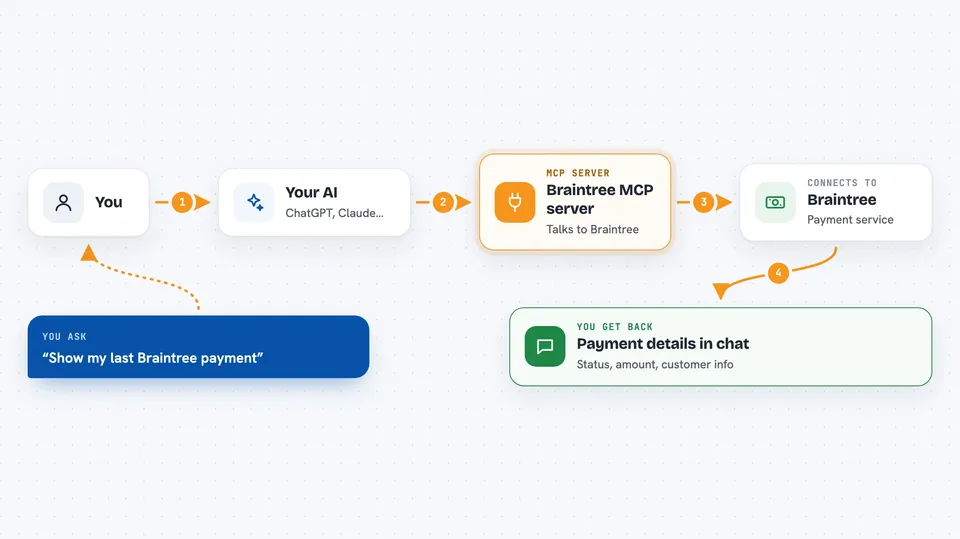
You type a request in plain words, like asking about a payment or a customer. Your AI passes that request to this helper program. The helper then talks to Braintree using your account details. Braintree sends back the answer, and the helper passes it to your AI, which shows it to you in the chat. For some tasks, like starting a payment, it can also send a change to Braintree, not just read.
 Click to zoom
What you can do with it
- Check whether your Braintree connection and login details work
- Look up a customer and see their saved payment methods
- Fetch the details of a single transaction, like its status and amount
- Start a new charge against a saved payment method
- Run a custom Braintree query when you know exactly what you need
- Read payment information such as amounts and currencies
What it gives back to you
You get answers in your chat, usually as text or a short list. For a customer lookup, you might see their name, email and the last four digits of their cards. For a transaction, you get things like its status, amount and currency. If you start a payment, it tells you whether it went through and gives you the new transaction details.
Before you start
What you need
- A Braintree account with a merchant ID, public key and private key (these come from your Braintree Control Panel)
- Python 3.13 or newer installed on your computer
- The Claude desktop app or another AI app that supports MCP
Good to know
This can start real payments and change data in your Braintree account, so be careful with requests that create charges, and test in sandbox mode first.
Install it with your AI
Add Braintree MCP server to your AI, no technical skills needed
You don't install anything by hand. You copy one prompt, paste it into an AI that can work on your computer, and it checks, installs and connects the server for you, asking you when it needs something.
Sign in to get the install prompt
Members get a ready-made prompt that lets the Claude desktop app check Braintree MCP server, install it and connect it for them, step by step. You don't need any technical skills: you copy, paste and answer a few questions. Your connected AI can also find and install any of the 4,609 MCP servers here for you.
Who it's for
People who already use Braintree for payments, like finance staff, support teams or small business owners, and who want to check or manage payments by just asking their AI.



