
MCP server · Research
Catalysis Hub MCP server
by QuentinCody
Lets your AI search Catalysis Hub for reactions, materials, and surface data for you.
This is a small helper that connects your AI assistant to Catalysis Hub, a public database of catalysis research. It is handy if you study or work with catalysts and want to look things up without clicking through a website. Your AI does the searching, and you get the results in plain chat.
What is an MCP server? The 30-second version
On its own, your AI can only chat with you using what it already knows. An MCP server is a small helper program that gives your AI a new skill or a connection to an app or service. This one connects your AI to Catalysis Hub, so it can look up reactions, materials, and publications there when you ask. You do not need to understand how it works under the hood. You just ask a question, and the helper fetches the answer.
What this MCP server does
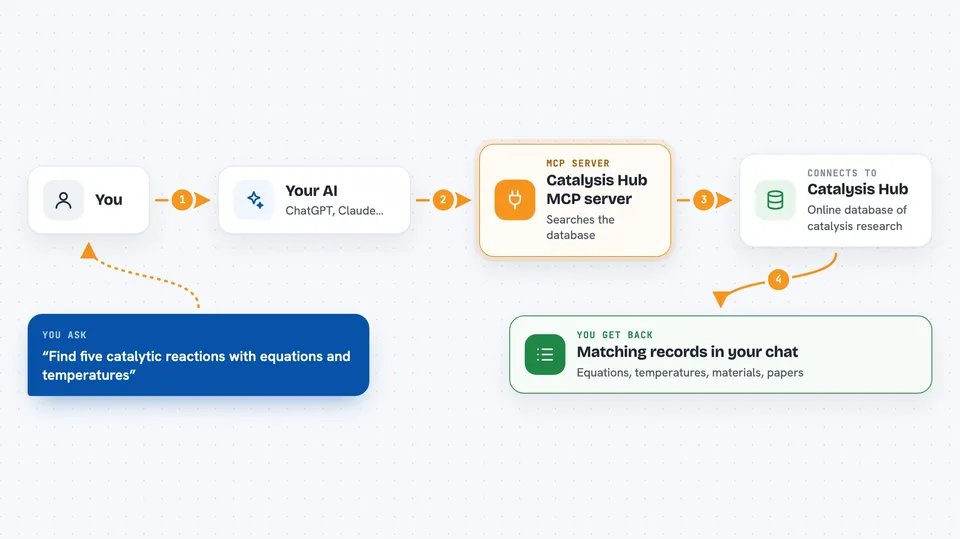
You ask your AI a question about catalysis, like which reactions involve a certain material. Your AI sends that request to this helper program. The helper talks to the Catalysis Hub database over the internet using its query system. Catalysis Hub sends back the matching records, such as reaction equations, temperatures, or material details. Your AI then shows you the results in the chat, usually as a list or a short summary.
 Click to zoom
What you can do with it
- Search for catalytic reactions by equation or condition
- Look up material systems and their properties
- Find research publications by title, author, or DOI
- Retrieve surface reaction data like adsorption energies
- Run a custom query against the Catalysis Hub database
- Pull related reactions for a specific material
Try asking your AI
- “Find five catalytic reactions and show me their equations and temperatures”
- “Look up the material with id mp-1234 and tell me its energy and related reactions”
- “Search Catalysis Hub for publications about ammonia synthesis catalysts”
- “Show me surface reaction data with adsorption energies for a given material”
What it gives back to you
You get back lists of records from Catalysis Hub, such as reaction equations, temperatures, material formulas, energies, and publication details. Your AI usually presents them as a table, a bullet list, or a short written summary. If something goes wrong, you may see an error message explaining what the database did not understand. The results appear right in your chat, so you can keep asking follow-up questions.
Before you start
What you need
- Python 3 installed on your computer
- The httpx library (installed with pip)
- The Claude desktop app or another tool that supports MCP servers
Good to know
This server only reads data from Catalysis Hub, so it will not change or delete anything, but it does need an internet connection to reach the database.
Install it with your AI
Add Catalysis Hub MCP server to your AI, no technical skills needed
You don't install anything by hand. You copy one prompt, paste it into an AI that can work on your computer, and it checks, installs and connects the server for you, asking you when it needs something.
Sign in to get the install prompt
Members get a ready-made prompt that lets the Claude desktop app check Catalysis Hub MCP server, install it and connect it for them, step by step. You don't need any technical skills: you copy, paste and answer a few questions. Your connected AI can also find and install any of the 4,609 MCP servers here for you.
Who it's for
Researchers, students, and engineers who work with catalysts and want quick answers from Catalysis Hub without browsing the site by hand.


