MCP server · Research
Rijksmuseum MCP server
by r-huijts
Lets your AI search Rijksmuseum artworks, pull up details and high-resolution images, and explore collections.
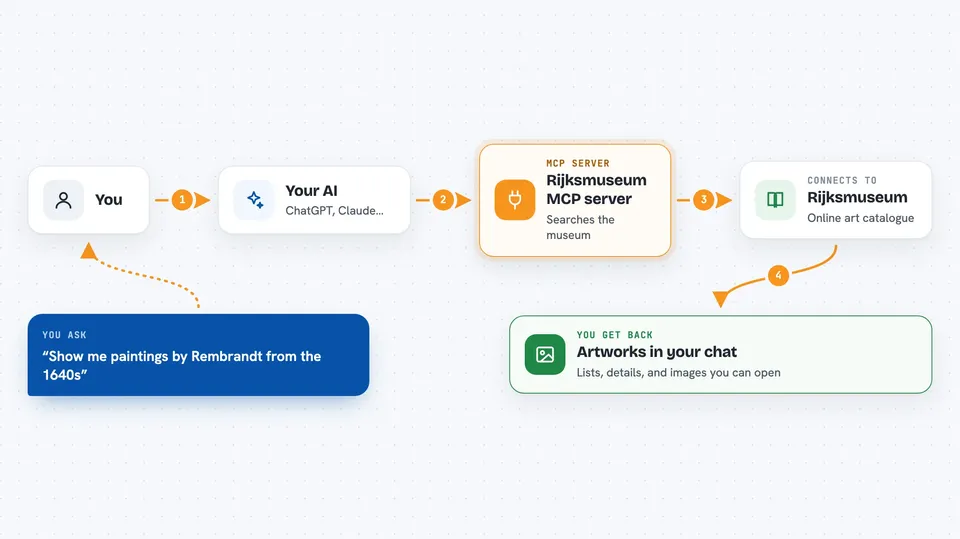
This is a helper that connects your AI assistant to the Rijksmuseum's online collection. Once it is set up, you can just ask questions in plain words and the AI will look things up in the museum's catalogue for you. It is handy if you like art, study art history, or just want to browse Dutch masterpieces without clicking around a website.
What is an MCP server? The 30-second version
On its own, your AI can only chat with you using what it already knows. An MCP server is a small helper program that gives your AI a new skill, in this case a direct line to the Rijksmuseum's collection. When you ask about a painting or an artist, your AI passes the question to this helper, the helper asks the museum's system, and the answer comes back into your chat. You do not need to understand how it works under the hood. You just ask, and the AI handles the rest.
What this MCP server does
You type a question in your chat, like asking for paintings by Rembrandt from the 1640s. Your AI sends that request to this helper. The helper talks to the Rijksmuseum's online catalogue and fetches matching artworks, details, or images. The results come back into your chat as a list, a description, or a picture you can open. You never have to visit the museum's website or fill in search forms yourself.
 Click to zoom
What you can do with it
- Search artworks by artist, type, material, time period, or color
- Get full details on a specific painting, including title, dates, and history
- Pull up high-resolution images with zoom levels for close study
- Browse user-created collections and thematic sets
- Open an artwork image in your browser for a closer look
- Build a timeline of an artist's works in chronological order
Try asking your AI
- “Show me all paintings by Rembrandt from the 1640s”
- “Tell me everything about The Night Watch”
- “Find artworks that prominently feature the color blue”
- “Create a timeline of Rembrandt's self-portraits”
What it gives back to you
Depending on what you ask, you get back a list of matching artworks with titles and artists, a detailed description of one piece, or a link to a high-resolution image. Timelines come back as an ordered list of works with dates. Everything shows up right in your chat, so you can keep asking follow-up questions without leaving the conversation.
Before you start
What you need
- A Rijksmuseum API key (a kind of password for apps; you can get one for free from the Rijksmuseum API Portal)
- The Claude desktop app, or another AI app that supports MCP servers
- Node.js installed on your computer if you use the npx install method
Good to know
The server only reads public museum data, so nothing in your own files or accounts is touched, but you do need your own API key and should keep it private.
Install it with your AI
Add Rijksmuseum MCP server to your AI, no technical skills needed
You don't install anything by hand. You copy one prompt, paste it into an AI that can work on your computer, and it checks, installs and connects the server for you, asking you when it needs something.
Sign in to get the install prompt
Members get a ready-made prompt that lets the Claude desktop app check Rijksmuseum MCP server, install it and connect it for them, step by step. You don't need any technical skills: you copy, paste and answer a few questions. Your connected AI can also find and install any of the 4,361 MCP servers here for you.
Who it's for
Art lovers, students, teachers, and anyone curious about Dutch art who wants to explore the Rijksmuseum's collection through simple conversation.