MCP server · Research
Rampify MCP server
by rampify-dev
Lets your AI crawl your site, find SEO gaps, write the fixes, and open pull requests for you.

Rampify is a helper that connects your AI assistant to your website's SEO data. Once it is connected, your AI can look at your pages, spot what is missing, and even prepare the changes for you. It is made for people who want their site to show up better in Google and in AI answers, without juggling five different tools.
What is an MCP server? The 30-second version
On its own, your AI can only chat with you. An MCP server is a small helper program that gives your AI a new skill or a connection to an app or service. This one connects your AI to Rampify, which is a service that studies your website's search and AI-answer visibility. So when you ask your AI something about your site, it can actually go look, instead of guessing.
What this MCP server does
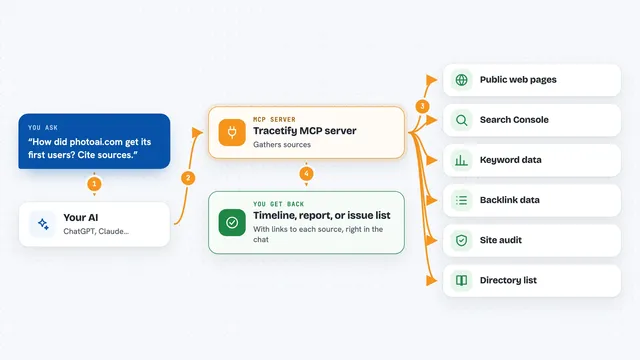
You ask your AI a question about your website, like which pages are missing a good title. Your AI uses this helper to reach Rampify, which crawls your site and pulls in keyword data and your Google Search Console numbers. Rampify puts that together and hands back what it found, plus suggested fixes. If you want, your AI can then turn those fixes into a pull request, which is a proposed change to your website's code that someone can review. You stay in the chat the whole time.
 Click to zoom
What you can do with it
- Crawl your site and check meta tags, schema, content, and page speed
- Look up keyword volume and trends
- Pull your Google Search Console performance
- Generate better titles, meta descriptions, and schema markup
- Run discovery research to see where AI assistants miss your brand
- Turn findings into feature specs with the affected pages listed
- Open pull requests with the fixes
Try asking your AI
- “Crawl my site and tell me which pages are missing meta descriptions”
- “Which keywords should I target on my pricing page?”
- “Show me my Search Console clicks and impressions for last month”
- “Write better meta tags for my top 10 pages and open a pull request”
What it gives back to you
You get answers in the chat: lists of pages with problems, keyword ideas with numbers, Search Console stats, and suggested titles or schema text. When you ask for a fix, it can come back as a pull request link you can review. Findings can also be saved as specs with the affected URLs and tasks listed.
Before you start
What you need
- A Rampify account
- Your website's address
- Access to your Google Search Console (if you want that data)
- An MCP client like Claude Code, Cursor, VS Code, or claude.ai
Good to know
It can open pull requests and suggest changes to your live site, so review what it proposes before merging anything.
Install it with your AI
Add Rampify MCP server to your AI, no technical skills needed
You don't install anything by hand. You copy one prompt, paste it into an AI that can work on your computer, and it checks, installs and connects the server for you, asking you when it needs something.
Sign in to get the install prompt
Members get a ready-made prompt that lets the Claude desktop app check Rampify MCP server, install it and connect it for them, step by step. You don't need any technical skills: you copy, paste and answer a few questions. Your connected AI can also find and install any of the 4,361 MCP servers here for you.
Who it's for
Marketers, SEO folks, and small teams who want their website's search visibility handled inside the AI tool they already use.