
MCP server · Developer tools
Forgejo MCP server
by raohwork
Lets your AI read and manage issues, labels, releases, and wikis on your Forgejo or Gitea server.
This is a small helper that connects your AI assistant to your Forgejo or Gitea account, the place where your team keeps its code and project tasks. Once it is set up, you can just ask your AI in normal words to look at issues, add labels, or check a release. It is handy for anyone who spends part of their day in Forgejo or Gitea and wants less clicking around.
What is an MCP server? The 30-second version
On its own, your AI can only chat. An MCP server is a small helper program that gives your AI a new skill or a connection to an app. This one connects your AI to your Forgejo or Gitea server, so it can look things up and do things there when you ask. You stay in the chat, and the helper does the talking to Forgejo behind the scenes.
What this MCP server does
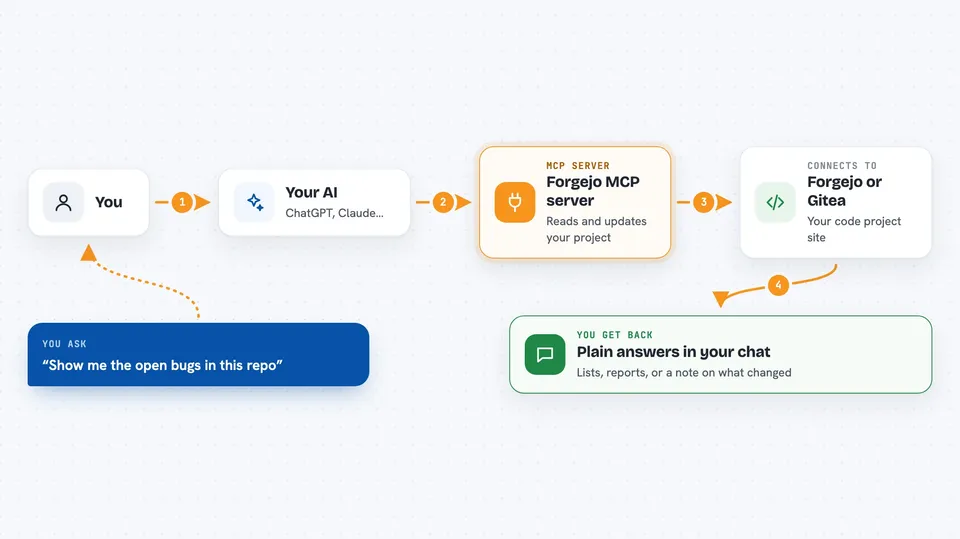
You ask your AI something like show me the open bugs in this repo. Your AI passes that request to this helper. The helper talks to your Forgejo or Gitea server using an access token you gave it. Forgejo sends back the issues, labels, or release info, and the helper hands it to your AI. Your AI then writes it up for you in the chat, or makes the change you asked for.
 Click to zoom
What you can do with it
- List and search repositories on your Forgejo or Gitea server
- Create, edit, and view issues
- Add, remove, or replace labels on issues
- Create and manage milestones
- Create and manage releases and their attachments
- View pull requests
- Manage wiki pages and check Actions tasks
Try asking your AI
- “Show me the critical bug reports in this repo on my Forgejo server”
- “Create a detailed issue about the bug we just discussed, then add a comment describing how we will fix it”
- “Give me a report on the current milestone, especially recent progress”
- “Look at the recent pull requests and tell me which ones need priority review”
What it gives back to you
You get answers written in plain language in the chat: lists of issues, short reports on a milestone, or a summary of pull requests. When you ask it to change something, like adding a label or creating an issue, it tells you what it did. You do not see raw data dumps unless you ask for them.
Before you start
What you need
- A Forgejo or Gitea account on a server you can reach
- An access token from that server (you create it in Settings, then Applications, then Access Tokens)
- Docker, or Go installed, or a pre-built file from the releases page, depending on how you install it
Good to know
This helper can change things on your Forgejo or Gitea server, like creating issues or deleting labels, so give it a token with only the permissions you are comfortable with and check before letting it make big changes.
Install it with your AI
Add Forgejo MCP server to your AI, no technical skills needed
You don't install anything by hand. You copy one prompt, paste it into an AI that can work on your computer, and it checks, installs and connects the server for you, asking you when it needs something.
Sign in to get the install prompt
Members get a ready-made prompt that lets the Claude desktop app check Forgejo MCP server, install it and connect it for them, step by step. You don't need any technical skills: you copy, paste and answer a few questions. Your connected AI can also find and install any of the 4,609 MCP servers here for you.
Who it's for
Developers, project leads, and anyone who tracks issues and releases on a Forgejo or Gitea server and wants to do it from the chat instead of the web page.


