
MCP server · Developer tools
Open Code Review MCP server
by raye-deng
Lets your AI check code for made-up packages, old APIs and other AI mistakes, right inside your chat.
Open Code Review is a free tool that checks code for a special kind of mistake: the ones AI assistants make when they write code. It looks for packages that do not exist, APIs that are out of date, and other odd things. The MCP server is the part that plugs this checker into your AI chat, so you can ask your AI to review code and get an answer without leaving the conversation.
What is an MCP server? The 30-second version
On its own, your AI can only chat. It cannot run a checker on your code or look up whether a package really exists. An MCP server is a small helper program that gives your AI a new skill. This one connects your AI to Open Code Review, so when you ask it to check your code, it can actually run the scan and tell you what it found.
What this MCP server does
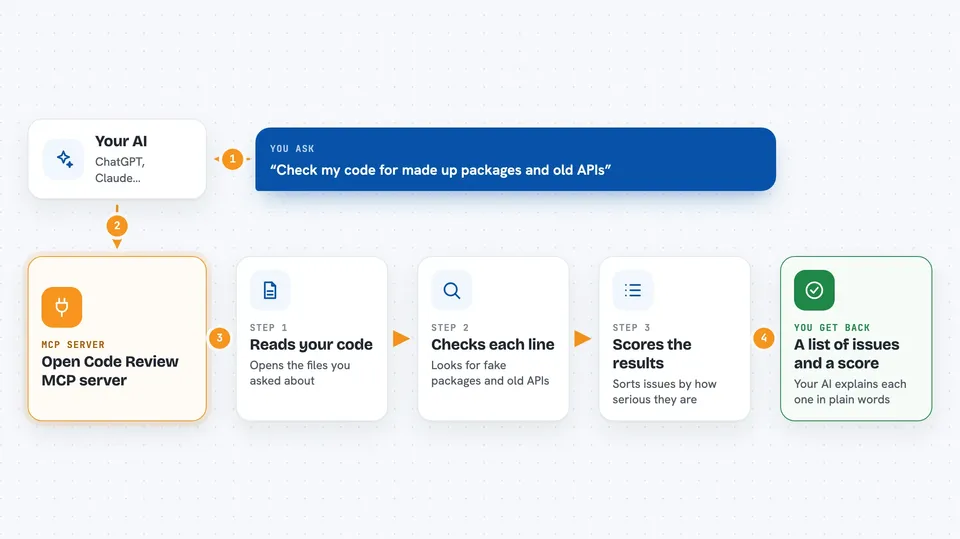
You ask your AI to review some code. Your AI passes that request to this helper, which runs the Open Code Review scanner on the files. The scanner checks for things like imports of packages that do not exist, old APIs, and security patterns. Then the results come back to your AI, and your AI explains them to you in the chat.
 Click to zoom
What you can do with it
- Scan a folder of code and get a quality score
- Find imports of packages that do not exist
- Spot APIs that are out of date
- Get a plain explanation of each issue found
- Ask the AI to suggest fixes for the issues
- Run the check without sending your code to the cloud
Try asking your AI
- “Can you scan my src folder and tell me what is wrong?”
- “Check this file for made-up packages and old APIs.”
- “Explain the issues in my last scan in simple words.”
- “Suggest fixes for the problems you found.”
What it gives back to you
You get back a list of issues, each with a short description and a severity level. You also get an overall score, like 67 out of 100, and a pass or fail result. Your AI can then explain any issue in plain words or suggest a fix.
Before you start
What you need
- Node.js installed on your computer (the free program that runs npx commands)
- The Claude desktop app or another AI tool that supports MCP servers
- Optional: Ollama if you want the AI part to run fully on your own machine
Good to know
The heal tool can change your files, so review the suggested fixes before applying them.
Install it with your AI
Add Open Code Review MCP server to your AI, no technical skills needed
You don't install anything by hand. You copy one prompt, paste it into an AI that can work on your computer, and it checks, installs and connects the server for you, asking you when it needs something.
Sign in to get the install prompt
Members get a ready-made prompt that lets the Claude desktop app check Open Code Review MCP server, install it and connect it for them, step by step. You don't need any technical skills: you copy, paste and answer a few questions. Your connected AI can also find and install any of the 4,609 MCP servers here for you.
Who it's for
Developers and teams who use AI coding assistants and want a quick, free way to catch the mistakes those assistants make.




