
MCP server · Video editing · official
WeftCut MCP server
by WeftCut · official
Let your AI trim, split, caption and export video right inside the WeftCut desktop editor.
WeftCut is a desktop video editor, and this is its built-in helper that lets your AI assistant work the timeline for you. You keep watching the editor while the AI makes cuts, adds captions, or mixes audio, and every change shows up live. It is handy if you edit video and already use an AI assistant like Claude or Codex.
What is an MCP server? The 30-second version
On its own, your AI can only chat with you. An MCP server is a small helper program that gives your AI a new skill or a connection to an app. This one connects your AI to WeftCut, the video editor on your computer, so the AI can look at your project and make edits when you ask. You stay in charge, and you can watch everything happen.
What this MCP server does
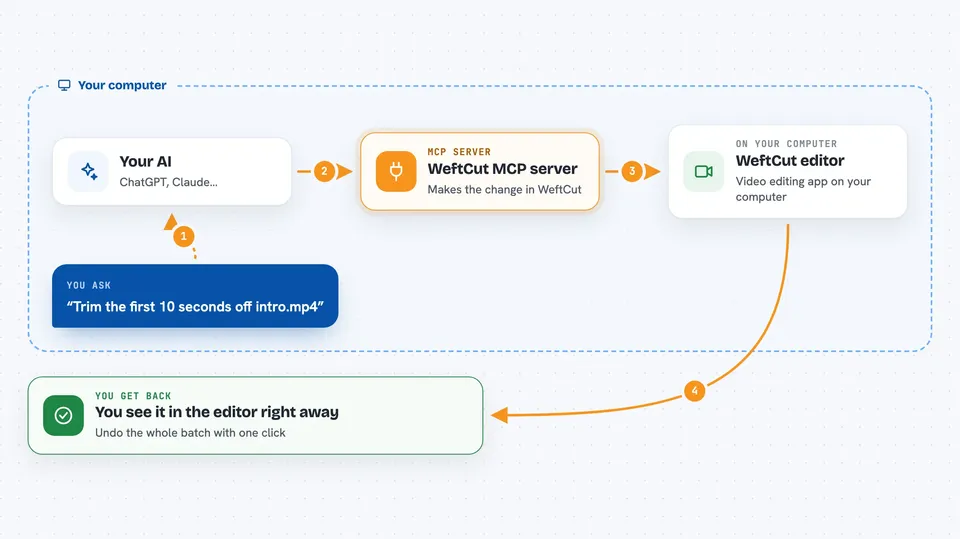
You ask your AI to do something with your video, like trim a clip or add captions. The AI sends that request to WeftCut through this helper. WeftCut then makes the change on your timeline, and you see it happen right away in the editor window. Every action is written down in an Agent panel, so you can see exactly what was done. If you do not like it, you can undo the whole batch with one click.
 Click to zoom
What you can do with it
- Trim, split and move clips on your timeline
- Add captions by transcribing the audio in a clip
- Mix audio by role, like dialogue, music or sound effects
- Add keyframes and animate effects over time
- Find pauses in a recording and cut them out
- Add titles, transitions and effects to your video
- Export the finished video in common formats
Try asking your AI
- “Trim the first 10 seconds off the clip called intro.mp4”
- “Transcribe this interview clip and add captions”
- “Remove all the long pauses in the voiceover track”
- “Add a lower third title with my name for the first 5 seconds”
What it gives back to you
You get answers in the chat, like a short note that a clip was trimmed or a caption track was added. The real result shows up in the WeftCut editor itself, where you can see the new clip length, the captions on the timeline, or the audio changes. The AI also lists what it did in the Agent panel, so you have a record. Nothing is hidden from you.
Before you start
What you need
- The WeftCut desktop app installed on your computer
- An AI assistant that supports MCP, like Claude or Codex
- The connection prompt from WeftCut's settings panel, copied into your AI
Good to know
The AI can change your project, so use the dry run option when you want to test an edit first, and remember you can undo a whole batch from a checkpoint.
Install it with your AI
Add WeftCut MCP server to your AI, no technical skills needed
You don't install anything by hand. You copy one prompt, paste it into an AI that can work on your computer, and it checks, installs and connects the server for you, asking you when it needs something.
Sign in to get the install prompt
Members get a ready-made prompt that lets the Claude desktop app check WeftCut MCP server, install it and connect it for them, step by step. You don't need any technical skills: you copy, paste and answer a few questions. Your connected AI can also find and install any of the 4,361 MCP servers here for you.
Who it's for
Video editors, content creators and anyone who edits footage and wants an AI assistant to handle the repetitive parts.





