
MCP server · Developer tools
Odoo Claude MCP server
Lets your AI read and change records in your own Odoo system, plus GitHub, files and more.
This is a helper you run on your own computer or server that connects your AI assistant to Odoo, the business software many companies use for sales, invoices, stock and customers. It is made for people who already have their own Odoo instance and want to ask their AI questions about it or have it do small jobs there. It also bundles a few extra connections, like GitHub and a browser terminal, in one package.
What is an MCP server? The 30-second version
On its own, your AI can only chat with you. An MCP server is a small helper program that gives your AI one new skill or one new connection. This helper connects your AI to your Odoo system, so when you ask about an order or a customer, the AI can actually go and look it up or make the change for you.
What this MCP server does
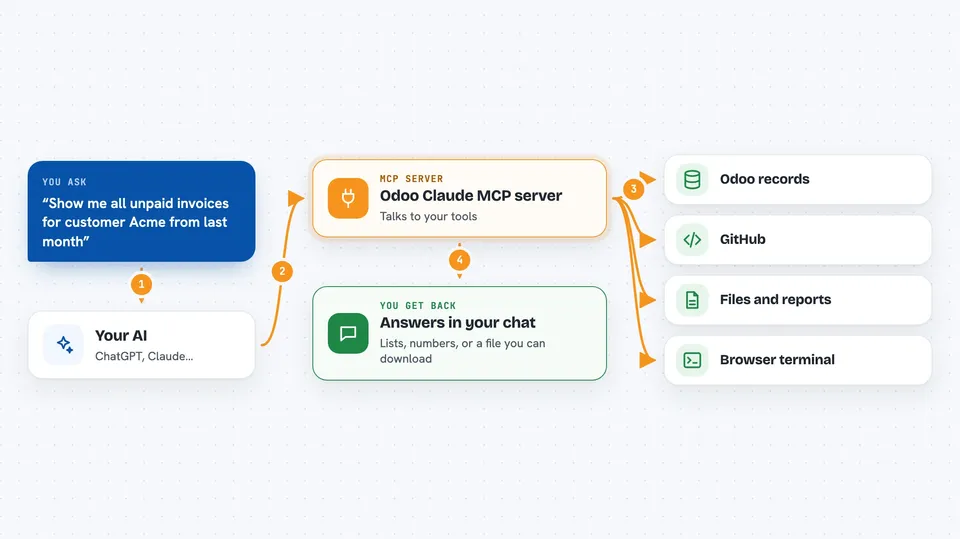
You type a request in plain words, like asking about last month's sales or asking to update a customer address. Your AI sends that request to this helper, which is running quietly in the background. The helper then talks to your Odoo system using your login details, finds or changes the records you asked about, and sends the answer back. Your AI shows you the result in the chat, in normal sentences or a small table.
 Click to zoom
What you can do with it
- Look up customers, orders, invoices and products in your Odoo
- Create or update records, like a new contact or a corrected invoice line
- Search your Odoo data in plain language and get a summary back
- Download or upload attachments and reports from Odoo
- Switch between several Odoo databases from one chat
- Search GitHub code, issues and pull requests
- Open a browser terminal to run Claude Code on your server
Try asking your AI
- “Show me all unpaid invoices for customer Acme from last month”
- “Find the sale order for Maria Petrova and tell me its status”
- “Update the phone number on the contact Ivan Dimitrov to the one in this email”
- “List the products we sold most in the last 30 days”
What it gives back to you
You get answers in the chat: lists of records, short summaries, numbers, or a confirmation that something was changed. If you asked for a report, it can come back as a file you can download. For changes, it tells you what it updated so you can check it.
Before you start
What you need
- Your own Odoo instance (version 15 to 19) that the helper can reach
- Your Odoo web address, database name and a login or API key
- Docker installed if you use the recommended setup
- A Claude account or the Claude desktop app to connect to the helper
Good to know
It can create, change and delete real records in your Odoo, so check before letting it make changes and keep a backup.
Install it with your AI
Add Odoo Claude MCP server to your AI, no technical skills needed
You don't install anything by hand. You copy one prompt, paste it into an AI that can work on your computer, and it checks, installs and connects the server for you, asking you when it needs something.
Sign in to get the install prompt
Members get a ready-made prompt that lets the Claude desktop app check Odoo Claude MCP server, install it and connect it for them, step by step. You don't need any technical skills: you copy, paste and answer a few questions. Your connected AI can also find and install any of the 4,361 MCP servers here for you.
Who it's for
Odoo developers, consultants and business teams who already run their own Odoo and want their AI to work directly with it.




