
MCP server · Developer tools
omni-dev MCP server
by rust-works
Lets your AI read and update Jira issues and Confluence pages, and help tidy up your Git commit messages.
omni-dev is a helper program that connects your AI assistant to Jira, Confluence and your Git work. It is made for people who write code or manage tickets and pages, and who want their AI to read and change those things for them. You do not need to be a programmer to use the simple parts of it.
What is an MCP server? The 30-second version
On its own, your AI can only chat with you. An MCP server is a small helper program that gives your AI a new skill or a connection to another app. This one connects your AI to Jira, Confluence and your Git repository, so it can look up a ticket, read a page, or suggest a better commit message when you ask. You stay in the chat, and the helper does the running around.
What this MCP server does
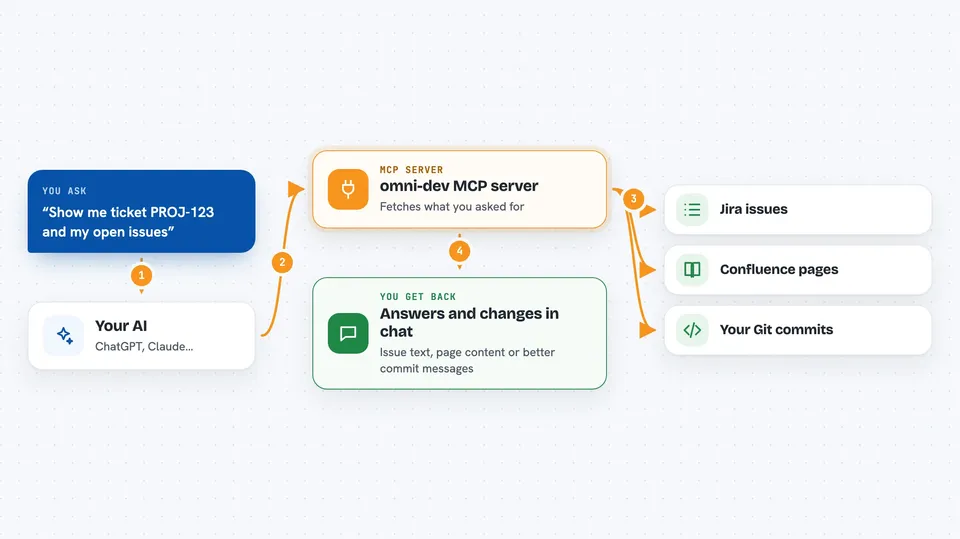
You ask your AI something like "show me ticket PROJ-123" or "improve my last three commit messages". The AI sends that request to the omni-dev helper. The helper talks to Jira, Confluence or your local Git repository, and brings the answer back. Then the AI shows it to you in the chat, or makes the change you asked for. It can also check that a Confluence page is well formed before saving, so nothing gets quietly lost.
 Click to zoom
What you can do with it
- Read a Jira issue and show it to you as plain text
- Search Jira issues with a query
- Create or update a Jira issue
- Move a Jira issue to a new status
- Read and search Confluence pages
- Create or update a Confluence page
- Look at your recent Git commits and suggest better messages
Try asking your AI
- “Show me the Jira issue PROJ-123 in plain text”
- “Find all open Jira issues in project PROJ assigned to me”
- “Read the Confluence page with ID 12345 and summarise it”
- “Look at my last five Git commits and suggest clearer messages”
What it gives back to you
You get answers in the chat: the text of a Jira issue, a list of search results, the content of a Confluence page, or a set of suggested commit messages. When you ask it to change something, it tells you what it changed. For Confluence pages, it can also warn you if the page content would break the expected format before saving.
Before you start
What you need
- An Atlassian account with an API token (a kind of password for apps; Atlassian gives you one for free)
- The omni-dev program installed on your computer
- Your Git repository open locally if you want the commit message features
Good to know
It can change or delete Jira issues and Confluence pages, so check before you let it write, and keep a copy of anything important.
Install it with your AI
Add omni-dev MCP server to your AI, no technical skills needed
You don't install anything by hand. You copy one prompt, paste it into an AI that can work on your computer, and it checks, installs and connects the server for you, asking you when it needs something.
Sign in to get the install prompt
Members get a ready-made prompt that lets the Claude desktop app check omni-dev MCP server, install it and connect it for them, step by step. You don't need any technical skills: you copy, paste and answer a few questions. Your connected AI can also find and install any of the 4,609 MCP servers here for you.
Who it's for
Developers, technical writers and project managers who work with Jira, Confluence and Git every day.



