
MCP server · Notes
Vestige MCP server
by samvallad33
Gives your AI a private local memory so it remembers past decisions and can trace failures back to their cause.
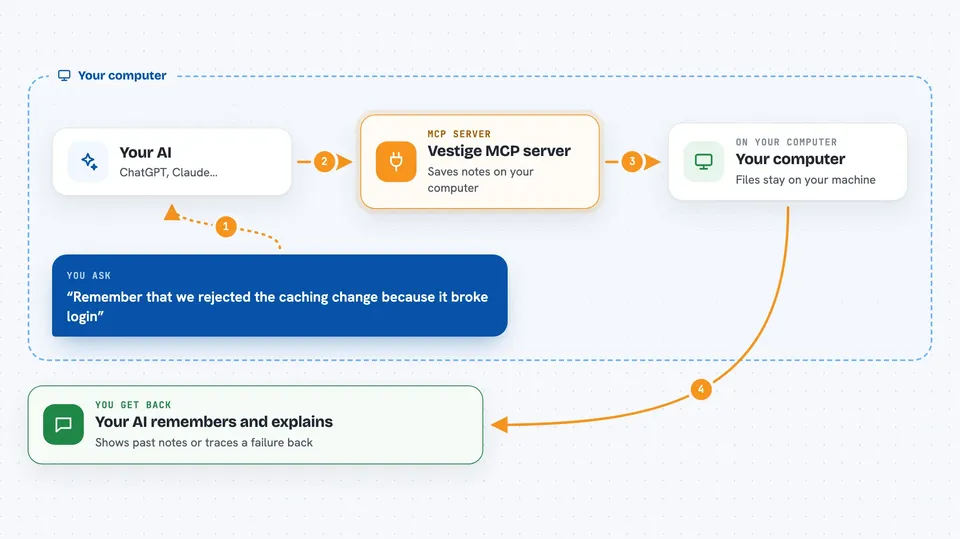
Vestige is a memory helper that runs on your own computer. It lets your AI assistant store notes about your project and look them up later, so it stops re-suggesting things you already tried. It is handy if you work with an AI on the same code or project over many days.
What is an MCP server? The 30-second version
On its own, your AI can only chat. It forgets everything the moment you close the window. An MCP server is a small helper program that gives your AI a new skill. Vestige is that helper, and its skill is memory: it keeps a private notebook on your machine, and your AI can write to it and read from it when you ask.
What this MCP server does
You tell your AI something worth remembering, like a decision you made or a bug you fixed. The AI passes it to Vestige, which saves it in a file on your computer. Later, you ask your AI about that topic. The AI asks Vestige, Vestige finds the right note, and your AI tells you what it found. Vestige can also walk backward from a failure, following the links it recorded, to show you what led to it.
 Click to zoom
What you can do with it
- Save decisions, fixes and lessons so your AI remembers them next time
- Look up a saved memory by its exact name or tag
- Trace a failure backward to find what caused it
- Suggest two memories that were never combined before
- Check that a saved write really happened, with a receipt
- Keep everything on your own machine, with no signup
- Run alongside several AI apps at once on the same computer
Try asking your AI
- “Remember that we rejected the caching change because it broke login”
- “What did we decide about the database migration last week”
- “Walk back from this failing test and show me what caused it”
- “Show me two memories we never connected before”
What it gives back to you
You get answers in plain chat: a list of matching memories, a short summary of what was saved, or a step-by-step path from a failure back to its cause. When something is saved, you get a short receipt code you can check later. Nothing shows up as a file you have to open yourself.
Before you start
What you need
- A Mac, Linux or Windows computer
- The Vestige program downloaded from its release page
- An AI app that supports MCP, like Claude Code, Codex or Cursor
Good to know
Vestige writes to a log on your own computer, so anything you ask it to remember stays there until you remove it, and the optional Operator gate can block commands your AI tries to run.
Install it with your AI
Add Vestige MCP server to your AI, no technical skills needed
You don't install anything by hand. You copy one prompt, paste it into an AI that can work on your computer, and it checks, installs and connects the server for you, asking you when it needs something.
Sign in to get the install prompt
Members get a ready-made prompt that lets the Claude desktop app check Vestige MCP server, install it and connect it for them, step by step. You don't need any technical skills: you copy, paste and answer a few questions. Your connected AI can also find and install any of the 4,609 MCP servers here for you.
Who it's for
Developers and anyone who works with an AI on the same project across many sessions and is tired of repeating themselves.





