MCP server · Research
PyreCrawl MCP server
by SanggonBoy
Let your AI read and gather pages from the web, including tricky ones, without paying for a scraping service.

PyreCrawl is a free helper you run on your own computer that lets your AI assistant open web pages, read them, and pull out the parts you care about. It is handy if you often ask your AI to look something up online, gather info from several pages, or keep an eye on a page that changes. You do not need an account or a paid subscription for it.
What is an MCP server? The 30-second version
On its own, your AI can only chat with what it already knows or what you paste in. An MCP server is a small helper program that gives your AI a new skill, in this case the ability to go out to the web and fetch pages for you. PyreCrawl is that helper: it runs quietly on your machine and hands your AI the tools to read sites, search, and follow links. When you ask a question that needs fresh web info, your AI uses PyreCrawl to get it and then answers you in the chat.
What this MCP server does
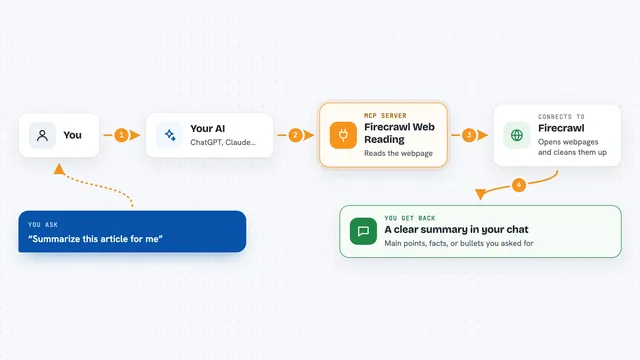
You ask your AI something that needs the web, like summarizing a page or finding recent articles. Your AI passes the request to PyreCrawl, which fetches the page or runs the search for you. PyreCrawl tries the quickest method first, and if the site blocks it or needs a real browser, it steps up to a stronger method automatically. It turns messy web pages into clean text your AI can read, and can also pull out specific fields like names and prices. You get the result back in the chat as a summary, a list, or structured info.
 Click to zoom
What you can do with it
- Read a single web page and turn it into clean text
- Pull specific fields from a page, like product names and prices
- Crawl a whole site and give you an overview
- Search the web without needing any search API key
- Find academic papers on arXiv and Crossref
- Watch a page over time and tell you what changed
- Read PDF, Word, and PowerPoint files from a link
Try asking your AI
- “Scrape https://example.com and summarize it”
- “Research Rust memory safety vulnerabilities”
- “Extract all product names and prices from this page”
- “Crawl https://docs.example.com and give me an overview”
- “Find papers about transformer attention”
What it gives back to you
You get answers in the chat, usually as a summary or a list your AI writes for you. Some tools return structured data, like a table of extracted fields, or a list of links found on a site. The monitor tool returns a before-and-after comparison showing what changed on a page. Everything shows up right in the conversation, so you can keep asking follow-up questions.
Before you start
What you need
- A computer where you can install small programs (Windows, Mac, or Linux)
- The UV tool, a free one-line installer that also brings Python with it
- An AI app that supports MCP, like Claude Desktop, Cursor, or VS Code
- About two minutes once, to download the browser engines it uses
Good to know
It sends one small anonymous ping a day by default, which you can turn off with a setting, and it can log into sites and save page snapshots on your computer, so be mindful of what you point it at.
Install it with your AI
Add PyreCrawl MCP server to your AI, no technical skills needed
You don't install anything by hand. You copy one prompt, paste it into an AI that can work on your computer, and it checks, installs and connects the server for you, asking you when it needs something.
Sign in to get the install prompt
Members get a ready-made prompt that lets the Claude desktop app check PyreCrawl MCP server, install it and connect it for them, step by step. You don't need any technical skills: you copy, paste and answer a few questions. Your connected AI can also find and install any of the 4,609 MCP servers here for you.
Who it's for
Anyone who asks their AI to look things up online, gather research, or keep an eye on web pages, especially office workers who want web reading without a paid scraping service.