
MCP server · Research
OpenGraph.io MCP server
by securecoders
Let your AI pull link previews, screenshots, page text, and images from any website you point it at.
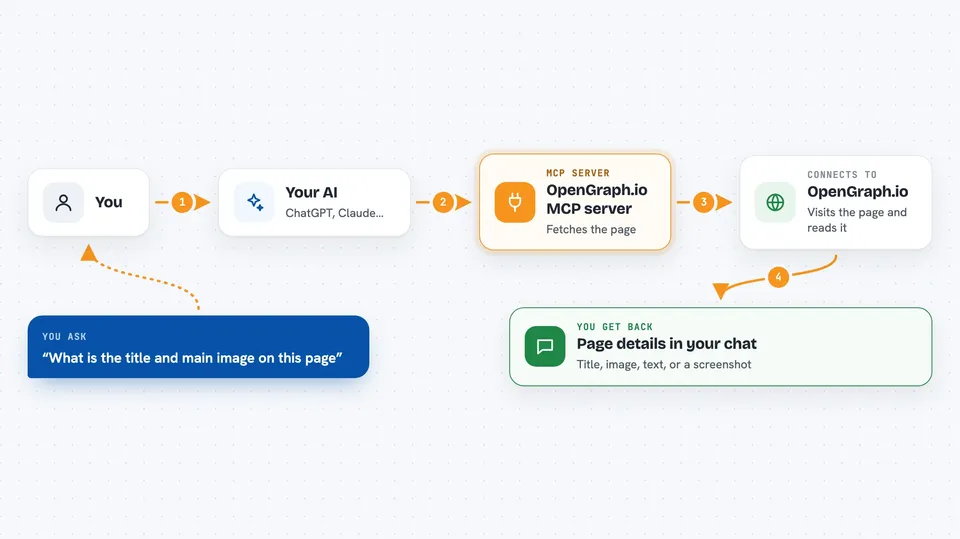
This is a helper that connects your AI assistant to OpenGraph.io, a service that reads web pages for you. Once it is set up, you can ask your AI to look at a link and it will fetch the title, image, description, or full text behind that link. It is handy for anyone who shares links, checks how pages look when posted, or needs to grab content from the web without copying and pasting.
What is an MCP server? The 30-second version
On its own, your AI can only chat with you using what it already knows. An MCP server is a small helper program that gives your AI a new skill or a connection to an outside service. This one connects your AI to OpenGraph.io, a website-reading service. So when you ask about a link, your AI can go ask OpenGraph.io for the details and bring the answer back to you.
What this MCP server does
You paste a web address into your chat and ask a question about it. Your AI passes that address to this helper, which sends it to OpenGraph.io. OpenGraph.io visits the page, reads it, and sends back things like the page title, preview image, description, or the main text. Your AI then shows you that information in the chat, or uses it to make a screenshot, a social card, or a diagram for you.
 Click to zoom
What you can do with it
- Get the title, image, and description of any link
- Take a screenshot of a web page, full page or just the top
- Turn a web page into clean Markdown text
- Ask a question about what a page says
- Pull out specific parts of a page, like headings or links
- Generate a social card or diagram image from a prompt
- Check how a link will look when shared on social media
Try asking your AI
- “What is the title and main image on this page: example.com/article”
- “Take a screenshot of this page and show it to me”
- “Turn this blog post into clean text I can read”
- “Make me a social card image for my new product launch”
What it gives back to you
You get back answers in plain chat: the page title, a description, a list of links, or the main text of the page. Screenshots and generated images come back as image files or links you can view. For site audits, you get scores, lists of issues, and summaries. Everything shows up right in the conversation, so you do not have to leave your chat window.
Before you start
What you need
- An OpenGraph.io account (free tier available)
- Your OpenGraph.io App ID (a kind of password the site gives you)
- A supported AI client like Claude Desktop, Cursor, or VS Code
Good to know
Some tools can delete audits or fix items permanently, and generating images or running audits may use up your OpenGraph.io credits or plan quota, so check before you confirm.
Install it with your AI
Add OpenGraph.io MCP server to your AI, no technical skills needed
You don't install anything by hand. You copy one prompt, paste it into an AI that can work on your computer, and it checks, installs and connects the server for you, asking you when it needs something.
Sign in to get the install prompt
Members get a ready-made prompt that lets the Claude desktop app check OpenGraph.io MCP server, install it and connect it for them, step by step. You don't need any technical skills: you copy, paste and answer a few questions. Your connected AI can also find and install any of the 4,361 MCP servers here for you.
Who it's for
Anyone who works with links, social media, or web content, like marketers, writers, support teams, and developers who want quick page details without leaving their chat.


