MCP server · Productivity
Word document MCP server
Let your AI open, edit, and review Word files, with changes shown as tracked revisions.
This is a helper that lets your AI work with Word documents (.docx files) directly. It can open a file, make edits, add comments, and save a new copy, with every change shown as a tracked revision just like a human reviewer would leave. It is handy if you deal with contracts, reports, proposals, or any Word file you need to review and update.
What is an MCP server? The 30-second version
On its own, your AI can only chat with you. An MCP server is a small helper program that gives your AI a new skill or a connection to an app or service. This one connects your AI to Word documents on your computer, so it can open a file, read it, change it, and save it when you ask. You do not need to know how it works inside; you just talk to your AI like a colleague.
What this MCP server does
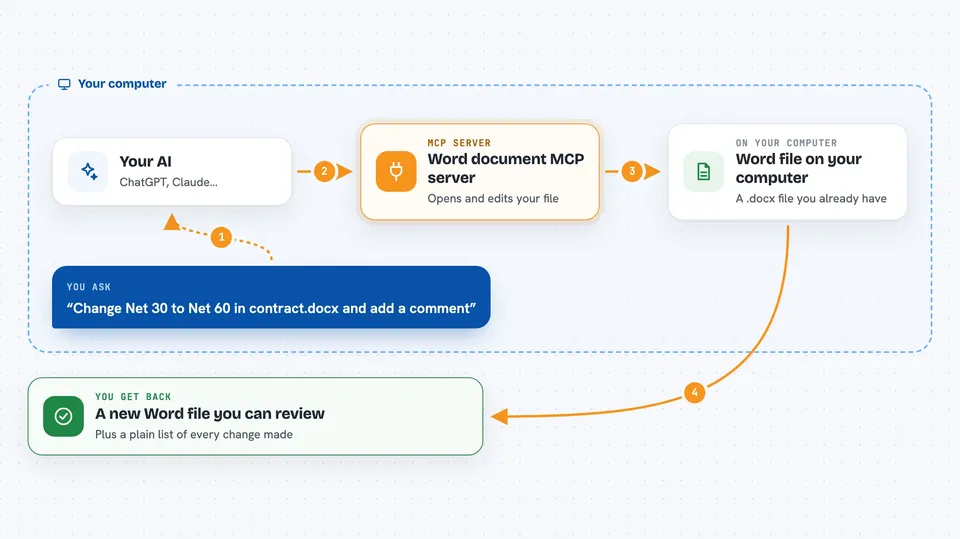
You ask your AI to do something with a Word file, like change a payment term or add a comment. Your AI passes that request to this helper program. The helper opens the .docx file, which is really a bundle of files inside, and edits the right parts. It can mark changes as tracked revisions, add comments, and check the document for problems before saving. Then you get a new Word file back, ready to open and review.
 Click to zoom
What you can do with it
- Open a Word document and show you its headings and structure
- Change text and leave the edits as tracked changes (red strikethrough for deletions, green underline for insertions)
- Add comments to specific paragraphs and reply to existing comment threads
- Find and replace text across the body, footnotes, and comments
- Create a new Word document from a markdown file or a template
- Compare two Word files and produce a tracked-changes version plus a plain-text summary
- Run a structural check to catch broken footnotes or cross-references before you send the file
Try asking your AI
- “Open contract.docx, find every instance of Net 30, change it to Net 60, and add a comment on each explaining it was updated per Amendment 3. Save as contract_revised.docx.”
- “Convert my pentest-findings.md to a Word document using the client template. Add footnotes for each CVE reference.”
- “Open the final deliverable, run a structural audit, check for any DRAFT or TODO markers, and remove any watermarks.”
- “Compare proposal_v1.docx and proposal_v2.docx and give me a plain-text summary of what changed.”
What it gives back to you
You get back answers in the chat, like a list of headings, the text of a paragraph, or a summary of changes. When you ask it to save, it writes a new Word file to your computer that you can open. It can also produce a plain-text change log listing every insertion, deletion, and replacement, which you can paste into an email. For comparisons, it gives you both a tracked-changes Word file and a text summary.
Before you start
What you need
- A computer with Python installed (the setup uses a tool called uvx, which runs Python programs)
- The Claude desktop app or another AI tool that supports MCP servers
- Word documents you want to work with, saved on your computer
Good to know
It can change or delete text in your Word files, so keep a backup of the original before letting your AI edit it.
Install it with your AI
Add Word document MCP server to your AI, no technical skills needed
You don't install anything by hand. You copy one prompt, paste it into an AI that can work on your computer, and it checks, installs and connects the server for you, asking you when it needs something.
Sign in to get the install prompt
Members get a ready-made prompt that lets the Claude desktop app check Word document MCP server, install it and connect it for them, step by step. You don't need any technical skills: you copy, paste and answer a few questions. Your connected AI can also find and install any of the 4,361 MCP servers here for you.
Who it's for
People who work with Word documents all day, like lawyers, consultants, compliance officers, and anyone who reviews or edits contracts, reports, or proposals.