MCP server · Analytics
FEC Campaign Finance MCP server
by sh-patterson
Ask your AI about US campaign money: candidates, donations, spending, and Super PAC activity.
This is a helper for your AI that connects it to official US campaign finance data from the Federal Election Commission. You ask questions in plain words, and your AI looks up the records for you. It is handy for journalists, researchers, students, and anyone curious about who funds political campaigns.
What is an MCP server? The 30-second version
On its own, your AI can only chat with you. An MCP server is a small helper program that gives your AI a new skill or a connection to an app or service. This one connects your AI to the OpenFEC API, the public data service of the Federal Election Commission. Once it is set up, your AI can look up candidates, committees, donations, and spending for you when you ask.
What this MCP server does
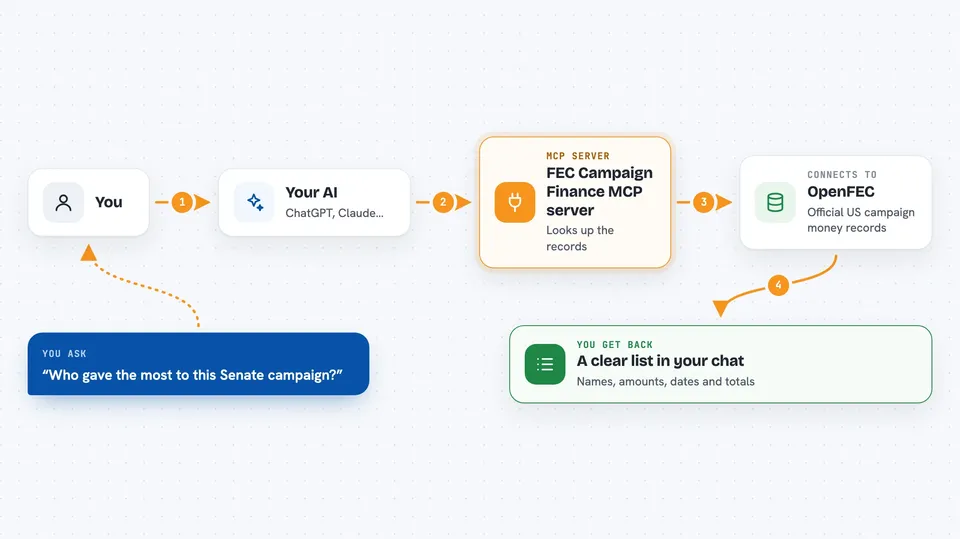
You type a question, like asking about a candidate or a committee. Your AI sends that request to this helper program. The helper talks to the OpenFEC service and pulls back the matching records. It then formats those records into readable text and shows them in your chat. You get lists, totals, and filing details without visiting any website yourself.
 Click to zoom
What you can do with it
- Search for federal candidates and their committee IDs
- Look up a committee's cycle totals and latest report balances
- List itemized donations (receipts) for one committee
- List itemized spending (disbursements) for one committee
- Find independent expenditures for or against a candidate
- Search individual donor records across committees
- Search spending records across committees
Try asking your AI
- “Find federal candidates named Smith running in California”
- “Show me the total receipts and disbursements for this committee in the 2024 cycle”
- “List the largest itemized donations to this committee”
- “Find independent expenditures made against this candidate”
What it gives back to you
You get back formatted text in the chat, usually a list of records with amounts, dates, names, and committee IDs. Each response shows how many rows are in that page and a count from OpenFEC, which can be exact, approximate, or unspecified. Some responses also include a continuation token so you can ask for the next page. If you turn on the optional notable flag, you may also see a small block of analyst notes, which are leads, not official findings.
Before you start
What you need
- Node.js 20 or later installed on your computer
- A free API key from the OpenFEC developer site (a kind of password for apps; the site gives you one for free)
- An MCP client, such as the Claude desktop app, that can run command-line servers
Good to know
The data comes from OpenFEC and updates nightly, so treat it as a dated snapshot, not a live ledger, and remember that some flags are review leads, not proof of a violation.
Install it with your AI
Add FEC Campaign Finance MCP server to your AI, no technical skills needed
You don't install anything by hand. You copy one prompt, paste it into an AI that can work on your computer, and it checks, installs and connects the server for you, asking you when it needs something.
Sign in to get the install prompt
Members get a ready-made prompt that lets the Claude desktop app check FEC Campaign Finance MCP server, install it and connect it for them, step by step. You don't need any technical skills: you copy, paste and answer a few questions. Your connected AI can also find and install any of the 4,066 MCP servers here for you.
Who it's for
Journalists, researchers, students, and civic-minded people who want to look up US campaign finance records without learning a data website.