
MCP server · Finance and crypto
Shieldz MCP server
by ShieldZCash
Let your AI create crypto payment links, tip jars, and pay-to-unlock pages that pay straight to your wallet.
This is a small helper that lets your AI assistant set up crypto payment pages for you. You give it a wallet address, and it can make a one-time payment link, a tip jar, or a page that unlocks a file once someone pays. It is handy if you sell something small online or want to accept crypto tips without signing up for a payment company.
What is an MCP server? The 30-second version
On its own, your AI can only chat. An MCP server is a small helper program that gives your AI a new skill or a connection to an app or service. This one connects your AI to Shieldz, a crypto payment service, so your AI can create payment links and tip jars for you when you ask. You do not need to be technical to use it, you just describe what you want and the AI does the clicking.
What this MCP server does
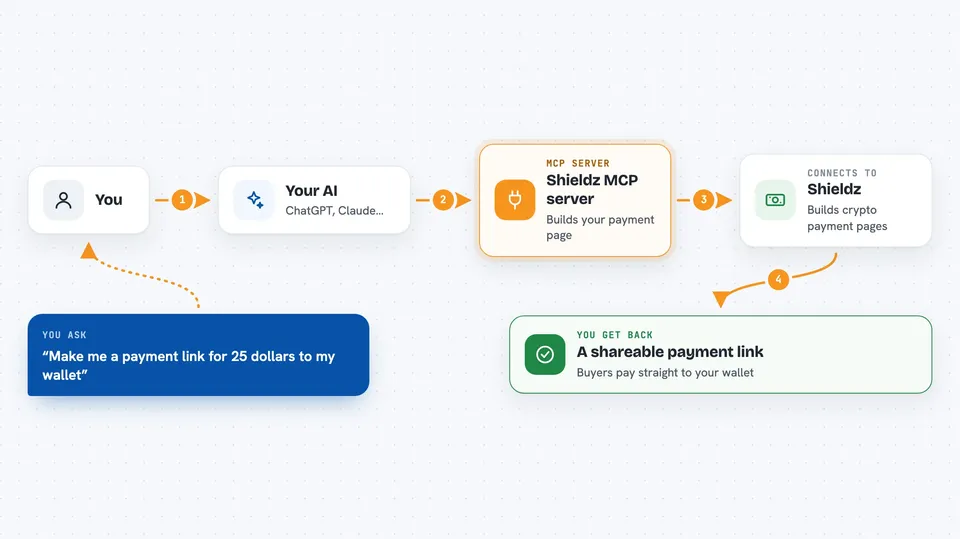
You tell your AI something like make me a payment link for 20 dollars to my wallet. The AI passes that to this helper. The helper talks to Shieldz and Shieldz builds the payment page for you. You get back a shareable link, a button you can put on a site, and a QR code. Money from buyers goes straight to the wallet address you gave, Shieldz never holds it.
 Click to zoom
What you can do with it
- Create a one-time crypto payment link for a set amount
- Create a reusable tip jar page where people choose how much to pay
- Sell a digital product like a file link, license key, or secret text
- Get a QR code and an embeddable button to share the payment page
- Look up your settlement details, tip jars, totals, and invoices
- Create and manage invoices if you connect a merchant account
Try asking your AI
- “Make me a payment link for 25 dollars to my wallet 0xABC123 on Base”
- “Create a tip jar page called Buy me a coffee with suggested amounts of 3, 5, and 10 dollars”
- “Set up a pay-to-unlock page for 9 dollars that reveals this license key after payment”
- “Show me my Shieldz account status and totals using my manage token”
What it gives back to you
You get back a shareable link, an embeddable button, and a QR code, plus the details of the page it created. If you ask for your account status, you get a summary of your settlement details, tip jars, totals, and invoices. For a pay-to-unlock page, the buyer sees the file link, license key, or secret text only after their payment is confirmed. Everything shows up right in the chat as text you can copy.
Before you start
What you need
- A crypto wallet address where you want the money to go
- An email address if you want to claim a dashboard later (optional)
- An API key from the Shieldz merchant dashboard if you want the invoice tools (optional)
Good to know
These tools create real payment pages that accept real crypto, so double-check the wallet address and the price before you share a link, and remember that money sent to a wrong address usually cannot be undone.
Install it with your AI
Add Shieldz MCP server to your AI, no technical skills needed
You don't install anything by hand. You copy one prompt, paste it into an AI that can work on your computer, and it checks, installs and connects the server for you, asking you when it needs something.
Sign in to get the install prompt
Members get a ready-made prompt that lets the Claude desktop app check Shieldz MCP server, install it and connect it for them, step by step. You don't need any technical skills: you copy, paste and answer a few questions. Your connected AI can also find and install any of the 4,609 MCP servers here for you.
Who it's for
Small sellers, creators, freelancers, and anyone who wants to accept crypto payments or tips without a payment company holding the money.



