MCP server · Research
UniProt MCP server
by smaniches
Lets your AI look up protein facts in UniProt and show where each answer came from.
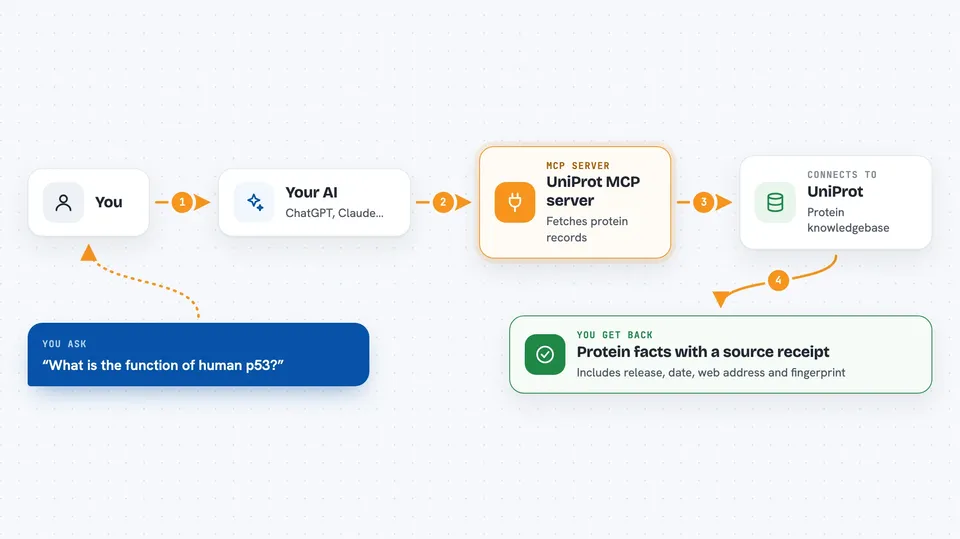
This is a helper that connects your AI to UniProt, a big public library of protein information. Once it is set up, you can ask your AI questions about proteins, genes, diseases and variants, and it will fetch the answers for you. It is handy for anyone who works with biology data, from students to lab researchers.
What is an MCP server? The 30-second version
On its own, your AI can only chat with you using what it already learned. An MCP server is a small helper program that gives your AI a new skill or a connection to an outside service. This one connects your AI to UniProt, the public protein knowledgebase. So when you ask about a protein, the AI can look it up in UniProt and bring back real, current facts instead of guessing.
What this MCP server does
You ask your AI a question about a protein, a gene, a disease or a variant. The AI sends that request to this helper program. The helper talks to UniProt over the internet and pulls the matching records. It then hands the results back to your AI, along with a note showing the UniProt release, the date, the web address it used, and a fingerprint (a SHA-256 hash) of the answer. Your AI shows you the facts and that little receipt so you can check where they came from.
 Click to zoom
What you can do with it
- Look up a protein entry by its UniProt ID, like P04637 for p53
- Search UniProt by gene name, organism or keyword
- Get the FASTA sequence of a protein
- List domains, binding sites and other features on a protein
- Find disease variants and natural mutations
- See GO terms and cross-references to other databases
- Check whether a previous answer still matches the current UniProt record
Try asking your AI
- “What is the function of human p53, UniProt P04637?”
- “Show me the FASTA sequence for BRCA1.”
- “Which diseases is the R175H variant in TP53 linked to?”
- “Find reviewed human proteins that contain the keyword Acetylation.”
What it gives back to you
You get back clear answers in the chat: protein names, gene names, organism, function text, disease associations, variant details, sequences and lists of cross-references. Each answer comes with a small footer showing the UniProt release, the retrieval time, the source web address and a SHA-256 fingerprint. You can copy that footer and later ask the server to check if the record has changed. Some tools also give you structured lists, like PDB structures with resolution, or GO terms grouped by category.
Before you start
What you need
- Python and uv installed on your computer (the README uses uvx to run it)
- An MCP client like Claude Desktop or another app that supports MCP servers
- No UniProt account or API key is needed
Good to know
Everything here is read-only, so it will not change or delete anything, but the answers come from an outside service and can change when UniProt updates its records.
Install it with your AI
Add UniProt MCP server to your AI, no technical skills needed
You don't install anything by hand. You copy one prompt, paste it into an AI that can work on your computer, and it checks, installs and connects the server for you, asking you when it needs something.
Sign in to get the install prompt
Members get a ready-made prompt that lets the Claude desktop app check UniProt MCP server, install it and connect it for them, step by step. You don't need any technical skills: you copy, paste and answer a few questions. Your connected AI can also find and install any of the 4,609 MCP servers here for you.
Who it's for
Biomedical researchers, students, and anyone who needs reliable protein facts with a way to check the source.