
MCP server · Productivity · official
SlideForge MCP server
by smartdatabrokers · official
Turn your notes into real, editable PowerPoint slides your AI builds for you.
SlideForge is a service that builds PowerPoint slides for you from plain instructions. This MCP server connects that service to your AI assistant, so you can just describe the slide you want and get a real .pptx file back. It is handy for anyone who has to make decks often and would rather not drag boxes around by hand.
What is an MCP server? The 30-second version
On its own, your AI can only chat with you. An MCP server is a small helper that gives your AI a new skill or a connection to another service. This one connects your AI to SlideForge, a slide-building service. So when you ask for a slide, your AI passes your request to SlideForge, and SlideForge does the actual building.
What this MCP server does
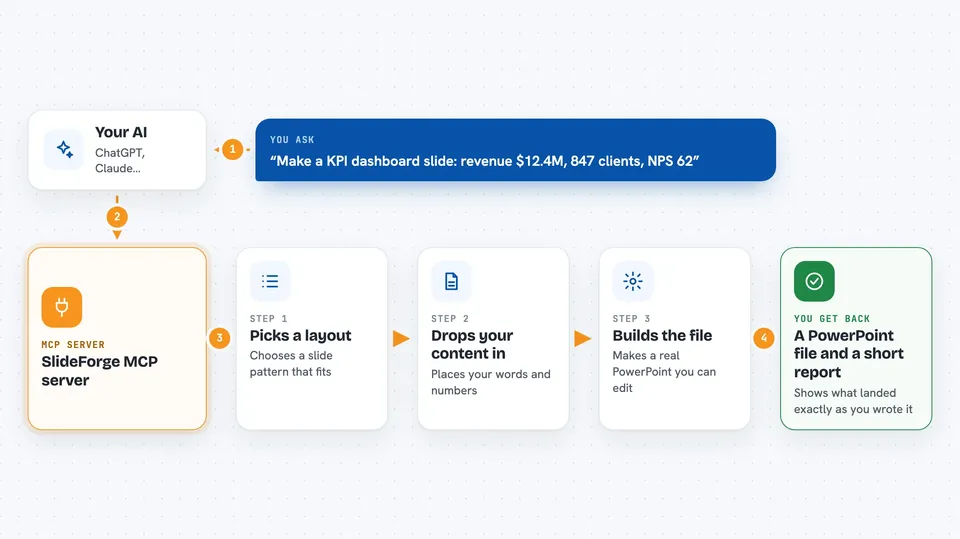
You tell your AI what slide you want, in normal words or with a few details like numbers and labels. Your AI sends that to SlideForge using this helper. SlideForge picks a layout from its catalog, drops your content into it, and builds a real PowerPoint file. You get the file back plus a short report saying which of your words and numbers made it onto the slide exactly as you gave them. If something did not fit, the report tells you what was left out.
 Click to zoom
What you can do with it
- Build a single slide from a short description or a few typed details
- Build a whole deck from a list of slides in one go
- Suggest which slide layout fits your idea best
- Browse the catalog of slide patterns and themes
- Translate an existing PowerPoint into another language
- Upload your company template so slides use your own branding
- Check your balance and past jobs
Try asking your AI
- “Make a KPI dashboard slide: revenue $12.4M up 18% year over year, 847 new clients, NPS 62”
- “Build a five-slide deck for our Q3 review using these notes”
- “Translate this PowerPoint into German and keep the formatting”
- “What slide layouts do you have for showing a project timeline”
What it gives back to you
You get a PowerPoint file you can open and edit in PowerPoint, plus a short report in the chat. That report lists each piece of your content and says whether it landed on the slide exactly as you wrote it or got changed. If a slide could not be built faithfully, you get a free report explaining what went wrong instead of a broken slide.
Before you start
What you need
- A SlideForge account (60 free slides on signup, no credit card)
- For most apps, nothing else: you sign in with Google when you add it
- For some apps, an API key from the SlideForge console (a kind of password for apps)
Good to know
Building slides costs money (about 5 cents each, with 60 free on signup), so keep an eye on your balance and use the free check option before building a big deck.
Install it with your AI
Add SlideForge MCP server to your AI, no technical skills needed
You don't install anything by hand. You copy one prompt, paste it into an AI that can work on your computer, and it checks, installs and connects the server for you, asking you when it needs something.
Sign in to get the install prompt
Members get a ready-made prompt that lets the Claude desktop app check SlideForge MCP server, install it and connect it for them, step by step. You don't need any technical skills: you copy, paste and answer a few questions. Your connected AI can also find and install any of the 4,361 MCP servers here for you.
Who it's for
Anyone who makes presentations regularly, like consultants, sales teams, analysts, and managers who would rather describe a slide than build it.





