
MCP server · Research
Library of Congress MCP server
by smeet666
Search old American newspapers and the Library of Congress catalogue right from your AI chat.
This is a small helper that connects your AI chat to the Library of Congress, the national library of the United States. It lets your AI search inside scanned American newspapers from the 1700s onward, and search the library's catalogue of books, photos, maps, audio and manuscripts. It is handy for anyone doing history or research who wants to find old sources without learning the library's website.
What is an MCP server? The 30-second version
On its own, your AI can only chat with you using what it already knows. An MCP server is a small helper program that gives your AI a new skill or a connection to an outside service. This one connects your AI to the Library of Congress, so when you ask about an old newspaper or a photograph, your AI can actually go and look it up there. You do not need an account or a special key; the helper just talks to the library for you.
What this MCP server does
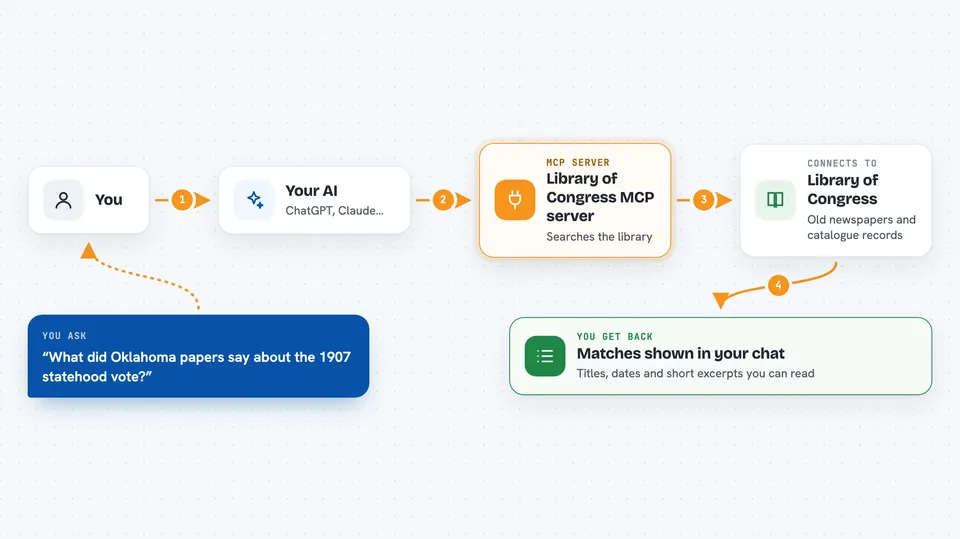
You type a question in plain words, like what old newspapers wrote about a certain event. Your AI sends that request to this helper, which passes it to the Library of Congress. The library sends back matching newspaper pages or catalogue records, and the helper hands them to your AI. Your AI then shows you the results in the chat, with titles, dates and short excerpts. You can then ask your AI to open one record and tell you more about it.
 Click to zoom
What you can do with it
- Search the words printed inside scanned American newspapers
- Narrow a newspaper search by place, paper name or year range
- Search the catalogue by title, creator, subject, place or language
- Pick a kind of material such as books, photos, maps, audio or manuscripts
- Open one record to read its details, rights and where the original is held
- List the library's digital collections, such as ones about the Civil War
Try asking your AI
- “What did Oklahoma newspapers write about the 1907 statehood vote?”
- “Find me photographs of Chicago tenements before 1920.”
- “Read that record and tell me who holds the original.”
- “What digital collections are there on the Civil War?”
What it gives back to you
You get back a list of matches, each with a title, a date, the newspaper or collection it came from, and short excerpts of the text. For catalogue searches you get titles, creators, years and a link to the item online. When you open one record, you get its full description, subjects, language, rights statement and where the original is kept. Everything appears as normal text in your chat, so you can read it and ask follow-up questions.
Before you start
What you need
- The Claude desktop app or another chat app that supports MCP servers
- Node.js 24 or newer if you install it with npx (or Docker if you prefer that route)
Good to know
The newspaper text was read by a machine from old scans, so it can contain misreadings; check the original page before quoting it, and read each record's rights statement before reusing anything.
Install it with your AI
Add Library of Congress MCP server to your AI, no technical skills needed
You don't install anything by hand. You copy one prompt, paste it into an AI that can work on your computer, and it checks, installs and connects the server for you, asking you when it needs something.
Sign in to get the install prompt
Members get a ready-made prompt that lets the Claude desktop app check Library of Congress MCP server, install it and connect it for them, step by step. You don't need any technical skills: you copy, paste and answer a few questions. Your connected AI can also find and install any of the 4,361 MCP servers here for you.
Who it's for
History buffs, students, journalists and anyone doing research who wants to dig into old American newspapers and library records without learning a complicated website.





