
MCP server · Analytics
Snowflake MCP server (deprecated)
Ask your AI to query Snowflake data and manage objects in plain English, within your permissions.
This is a community-made helper that connected your AI assistant to Snowflake, the cloud data platform many companies keep their data in. It let you ask questions in plain words and have the AI look things up or make changes in Snowflake for you. Important: the project is now deprecated, meaning the makers stopped supporting it and point people to Snowflake's official MCP server instead.
What is an MCP server? The 30-second version
On its own, your AI can only chat with you. An MCP server is a small helper program that gives your AI a new skill or a connection to another app. This one connected your AI to Snowflake, so it could search your data, run queries, and manage objects there when you asked. Because it is deprecated, the same idea now lives in Snowflake's official MCP server.
What this MCP server does
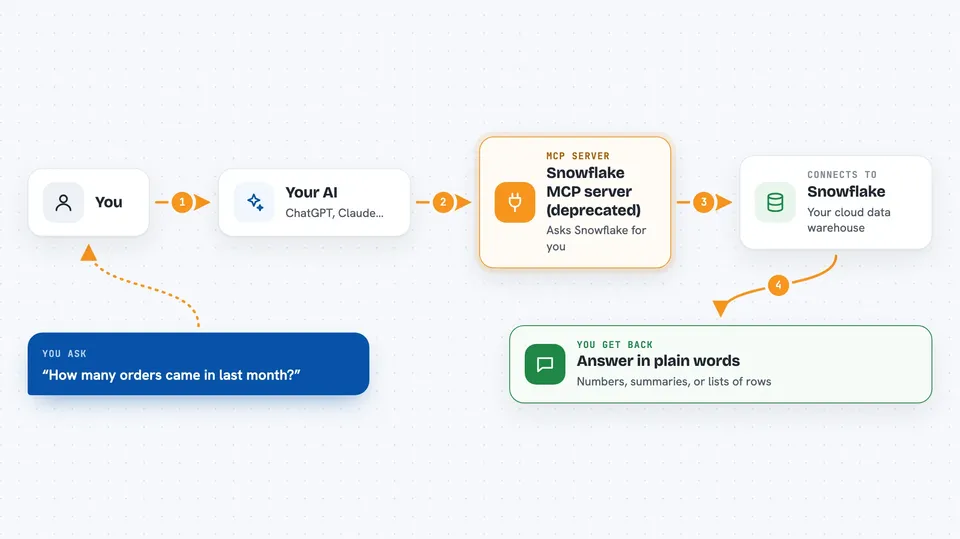
You ask your AI a question in normal words, like how many orders came in last month. The AI passes that request to this helper program, which talks to Snowflake using your own login and permissions. Snowflake runs the search or query and sends the result back. The helper hands the answer to your AI, and your AI explains it to you in the chat. It could also create, update, or drop common Snowflake objects, but only if your role allowed it.
 Click to zoom
What you can do with it
- Search unstructured text data in Snowflake, the kind used for document and knowledge lookups
- Ask questions about structured data using prepared semantic models
- Run SQL statements that the AI writes, limited by permissions you set in a config file
- Create, update, or drop common Snowflake objects
- Discover and query Snowflake Semantic Views
- Use a Cortex Agent that pulls from both structured and unstructured data
What it gives back to you
You get answers in the chat: numbers, short summaries, or lists of rows from your data. For searches, it returns matching text passages. For object changes, it tells you what it did, like which table it created or dropped. Everything comes back as normal conversation, not raw database output.
Before you start
What you need
- A Snowflake account with a user login
- A role with the permissions you want the AI to have
- A configuration file listing which Snowflake services and tools to switch on
- Python and the uvx tool installed on your computer (uvx runs small Python helper programs)
Good to know
This server could change or delete Snowflake objects and run SQL, so only give it a role with the permissions you are comfortable with, and note that the project is no longer maintained.
Install it with your AI
Add Snowflake MCP server (deprecated) to your AI, no technical skills needed
You don't install anything by hand. You copy one prompt, paste it into an AI that can work on your computer, and it checks, installs and connects the server for you, asking you when it needs something.
Sign in to get the install prompt
Members get a ready-made prompt that lets the Claude desktop app check Snowflake MCP server (deprecated), install it and connect it for them, step by step. You don't need any technical skills: you copy, paste and answer a few questions. Your connected AI can also find and install any of the 4,361 MCP servers here for you.
Who it's for
Data analysts, data engineers, and business teams who already work in Snowflake and want to ask questions or make changes without writing SQL by hand.


