MCP server · Speech to text
Spoken MCP server
by spokenmd
Lets your AI search podcasts and pull their transcripts with real speaker names.

Spoken is a service that keeps transcripts of already-published podcasts, written out as clean text with the actual names of the people talking. This MCP server connects that service to your AI assistant, so you can ask for a podcast's transcript and get it right in the chat. It is handy if you follow shows for work, research, or just want to read what was said without listening.
What is an MCP server? The 30-second version
On its own, your AI can only chat with you using what it already knows. An MCP server is a small helper program that gives your AI a new skill or a connection to another service. This one connects your AI to Spoken, a podcast transcript service. Once it is set up, your AI can look up episodes and fetch their transcripts for you when you ask.
What this MCP server does
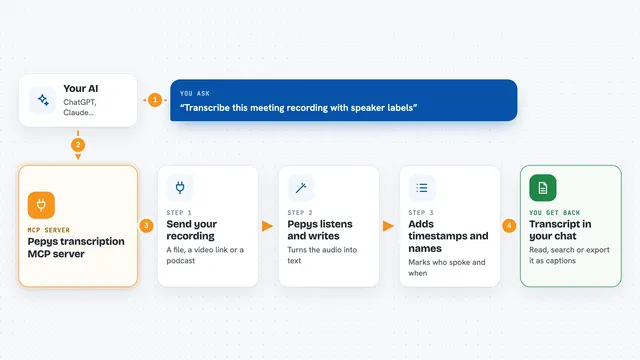
You ask your AI something like "find the Huberman episode about sleep and give me the transcript." Your AI passes that request to this helper, which talks to the Spoken service. Spoken searches its library of published podcasts and finds matching episodes. When you pick one, it sends back the transcript as clean text with timestamps and the real names of the speakers. Your AI shows you that text in the chat, and you can ask it to summarize, quote, or organize it.
 Click to zoom
What you can do with it
- Search podcasts by a topic or by pasting a Spotify or YouTube link
- Fetch an episode's transcript with real speaker names and timestamps
- List every episode in a show's back catalog
- Check how many credits you have left
- Follow a show so new episodes show up in your list
- See new episodes on shows you follow that you have not fetched yet
- Mute a show so it stops appearing in your list
Try asking your AI
- “Find the Huberman Lab episode about sleep and give me the transcript”
- “List all episodes of the Lex Fridman podcast”
- “Get the transcript for this YouTube link and summarize the main points”
- “What new episodes came out on the shows I follow this week”
What it gives back to you
You get text back in the chat. Search results come as a list of episodes with their titles, show names, and dates. Transcripts come as clean Markdown with timestamps and the real names of each speaker, so you can read it, quote it, or ask your AI to summarize it. Balance and follow lists come back as simple numbers and lists.
Before you start
What you need
- A Spoken API key from spoken.md (a kind of password for apps; you can start with the free demo key pt_demo)
- The Claude desktop app or another app that supports MCP servers
- Node.js installed on your computer if you use the npx setup
Good to know
Fetching a transcript for the first time uses one credit, and credits cost money, so keep an eye on your balance; repeat fetches of the same episode are free.
Install it with your AI
Add Spoken MCP server to your AI, no technical skills needed
You don't install anything by hand. You copy one prompt, paste it into an AI that can work on your computer, and it checks, installs and connects the server for you, asking you when it needs something.
Sign in to get the install prompt
Members get a ready-made prompt that lets the Claude desktop app check Spoken MCP server, install it and connect it for them, step by step. You don't need any technical skills: you copy, paste and answer a few questions. Your connected AI can also find and install any of the 4,361 MCP servers here for you.
Who it's for
Anyone who follows podcasts for work or research and wants transcripts they can read, search, or summarize, without listening to the audio.