MCP server · Speech to text
Whisper Windows MCP server
Turn audio and video files into text on your own Windows PC, right from your AI chat.
This is a helper for Windows that lets your AI write out the words in audio and video files. You point it at a file or a folder, and it gives you a transcript or subtitle file. It is handy if you deal with meeting recordings, interviews, or videos and want the text without uploading anything to the internet.
What is an MCP server? The 30-second version
On its own, your AI can only chat with you. An MCP server is a small helper program that gives your AI a new skill or a connection to another tool. This one connects your AI to Whisper, a well-known speech-to-text engine, running on your own Windows machine. So when you ask your AI to transcribe a file, it can actually do it for you instead of just talking about it.
What this MCP server does
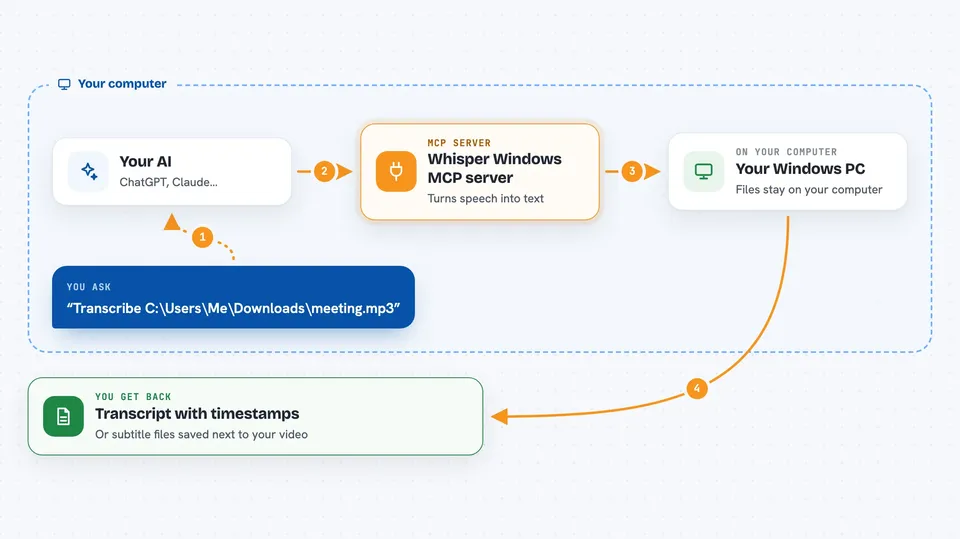
You ask your AI something like "transcribe this file" and give it the path. Your AI passes that request to this helper. The helper runs Whisper on your computer, using your graphics card to speed things up when possible. Then it hands the text back to your AI, which shows it to you in the chat or saves it as a file next to your recording. Everything happens on your machine, so your audio and video never leave your computer.
 Click to zoom
What you can do with it
- Transcribe a single audio or video file into text
- Turn a whole folder of recordings into text files in one go
- Generate subtitle files (SRT or VTT) for a video
- Detect the language automatically and translate subtitles into English
- Run long transcriptions in the background and check on progress
- Check whether your GPU is being used and how fast a file will take
- Download and switch between different Whisper models
Try asking your AI
- “Transcribe C:\Users\Me\Downloads\meeting.mp3”
- “Transcribe this folder of recordings and save each as a text file”
- “Generate Japanese and English subtitles for this video”
- “How long will it take to transcribe these files?”
What it gives back to you
You get back the transcript itself, usually with timestamps so you can see when each line was said. If you asked for subtitles, you get SRT or VTT files saved next to your video. For folder jobs, you get a progress report and then a text file for each recording. If you asked about timing or hardware, you get a short summary with numbers.
Before you start
What you need
- A Windows PC
- Node.js 18 or later
- The whisper.cpp program with Vulkan support, placed in a folder on your PC
- A Whisper model file (the helper can download one for you)
- FFmpeg, if you want to transcribe video or unusual audio formats
Good to know
The persistent whisper_server option keeps your graphics card memory busy the whole time it runs, so stop it when you are done if other apps need the GPU.
Install it with your AI
Add Whisper Windows MCP server to your AI, no technical skills needed
You don't install anything by hand. You copy one prompt, paste it into an AI that can work on your computer, and it checks, installs and connects the server for you, asking you when it needs something.
Sign in to get the install prompt
Members get a ready-made prompt that lets the Claude desktop app check Whisper Windows MCP server, install it and connect it for them, step by step. You don't need any technical skills: you copy, paste and answer a few questions. Your connected AI can also find and install any of the 4,361 MCP servers here for you.
Who it's for
Anyone on Windows who works with recordings, interviews, meetings, or videos and wants the words written out without sending files to a cloud service.