MCP server · Speech to text
Pepys transcription MCP server
by ankurmans
Turn audio, video, YouTube links and podcasts into labeled, timestamped transcripts your AI can read.
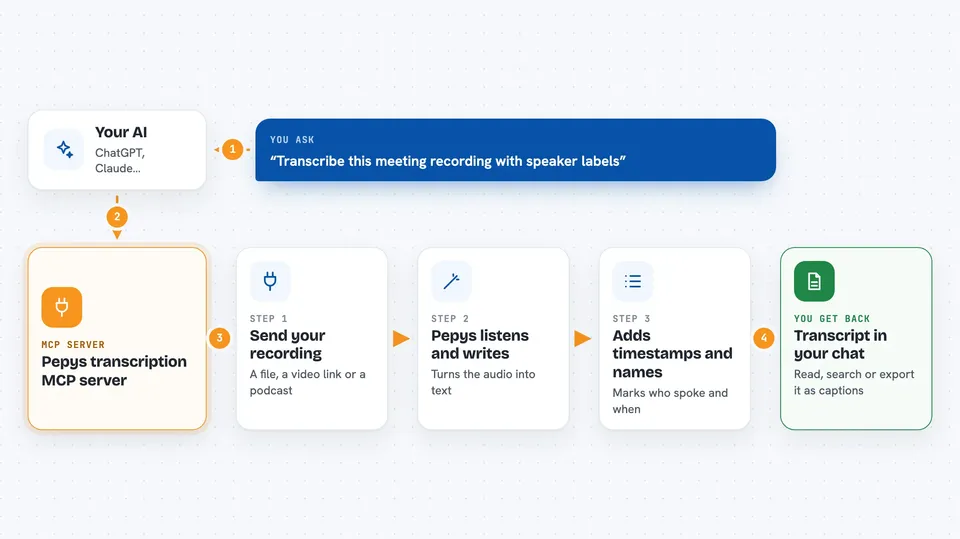
This is a small helper that lets your AI turn sound and video into text. You give it a file or a link, and it comes back with a transcript where you can see who spoke and when. It is handy for anyone who deals with meetings, interviews, videos or podcasts and would rather read than listen.
What is an MCP server? The 30-second version
On its own, your AI can only chat with you. It cannot listen to a recording or open a YouTube link. An MCP server is a small helper program that gives your AI a new skill, and this one gives it the skill of transcription through a service called Pepys. Once it is connected, you can ask your AI to transcribe something and it will pass the job to Pepys and bring the result back into the chat.
What this MCP server does
You ask your AI to transcribe a recording, a video file, a YouTube link or a podcast episode. The AI hands that request to this helper, which sends it to Pepys. Pepys does the actual listening and writing, then sends back the text. The helper passes that text to your AI, and your AI shows it to you in the chat, ready to read, search or export.
 Click to zoom
What you can do with it
- Transcribe audio and video files into text
- Label who spoke in a recording (speaker diarization)
- Transcribe a YouTube link or a podcast episode without downloading it yourself
- Export transcripts as SRT or VTT captions, or as plain text, Markdown or JSON
- Search inside a long transcript for a phrase and get just the matching parts
- Ask a question about a transcript and get an answer with citations
- Check how much transcription credit you have left
Try asking your AI
- “Transcribe this meeting recording and tell me who said what”
- “Turn this YouTube link into a transcript with timestamps”
- “Search the transcript for where they talk about the budget”
- “Export the transcript of my last interview as an SRT file”
What it gives back to you
You get text back in the chat: the transcript itself, often with timestamps and speaker labels. It can also come as a caption file (SRT or VTT) or as plain text, Markdown or JSON. For search, you get only the matching lines with their timestamps. For questions, you get a short answer with citations pointing to the parts of the transcript it came from.
Before you start
What you need
- Node.js 18 or newer on your computer
- A Pepys API key (a kind of password for apps; you get one free from the Pepys developer page)
- A Pepys account, since some features need an account entitlement
Good to know
Transcription uses your Pepys credit, so long recordings or whole podcast feeds can use up your balance, and some features need a paid account entitlement.
Install it with your AI
Add Pepys transcription MCP server to your AI, no technical skills needed
You don't install anything by hand. You copy one prompt, paste it into an AI that can work on your computer, and it checks, installs and connects the server for you, asking you when it needs something.
Sign in to get the install prompt
Members get a ready-made prompt that lets the Claude desktop app check Pepys transcription MCP server, install it and connect it for them, step by step. You don't need any technical skills: you copy, paste and answer a few questions. Your connected AI can also find and install any of the 4,361 MCP servers here for you.
Who it's for
People who work with recordings a lot, like journalists, researchers, podcasters, students and anyone who sits through meetings and interviews.