MCP server · Speech to text
babelscribe MCP server
by phonology024
Turn audio and video files on your own computer into subtitles and text in 99 languages, using your GPU.
babelscribe is a free tool that listens to an audio or video file and writes out what was said, as subtitles (SRT or VTT) or plain text. It runs entirely on your own computer, so nothing gets uploaded anywhere. It is handy for anyone who has to caption a recording, transcribe an interview, or turn a talk into notes.
What is an MCP server? The 30-second version
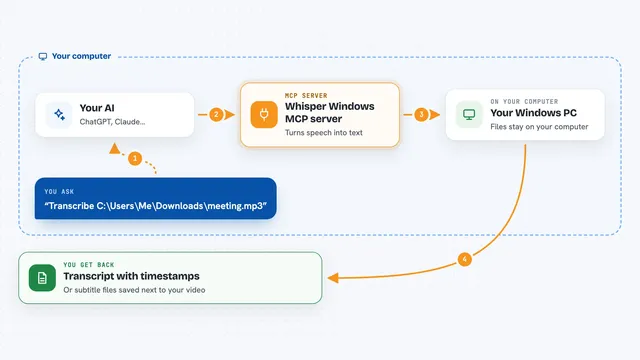
On its own, your AI can only chat with you. An MCP server is a small helper program that gives your AI a new skill, in this case the ability to transcribe sound and video on your machine. Once you connect babelscribe, your AI can reach into your folders, run the transcription on your own graphics card, and hand you back subtitles or text. You just ask in plain words, and the helper does the heavy lifting.
What this MCP server does
You ask your AI something like make subtitles for the newest video in my Downloads. The AI uses this helper to find the file, feed it to babelscribe, and babelscribe runs Whisper on your own GPU. It writes an SRT or VTT subtitle file and a text file next to your original video. Then the AI can read that text and proofread names, translate it, or summarise it for you.
What you can do with it
- Turn a video or audio file into SRT or VTT subtitles
- Get a plain text transcript of a recording
- Find the newest audio or video file in your Downloads, Videos, or Desktop folder
- See which graphics cards babelscribe can use on your machine
- List the languages and models it supports
- Ask your AI to proofread or summarise the transcript it just made
Try asking your AI
- “Make Thai subtitles for the newest video in my Downloads”
- “Transcribe interview.mp4 and give me the text”
- “Which GPUs can you use for transcription on this computer?”
- “Turn the podcast in my Videos folder into an SRT file and summarise it”
What it gives back to you
You get back a short confirmation that the file was transcribed, plus the path to the subtitle and text files it wrote next to your original. The AI can also show you the first part of the transcript right in the chat. If you asked for a summary or a translation, it will give you that as text.
Before you start
What you need
- Python 3.9 or newer, or the uv tool if you prefer uvx
- An audio or video file on your own computer
- Enough free disk space for the Whisper models (they download on first use)
Good to know
It reads files on your computer and writes new files next to them, so point it at folders you are happy for it to look in, and check names and spellings before you publish any subtitles.
Install it with your AI
Add babelscribe MCP server to your AI, no technical skills needed
You don't install anything by hand. You copy one prompt, paste it into an AI that can work on your computer, and it checks, installs and connects the server for you, asking you when it needs something.
Sign in to get the install prompt
Members get a ready-made prompt that lets the Claude desktop app check babelscribe MCP server, install it and connect it for them, step by step. You don't need any technical skills: you copy, paste and answer a few questions. Your connected AI can also find and install any of the 4,609 MCP servers here for you.
Who it's for
Anyone who has to caption or transcribe recordings, like journalists, students, video editors, podcasters, and office workers who deal with meeting or interview recordings.