
MCP server · Finance and crypto
Stillos Notary MCP server
Lets your AI check facts, screen names against sanctions lists, and score company distress.
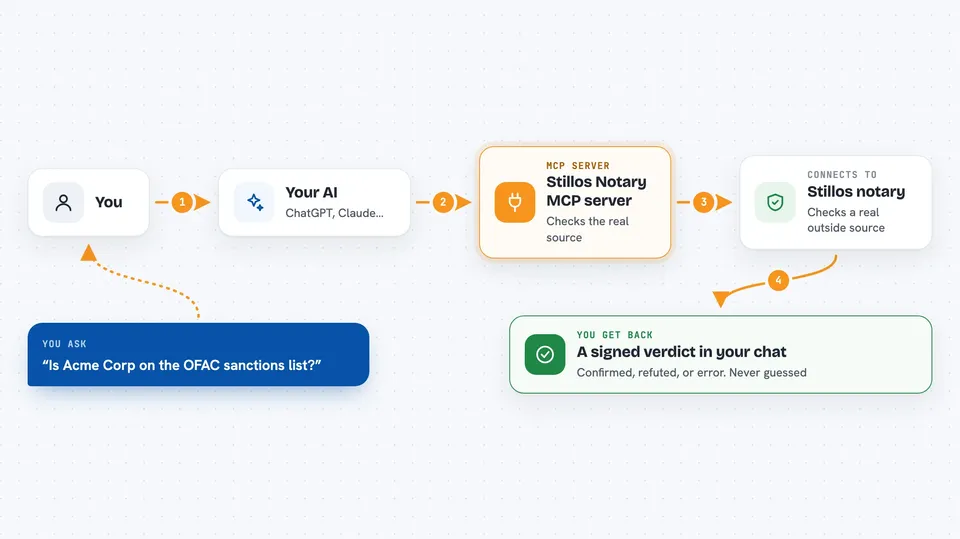
This is a helper that lets your AI ask a public online notary to verify claims, check names against a sanctions list, and score how financially stressed a company looks. It is handy if you handle compliance checks, research, or fact-checking and want a signed answer you can point to later. You do not need an account to try the free parts.
What is an MCP server? The 30-second version
On its own, your AI can only chat with you. An MCP server is a small helper program that gives your AI a new skill or a connection to an outside service. This helper connects your AI to the Stillos public notary, a website that checks claims against real outside sources and signs the result. So when you ask your AI to check something, it can pass the request to this notary and bring the signed answer back to you.
What this MCP server does
You ask your AI something like whether a web page returns a certain code, or whether a company name appears on a sanctions list. Your AI passes that request to this helper. The helper sends it over the internet to the Stillos notary, which looks at a real outside source, not another AI's opinion. The notary signs the result and sends it back, and your AI shows you the verdict in the chat.
 Click to zoom
What you can do with it
- Check whether a claim is confirmed, refuted, or could not be resolved
- Screen a person or company name against the OFAC sanctions list
- Score how financially distressed a public company looks from its filings
- Verify that a past verdict receipt is genuine and has not been changed
- File a dispute against a verdict you think is wrong
- See the exact price and payment details when a paid check is needed
Try asking your AI
- “Use the notary to check whether example.com returns a 200 status code”
- “Screen Acme Corp against the OFAC sanctions list”
- “What is the Altman Z-score distress ranking for AAPL”
- “Verify this notary receipt hash and tell me if the signature is valid”
What it gives back to you
You get a short answer in the chat: a verdict like CONFIRMED, REFUTED, or ERROR, or a screening result, or a distress score with a freshness date. Each answer comes with a signature and a hash chain you can check later. If a paid check is needed, you get the price, the network, and the payment address instead of a result. Nothing is guessed: if the notary cannot resolve something, it says ERROR.
Before you start
What you need
- Node.js installed on your computer (the free runtime that runs the helper)
- A wallet that can pay in USDC on Base if you go past the free limits
- The Claude desktop app or another app that supports MCP servers
Good to know
Paid checks cost real USDC on Base, and filing a dispute can lead to a payout against the notary's bond, so treat payment and dispute actions carefully.
Install it with your AI
Add Stillos Notary MCP server to your AI, no technical skills needed
You don't install anything by hand. You copy one prompt, paste it into an AI that can work on your computer, and it checks, installs and connects the server for you, asking you when it needs something.
Sign in to get the install prompt
Members get a ready-made prompt that lets the Claude desktop app check Stillos Notary MCP server, install it and connect it for them, step by step. You don't need any technical skills: you copy, paste and answer a few questions. Your connected AI can also find and install any of the 4,609 MCP servers here for you.
Who it's for
People who do compliance checks, research, or fact-checking and want a signed, outside-source answer they can keep.



