
MCP server · Productivity
HumanSurvey MCP server
by sunsiyuan
Ask your customers how they found you, and let your AI read back the answers and totals.
HumanSurvey is a service that asks people one simple question: how did you hear about us? It shows that question inside your own signup or payment pages. This MCP server lets your AI set up the question and read the results for you, without you touching any code.
What is an MCP server? The 30-second version
On its own, your AI can only chat with you. An MCP server is a small helper program that gives your AI a new skill or a connection to an app or service. This one connects your AI to HumanSurvey, so the AI can create your question, check the answers, and pull totals when you ask. You stay in the conversation; the helper does the running around.
What this MCP server does
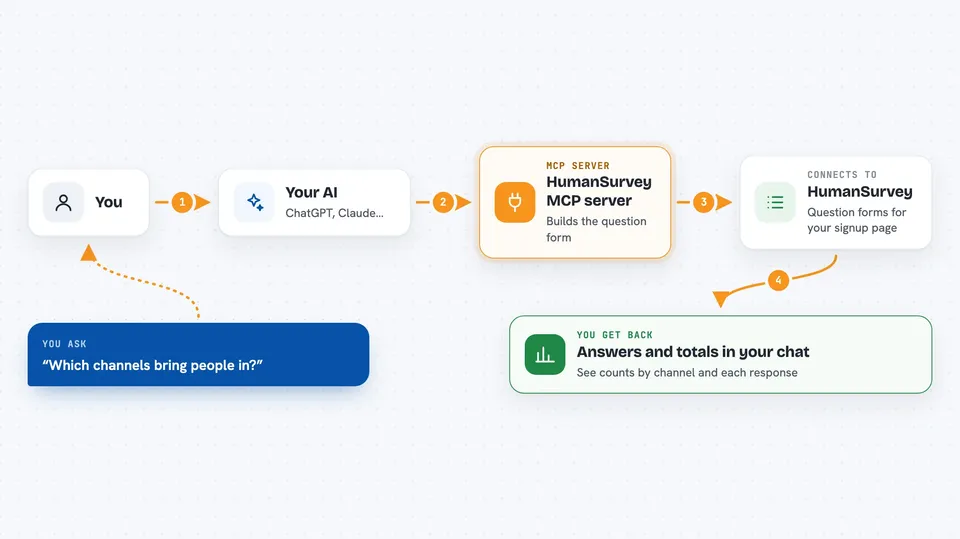
You tell your AI what you want to know, for example which channels bring people in. The AI uses this helper to set up a short question form on HumanSurvey. You then put that form into your signup or checkout page. When people answer, the helper can read the responses back and give you totals by channel. You see the numbers and the raw answers in your chat.
 Click to zoom
What you can do with it
- Create a new question form for your signup or payment page
- Set up the answer choices people will pick from
- Read back the totals of answers by channel
- Pull the raw list of individual responses
- Find free text answers that still need a label
- Match a vague answer to a known creator or platform
- Connect your own user ids to the answers people gave
Try asking your AI
- “Create a form called Checkout - how did you hear about us”
- “Set up the answer choices: TikTok, Reddit, a friend, or I don't remember”
- “Show me the totals for this form for July, grouped by answer”
- “List the free text answers that haven't been matched to a channel yet”
What it gives back to you
You get answers in your chat as lists and numbers. For totals, you see each channel next to its count and the total it was figured from. For raw responses, you see the individual picks people made, one by one. When the AI changes something, like creating a form, it tells you what it made and gives you the link.
Before you start
What you need
- A HumanSurvey account (you sign in with your email and a code they send you)
- An API key from HumanSurvey (a kind of password for apps; you get one after signing in)
- Node.js installed on your computer if you run the helper yourself
Good to know
This helper can create and change your survey forms and read the answers people gave, so only connect it to an account you are happy for your AI to work in.
Install it with your AI
Add HumanSurvey MCP server to your AI, no technical skills needed
You don't install anything by hand. You copy one prompt, paste it into an AI that can work on your computer, and it checks, installs and connects the server for you, asking you when it needs something.
Sign in to get the install prompt
Members get a ready-made prompt that lets the Claude desktop app check HumanSurvey MCP server, install it and connect it for them, step by step. You don't need any technical skills: you copy, paste and answer a few questions. Your connected AI can also find and install any of the 4,361 MCP servers here for you.
Who it's for
Founders, marketers, and product people who want to know where their customers really come from, without building a survey tool.



