
MCP server · API
Rhumb MCP server
by supertrained
Compare online services and run supported tasks through one helper, with costs and receipts.
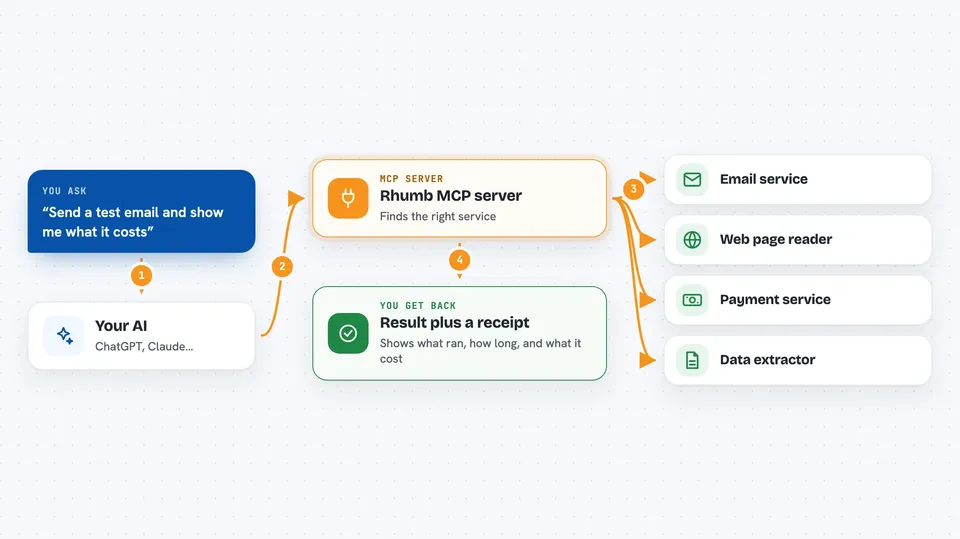
Rhumb is a helper that lets your AI look up and compare online services, then run certain tasks for you. It scores services on how well they work with AI, so you can pick a good one without guessing. It is handy if you often ask your AI to send email, pull data, or generate content and want to know what it will cost first.
What is an MCP server? The 30-second version
On its own, your AI can only chat with you. An MCP server is a small helper program that gives your AI a new skill or a connection to an app or service. This one connects your AI to Rhumb, a service that scores and compares other online services. Once connected, your AI can ask Rhumb which service is best for a task, what it costs, and then run it for you.
What this MCP server does
You ask your AI to do something, like send an email or extract text from a page. Your AI uses this helper to search Rhumb's list of scored services and pick a good match. The helper checks the cost and health of that service, then runs the task if you have a key. You get back the result plus a receipt that shows what ran and what it cost.
 Click to zoom
What you can do with it
- Find services that match what you need them to do
- Compare services by their Rhumb score and see alternatives
- Check known failure patterns before you rely on a service
- Estimate the cost of a task before running it
- Run supported tasks like sending email or extracting data
- Track your spending and see a receipt for each call
Try asking your AI
- “Find me a service that can send transactional email and compare the top three by score.”
- “What is the Rhumb score for Stripe, and what are its known failure modes?”
- “Estimate the cost to extract text from a web page before I run it.”
- “Send a test email to me@example.com with the subject Hello and body Test.”
What it gives back to you
You get back lists of services with scores, short summaries of failure patterns, and cost estimates in plain numbers. When you run a task, you get the result plus a receipt that shows which service ran, how long it took, and what it cost. Your chat shows these as text answers, tables, or links you can click.
Before you start
What you need
- The Claude desktop app or another MCP client
- Node.js 18 or newer (for the npx command)
- A Rhumb governed API key if you want to run tasks that cost money (you get one by signing up at rhumb.dev)
Good to know
Running tasks can spend money from your Rhumb balance, so check the cost estimate and your budget before you execute.
Install it with your AI
Add Rhumb MCP server to your AI, no technical skills needed
You don't install anything by hand. You copy one prompt, paste it into an AI that can work on your computer, and it checks, installs and connects the server for you, asking you when it needs something.
Sign in to get the install prompt
Members get a ready-made prompt that lets the Claude desktop app check Rhumb MCP server, install it and connect it for them, step by step. You don't need any technical skills: you copy, paste and answer a few questions. Your connected AI can also find and install any of the 4,609 MCP servers here for you.
Who it's for
People who ask their AI to do research, extraction, or generation tasks and want to compare services and control costs.


