
MCP server · Developer tools
Vectr MCP server
by swapnanil
Lets your AI code editor search your code by meaning and remember findings across sessions.
Vectr is a small helper program that runs on your own computer and gives your AI code editor a better memory of your project. Instead of re-reading the same files and hunting for the same function over and over, your AI can ask Vectr to find code by description and to recall notes it saved earlier. It is handy for anyone working in a large or unfamiliar codebase, or for work you come back to after a break.
What is an MCP server? The 30-second version
On its own, your AI can only chat with you and read what you paste in. An MCP server is a small helper program that gives your AI a new skill or a connection to something outside the chat. This one connects your AI to Vectr, which runs quietly on your machine and keeps an index of your project plus a store of notes. Once connected, your AI can search your code and pull up saved findings whenever you ask.
What this MCP server does
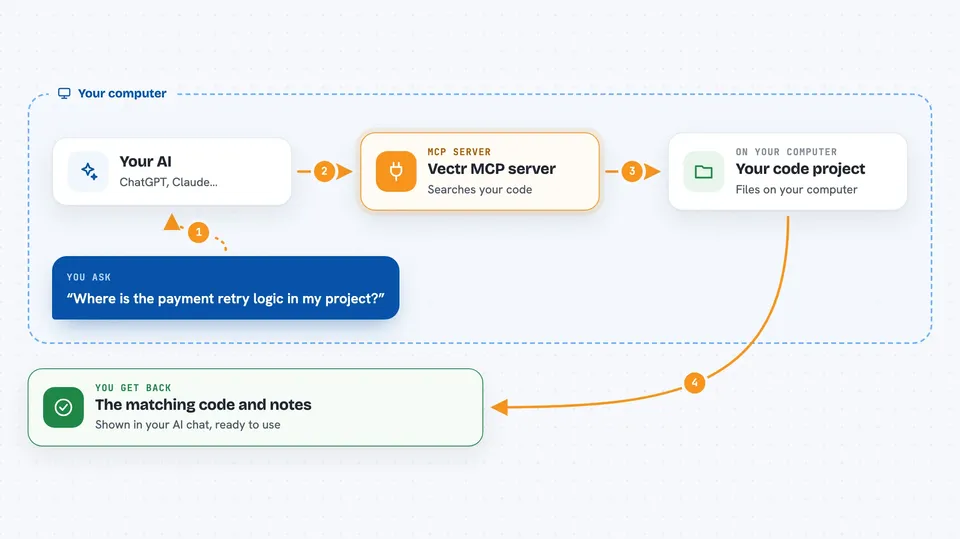
You ask your AI something about your project, like where a certain behaviour lives. Your AI sends that request to Vectr, which is running in the background on your computer. Vectr looks through its index of your files, which it built by reading your code and understanding its structure, and finds the most relevant pieces. It sends those back to your AI, which then explains or uses them in the chat. Vectr can also save notes your AI writes down and bring them back later, even after you close and reopen your editor.
 Click to zoom
What you can do with it
- Search your codebase by describing what the code does, not just by exact names
- Look up a function, class, or symbol and get the whole thing back
- Trace how functions call each other or how a route is wired up
- Save a finding as a note so your AI can recall it later
- Recall saved notes by meaning, even with different wording
- Check the status of indexing or the memory store
- Have relevant notes appear automatically in editors that support session hooks
Try asking your AI
- “Find the function that validates JWT tokens in this project”
- “Where is the user signup route defined and what does it call?”
- “Remember that the payment retry logic lives in billing/retry.py and uses exponential backoff”
- “What did we figure out earlier about the caching layer?”
What it gives back to you
You get answers in the chat, usually with the relevant code snippets or a summary of what was found. For a search, your AI shows the matching function or block. For a recall, it brings back the note you saved, in the same words. For a trace, it shows the chain of calls or routes. In editors with session hooks, some notes may appear on their own without you asking.
Before you start
What you need
- Python 3.14 or newer installed on your computer
- A terminal where you can run a couple of commands
- An AI code editor that supports MCP, such as Claude Code, Cursor, or VS Code with Copilot
- About 290 MB of free space for the embedding model, which downloads once
Good to know
Vectr runs locally and does not send your code anywhere, but it does read your project files to build its index, so point it at the right folder.
Install it with your AI
Add Vectr MCP server to your AI, no technical skills needed
You don't install anything by hand. You copy one prompt, paste it into an AI that can work on your computer, and it checks, installs and connects the server for you, asking you when it needs something.
Sign in to get the install prompt
Members get a ready-made prompt that lets the Claude desktop app check Vectr MCP server, install it and connect it for them, step by step. You don't need any technical skills: you copy, paste and answer a few questions. Your connected AI can also find and install any of the 4,609 MCP servers here for you.
Who it's for
Developers and anyone using an AI code editor on a large or unfamiliar codebase, especially work they resume across sessions.




