
MCP server · Productivity
Sweeppea MCP server
Run and manage legally compliant sweepstakes in the US and Canada from your AI chat.
This is a helper that connects your AI assistant to Sweeppea, a service for running sweepstakes and prize promotions that follow US and Canadian rules. Once connected, you can ask your AI to set up a sweepstakes, add participants, draw winners, or check your billing. It is handy for marketing teams, agencies, and anyone who runs giveaways and needs the legal side handled properly.
What is an MCP server? The 30-second version
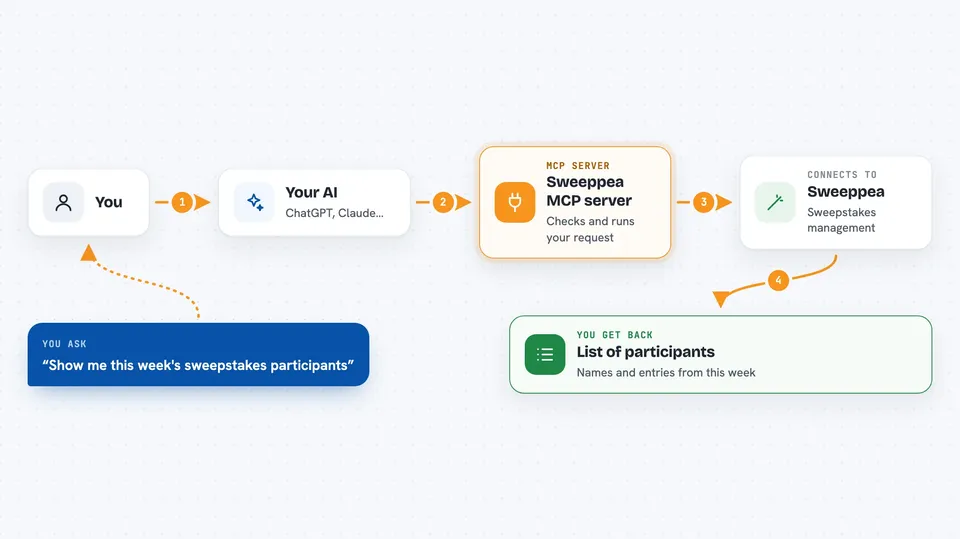
On its own, your AI can only chat with you. An MCP server is a small helper program that gives your AI a new skill or a connection to another service. This one connects your AI to Sweeppea, so it can look things up and take actions there for you. You just ask in plain words, and the helper passes your request along to Sweeppea.
What this MCP server does
You ask your AI something like set up a new sweepstakes or show me this week's participants. The AI uses this helper to talk to Sweeppea on your behalf. Sweeppea checks the request against legal and business rules before anything is created, and rejects anything that breaks them. If the request is fine, Sweeppea does the work and sends the result back. Your AI then shows you the answer or confirms the change in the chat.
 Click to zoom
What you can do with it
- Create, update, pause, or clone a sweepstakes
- Add participants and look up their entries
- Draw winners or schedule a future drawing
- Generate legally compliant official rules
- Check billing, wallet, and data usage
- Manage notes, calendar events, and to-do items
- Upload, send, or download files from your Drive
Try asking your AI
- “Create a new sweepstakes called Summer Giveaway running from June 1 to June 30”
- “Show me the participants in my Spring Promo sweepstakes from last week”
- “Draw 3 winners from the eligible participants in Summer Giveaway”
- “Generate the official rules for my new sweepstakes using the wizard”
What it gives back to you
You get back clear answers in the chat: lists of sweepstakes or participants, counts, winner names, rule documents, or billing totals. When you ask it to change something, it confirms what was created, updated, or deleted. Some tools return links to files or short summaries. Everything is written in normal sentences you can read at a glance.
Before you start
What you need
- A Sweeppea account with an active subscription
- A Sweeppea API key from your API dashboard (a kind of password for apps)
- An AI assistant that supports MCP servers, like Claude Desktop or Cursor
Good to know
Some actions delete data permanently or send messages and codes, so double-check before confirming, and remember the server enforces legal rules that can block a request.
Install it with your AI
Add Sweeppea MCP server to your AI, no technical skills needed
You don't install anything by hand. You copy one prompt, paste it into an AI that can work on your computer, and it checks, installs and connects the server for you, asking you when it needs something.
Sign in to get the install prompt
Members get a ready-made prompt that lets the Claude desktop app check Sweeppea MCP server, install it and connect it for them, step by step. You don't need any technical skills: you copy, paste and answer a few questions. Your connected AI can also find and install any of the 4,609 MCP servers here for you.
Who it's for
Marketing teams, agencies, and promotion managers who run sweepstakes and need the legal and compliance side handled properly.


