MCP server · Developer tools
Jira and GitHub MCP server
by TamarEngel
Lets your AI look up Jira issues and handle GitHub branches, commits, and pull requests for you.
This is a helper that connects your AI assistant to Jira and GitHub at the same time. You can ask it things like what tasks are assigned to you, or tell it to start work on a ticket and open a pull request. It is made for developers who move between Jira, GitHub, and their code editor all day.
What is an MCP server? The 30-second version
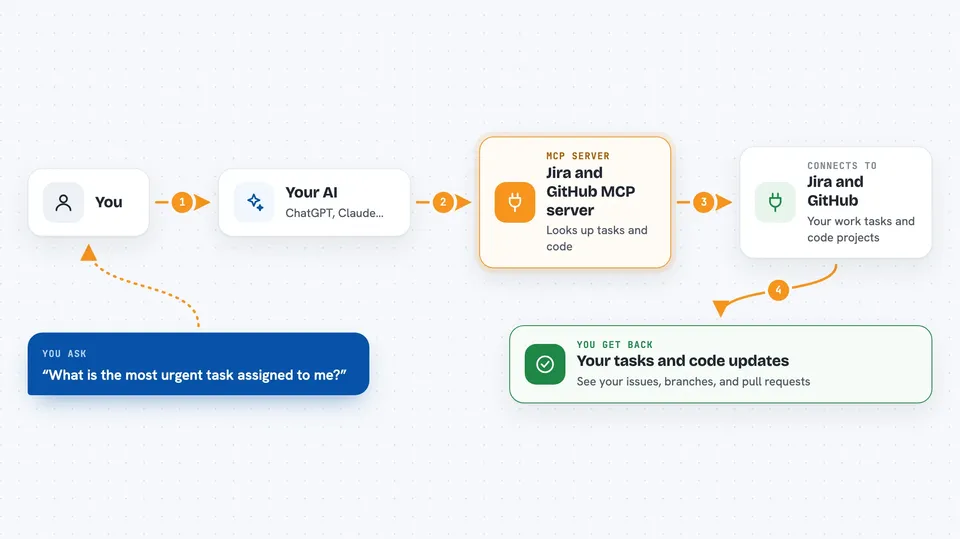
On its own, your AI can only chat with you. An MCP server is a small helper program that gives your AI a new skill or a connection to another app. This one connects your AI to Jira and GitHub, so it can look up your tickets, create branches, and open pull requests when you ask. You stay in your editor and just talk to the AI.
What this MCP server does
You ask your AI something like what is the most urgent task assigned to me. The AI uses this helper to ask Jira, and Jira sends back your issues. Then you can ask it to start work on a ticket, and the helper creates a branch in your code project and moves the Jira ticket to In Progress. When you are done, you ask it to commit and push your changes, open a pull request, and later merge it and close the ticket.
 Click to zoom
What you can do with it
- Look up a Jira issue by its key, like KAN-42
- Search Jira issues with a query and filter the results
- List the issues assigned to you
- Move a Jira issue to a different status, like In Progress or Done
- Create a Git branch named after a Jira issue
- Commit and push your local changes
- Open, merge, or check a pull request on GitHub
Try asking your AI
- “What is the most urgent task assigned to me?”
- “Start work on KAN-42”
- “Commit my changes with message Implement KAN-42”
- “Create a PR for KAN-42 and move it to In Review”
- “Merge the PR and move KAN-42 to Done”
What it gives back to you
You get answers in the chat, like a list of your Jira issues or the details of one ticket. When it creates a branch or opens a pull request, it tells you what it did and gives you the branch name or pull request number. It can also show you the new status of a Jira ticket after it moves it.
Before you start
What you need
- Python 3.10 or newer
- Git installed on your computer
- A Jira account with an API token
- A GitHub personal access token with permission to work with branches and pull requests
Good to know
This helper can change your Jira tickets, create branches, and merge pull requests, so make sure you review what it is about to do before you say yes.
Install it with your AI
Add Jira and GitHub MCP server to your AI, no technical skills needed
You don't install anything by hand. You copy one prompt, paste it into an AI that can work on your computer, and it checks, installs and connects the server for you, asking you when it needs something.
Sign in to get the install prompt
Members get a ready-made prompt that lets the Claude desktop app check Jira and GitHub MCP server, install it and connect it for them, step by step. You don't need any technical skills: you copy, paste and answer a few questions. Your connected AI can also find and install any of the 4,361 MCP servers here for you.
Who it's for
Developers and teams who use Jira and GitHub every day and want to spend less time switching between tools.