MCP server · Developer tools
GitMCP server
by idosal
Lets your AI read the latest docs and code from any public GitHub project so its answers stay accurate.

GitMCP is a free online helper that connects your AI assistant to the documentation and code of any public GitHub project. Instead of guessing, your AI can look up the real, current information before answering. It is handy for anyone who asks their AI about a library, tool, or project and wants correct answers.
What is an MCP server? The 30-second version
On its own, your AI can only chat with what it already learned during training. An MCP server is a small helper that gives your AI a new skill or a connection to something outside itself. GitMCP is that helper for GitHub: it lets your AI fetch documentation and search code from a project you point it at. You add one web address, and your AI can then look things up there when you ask.
What this MCP server does
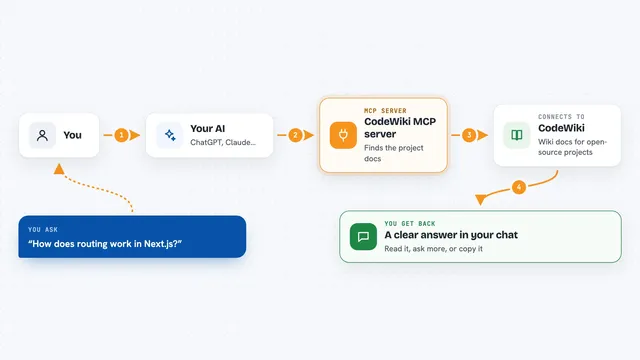
You add a GitMCP web address to your AI assistant, choosing either one specific project or a general one that works with any project. When you ask a question about that project, your AI sends a request to GitMCP. GitMCP then reads the project's documentation or searches its code on GitHub and sends the relevant parts back. Your AI uses that real information to write its answer. The whole thing happens in the background, and you just see a better, more accurate reply.
 Click to zoom
What you can do with it
- Ask about how a library or tool works and get answers based on its real docs
- Search a project's code for examples of how something is done
- Get up-to-date info on new or fast-changing projects your AI has never seen
- Look up a specific feature or function inside a project's documentation
- Follow links mentioned in the docs and read their content
- Use one general address to switch between many different projects on the fly
Try asking your AI
- “How do I use the Playwright MCP?”
- “Add memory to my LangGraph agent”
- “Explain how the OpenAI Whisper speech recognition model works”
- “Show me a code example of how authentication is handled in this project”
What it gives back to you
You get answers in your normal chat, but grounded in the project's real documentation and code. Your AI may show short quotes, code snippets, or summaries it pulled from the project. You usually do not see the behind-the-scenes requests, just a more accurate reply. If it searched code, it can point you to specific examples.
Before you start
What you need
- An AI assistant that supports MCP, such as Cursor, Claude Desktop, VSCode, or Windsurf
- The GitMCP web address for the project you want, like gitmcp.io/owner/repo, or the general one at gitmcp.io/docs
- For some apps, Node.js installed so the mcp-remote helper can run
Good to know
It only reads public GitHub content, so do not point it at private projects or anything you would not want fetched.
Install it with your AI
Add GitMCP server to your AI, no technical skills needed
You don't install anything by hand. You copy one prompt, paste it into an AI that can work on your computer, and it checks, installs and connects the server for you, asking you when it needs something.
Sign in to get the install prompt
Members get a ready-made prompt that lets the Claude desktop app check GitMCP server, install it and connect it for them, step by step. You don't need any technical skills: you copy, paste and answer a few questions. Your connected AI can also find and install any of the 4,361 MCP servers here for you.
Who it's for
Developers and technical folks who ask their AI about libraries, tools, or GitHub projects and want answers based on the real, current source.