
MCP server · Notes
StremAI shared memory MCP server
by thomasjumper
Let your coding AI remember what it learns, and share that memory with your other AI tools.
StremAI is a shared memory for your AI coding helpers. When one of them figures something out, like a tricky setup step or a decision your team made, it can save that note. Later, you or another AI tool can ask for it back. It is handy if you keep re-explaining the same project to a fresh chat every day.
What is an MCP server? The 30-second version
On its own, your AI can only chat with you in the moment. It forgets everything when the conversation ends. An MCP server is a small helper you connect to your AI so it gains a new skill. This one connects your AI to StremAI, a memory service, so it can save notes and look them up again later.
What this MCP server does
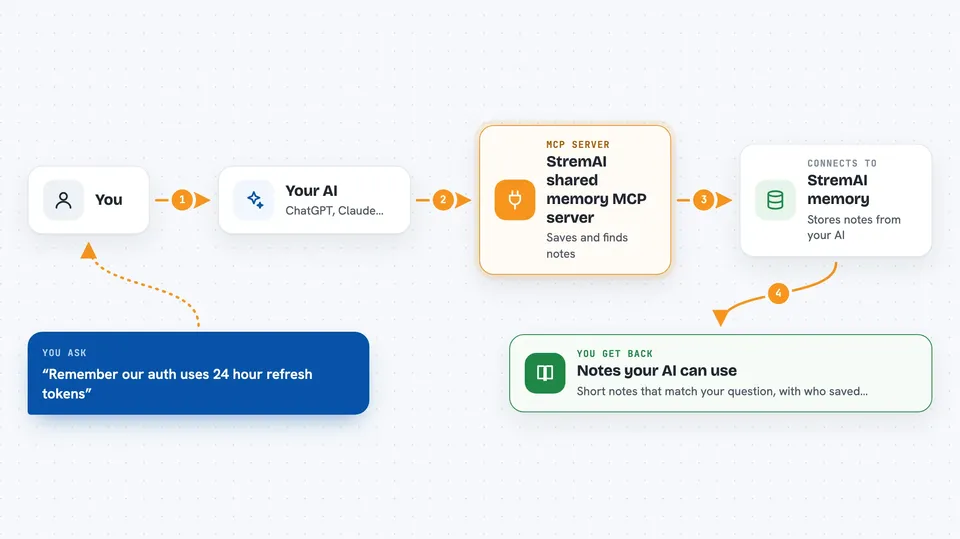
You tell your AI something worth remembering, or it notices something itself while working. The AI sends that note to StremAI through this helper. StremAI stores it and marks which AI wrote it. Later, when you or another AI asks about that topic, StremAI finds the matching notes and hands them back. Your AI then reads them and uses them in its answer.
 Click to zoom
What you can do with it
- Save a note about your project so future AI sessions can find it
- Ask your AI to recall what it learned about a topic earlier
- Share memory between different coding tools like Claude Code and Cursor
- Keep track of which AI wrote which note
- Export or erase your saved memory when you want
- Pick up where you left off after switching machines
Try asking your AI
- “Remember that our auth uses 24 hour refresh tokens, save it as a pattern”
- “What do you know about how we handle database migrations in this project?”
- “Save a note that the build breaks if you run tests before installing dependencies”
- “Recall anything we decided about the payments service last week”
What it gives back to you
You get back short, readable notes that match what you asked about. Each note shows what was saved, a title, and which AI stored it. Your AI reads them and folds them into its reply, so it feels like it already knows your project. You can also list, export, or delete your saved memory.
Before you start
What you need
- A StremAI account (sign in through your browser when you connect)
- An MCP client like Claude Code, Cursor, or Codex
- An API key only if your tool cannot do browser sign-in
Good to know
It stores notes about your projects on StremAI's servers, so avoid saving secrets or private code you would not want kept there.
Install it with your AI
Add StremAI shared memory MCP server to your AI, no technical skills needed
You don't install anything by hand. You copy one prompt, paste it into an AI that can work on your computer, and it checks, installs and connects the server for you, asking you when it needs something.
Sign in to get the install prompt
Members get a ready-made prompt that lets the Claude desktop app check StremAI shared memory MCP server, install it and connect it for them, step by step. You don't need any technical skills: you copy, paste and answer a few questions. Your connected AI can also find and install any of the 4,609 MCP servers here for you.
Who it's for
Developers and anyone who uses AI coding tools across several sessions or machines and is tired of repeating the same context.





