
MCP server · Finance and crypto
ThoughtProof MCP server
by ThoughtProof
Lets your AI double-check a decision before it acts, and only says go when the check passes.
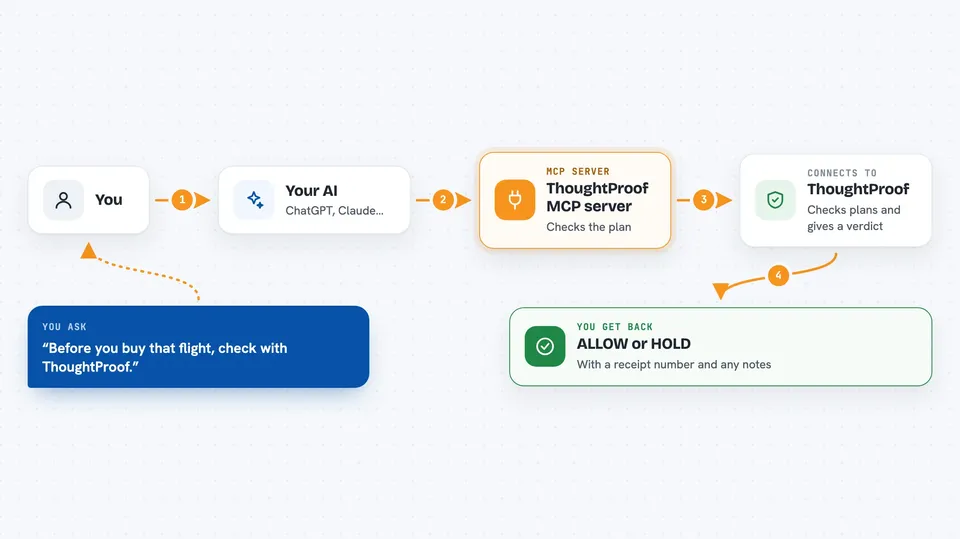
ThoughtProof is a helper that lets your AI pause and check a decision before it actually does something. You describe what you want and what the AI plans to do, and it comes back with a yes or a no. It is handy if you use AI to handle spending, bookings, or anything that is hard to undo.
What is an MCP server? The 30-second version
On its own, your AI can only chat with you. An MCP server is a small helper program that gives your AI a new skill or a connection to a service. This one connects your AI to ThoughtProof, a checking service. When you ask your AI to do something, it can send the plan to ThoughtProof first and get back a simple yes or no before going ahead.
What this MCP server does
You tell your AI what you want and what it is about to do. The AI sends that plan to this helper, which passes it to ThoughtProof. ThoughtProof looks at the plan and decides whether it should go ahead or stop and be reviewed. It sends back a verdict like ALLOW or HOLD, plus a short note and a receipt number. Your AI then either does the thing or holds off, depending on the answer.
 Click to zoom
What you can do with it
- Check a planned purchase or payment before it happens
- Pause risky actions like deleting, publishing, or deploying
- Get a simple ALLOW or HOLD answer with a receipt number
- Ask for a second opinion on a claim or a piece of reasoning
- Look up a trust score for a given agent ID
- Run a pre-trade check for trading agents
Try asking your AI
- “Before you buy that flight, check with ThoughtProof that it fits my budget of 400 euros.”
- “I want to delete the old customer records. Check first if that is safe to do.”
- “Verify this claim: our refund policy allows returns within 30 days.”
- “Look up the trust score for agent 42.”
What it gives back to you
You get a short verdict in the chat, usually ALLOW or HOLD, plus a receipt number and any objections. If it says ALLOW, your AI can go ahead. If it says HOLD or anything else, your AI should stop and ask you. It also shows which check was used, like spend or irreversible action.
Before you start
What you need
- The Claude desktop app or another local MCP client like Cursor, Windsurf, or Cline
- Node.js version 18 or newer
- A ThoughtProof key from their pricing page (a kind of password for the service)
Good to know
It only gives advice; your AI still has to actually stop when the answer is HOLD, so do not treat a missing answer as a yes.
Install it with your AI
Add ThoughtProof MCP server to your AI, no technical skills needed
You don't install anything by hand. You copy one prompt, paste it into an AI that can work on your computer, and it checks, installs and connects the server for you, asking you when it needs something.
Sign in to get the install prompt
Members get a ready-made prompt that lets the Claude desktop app check ThoughtProof MCP server, install it and connect it for them, step by step. You don't need any technical skills: you copy, paste and answer a few questions. Your connected AI can also find and install any of the 4,066 MCP servers here for you.
Who it's for
People who use AI to handle money, bookings, or anything hard to undo, and want a safety check before it acts.




