MCP server · Research
Vessel Traffic MCP server
by tools-mcp
Ask your AI where a ship is, where it has been, and what shipping schedules look like, with sources.
This is a helper that lets your AI look up ships and shipping schedules. You can ask about a vessel by name or number, see its recent positions, and check carrier schedules between ports. It is handy if you work in shipping, freight, trade, or logistics and want quick answers without hopping between websites.
What is an MCP server? The 30-second version
On its own, your AI can only chat with you. An MCP server is a small helper program that gives your AI a new skill or a connection to an app or service. This one connects your AI to public vessel tracking and shipping schedule sources. Once it is connected, you can ask your AI about a ship or a route, and it will fetch the details for you.
What this MCP server does
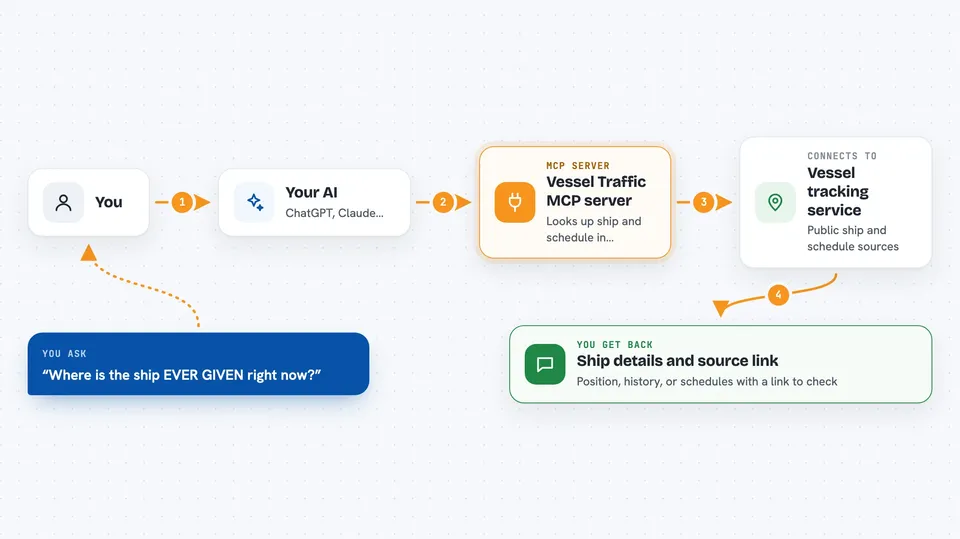
You ask your AI something like where a ship is right now. Your AI passes that question to this helper. The helper talks to public vessel tracking and schedule sources, then hands the results back. Your AI shows you the answer in the chat, along with the name of the source and a link you can open. It is read-only, so it looks things up but does not change anything anywhere.
 Click to zoom
What you can do with it
- Find a ship by name, MMSI, IMO, or callsign
- See a vessel's latest reported position
- See where a vessel has been recently
- List vessels in a specific area
- Look up port calls for a vessel
- Search carrier schedules between two ports
- Check a vessel's schedule and rough delay hints
Try asking your AI
- “Find the current position of EVER GIVEN and show the source link.”
- “Search carrier schedules from KRPUS to NLRTM and include the source URL.”
- “Which vessels are near the port of Singapore right now?”
- “Look up the vessel with MMSI 353136000 and tell me where it has been.”
What it gives back to you
You get answers in plain chat text: a ship's name and details, its latest position, a list of past positions, or a list of schedule options between two ports. Every live result comes with the name of the source and a link you can open to check it yourself. Some tools also give rough delay hints based on the schedule. Nothing is changed on any website, because this helper only reads.
Before you start
What you need
- The Claude desktop app or another app that supports MCP servers
- Node.js installed on your computer (the free tool that runs the helper)
- A free account on the public tracking sites if you want live data from them
Good to know
It only reads data, but the live results come from third-party sites, so check the source link before you rely on a position or schedule for a real decision.
Install it with your AI
Add Vessel Traffic MCP server to your AI, no technical skills needed
You don't install anything by hand. You copy one prompt, paste it into an AI that can work on your computer, and it checks, installs and connects the server for you, asking you when it needs something.
Sign in to get the install prompt
Members get a ready-made prompt that lets the Claude desktop app check Vessel Traffic MCP server, install it and connect it for them, step by step. You don't need any technical skills: you copy, paste and answer a few questions. Your connected AI can also find and install any of the 4,361 MCP servers here for you.
Who it's for
People in shipping, freight forwarding, trade, and logistics who want quick vessel and schedule lookups without leaving their chat.