
MCP server · Finance and crypto
DPX MCP server
Lets your AI check market and climate signals, score a company's ESG risk, and run cross-border USDC settlements.
DPX is a helper for AI that mixes two jobs: it gathers financial and climate signals, and it can move money across borders in USDC. It is made for finance teams, treasury people, and analysts who want their AI to look up risk and settle payments. If you work with cross-border payments or counterparty checks, this is for you.
What is an MCP server? The 30-second version
On its own, your AI can only chat with you. An MCP server is a small helper program that gives your AI a new skill or a connection to an app or service. This one connects your AI to DPX, a service that reads market and climate data and can send USDC payments on the Base network. Once it is connected, you can ask your AI to check a signal or start a settlement, and it will use DPX to do it.
What this MCP server does
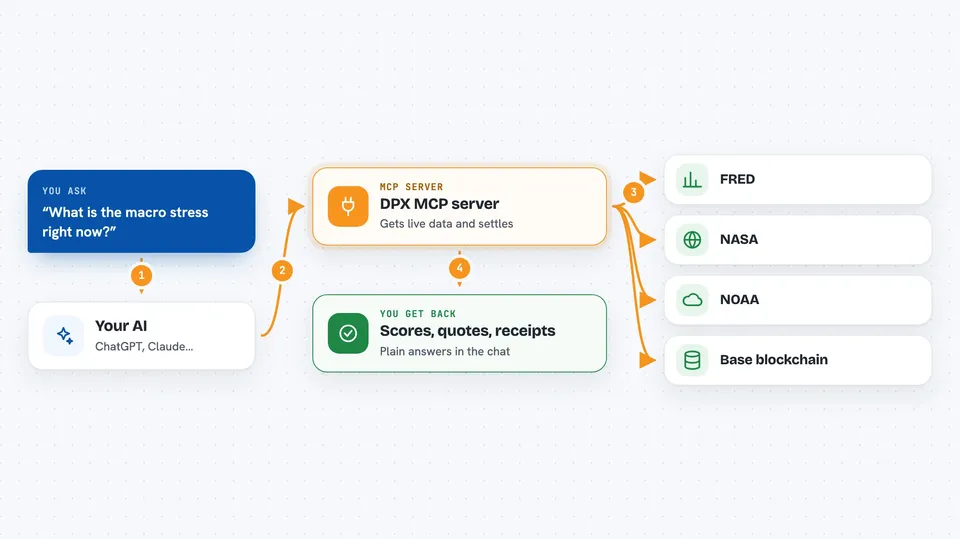
You ask your AI something like "what is the macro stress right now" or "settle 2 million dollars to euros for this wallet". The AI sends that request to the DPX helper. The helper talks to the DPX service, which pulls live data from sources like FRED, NASA, and NOAA, or talks to the Base blockchain to move USDC. Then it sends the answer back to your AI, and your AI shows it to you in the chat as a score, a quote, or a transaction receipt.
 Click to zoom
What you can do with it
- Check the current macro stress level and what it might mean for currencies
- Get an ESG score for a wallet address from public sources
- Ask for a binding fee quote before sending a cross-border payment
- Compare DPX fees to Stripe, Wise, SWIFT, or a bank wire
- Execute a USDC settlement on Base and get a transaction receipt
- Look up a past settlement by its ID
- Read a climate or supply chain signal for a region
Try asking your AI
- “What is the macro stress regime right now and what does it suggest for the dollar?”
- “Get me an ESG score for wallet 0x1234... and tell me if it is safe to settle with them.”
- “Give me a quote to send 2 million USD to EUR for 0xRecipient...”
- “Settle 500 USDC to this address in sandbox mode and show me the receipt.”
What it gives back to you
You get back plain answers in the chat: numbers, scores, tiers, and short written summaries. For a settlement, you get a quote with a rate and a time limit, and after it runs, a transaction ID and a receipt link. For intelligence queries, you get a score, a regime label, and a short forward outlook. Everything shows up as text you can read and copy.
Before you start
What you need
- The Claude desktop app or another app that supports MCP servers
- Node.js 18 or newer if you install it with npx
- A crypto wallet with USDC on Base if you want to run live settlements
- Internet access to reach the DPX service
Good to know
The settle tool can move real money on the Base network, so always test in sandbox mode first and double-check the amount and the recipient address before running it live.
Install it with your AI
Add DPX MCP server to your AI, no technical skills needed
You don't install anything by hand. You copy one prompt, paste it into an AI that can work on your computer, and it checks, installs and connects the server for you, asking you when it needs something.
Sign in to get the install prompt
Members get a ready-made prompt that lets the Claude desktop app check DPX MCP server, install it and connect it for them, step by step. You don't need any technical skills: you copy, paste and answer a few questions. Your connected AI can also find and install any of the 4,361 MCP servers here for you.
Who it's for
Finance, treasury, and compliance teams who handle cross-border payments or counterparty risk and want their AI to help with the checks and the paperwork.




