
MCP server · Research
Vectorize MCP server
by vectorize-io
Lets your AI search your own documents, pull text out of files, and write research reports.
This is a small helper that connects your AI assistant to Vectorize, a service that stores and searches your own documents. Once it is set up, you can ask your AI questions about your files and get answers based on your own material instead of the open internet. It is handy if you keep a pile of PDFs, reports, or notes and want your AI to actually read them.
What is an MCP server? The 30-second version
On its own, your AI can only chat with you using what it already learned. An MCP server is a small helper program that gives your AI a new skill or a connection to an app or service. This one connects your AI to Vectorize, where your documents live in something called a pipeline. So when you ask a question, your AI can reach into Vectorize, look things up, and bring the answer back to your chat.
What this MCP server does
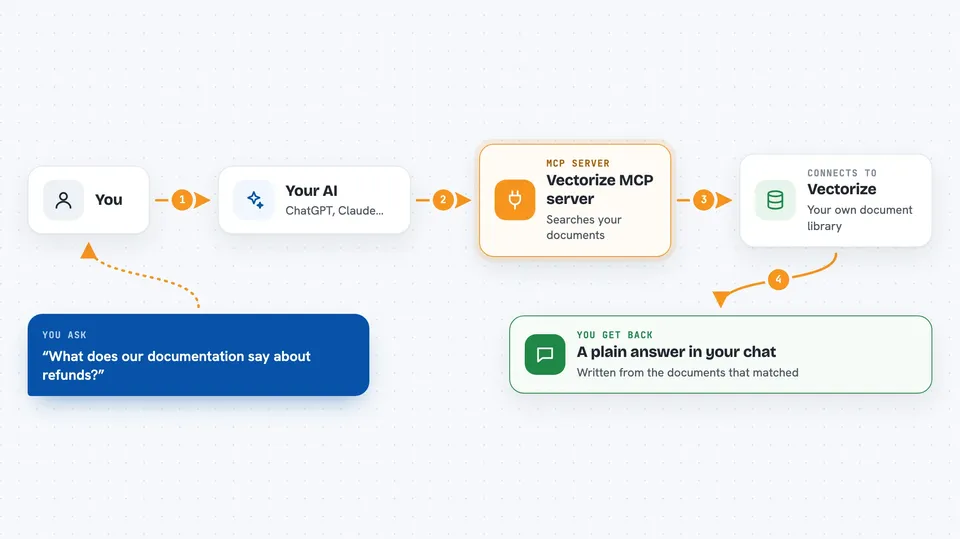
You ask your AI a question about your own documents. Your AI passes that question to this helper. The helper talks to Vectorize, which searches through the documents you have stored there. Vectorize sends back the most relevant pieces, and your AI turns them into a normal answer in your chat. You can also hand it a file to turn into clean text, or ask it to write a longer research report from your material.
 Click to zoom
What you can do with it
- Search your own documents and get answers based on them
- Turn a PDF or other file into clean Markdown text
- Split long documents into smaller readable chunks
- Ask for a private deep research report on a topic in your pipeline
- Choose how many matching documents you want back
- Include web search results in a research report when you want them
Try asking your AI
- “What does our documentation say about the refund policy?”
- “Search my pipeline for anything about the 2024 budget and summarize it.”
- “Turn this PDF into Markdown so I can read it easily.”
- “Write a short report on the financial health of the company using my documents.”
What it gives back to you
You get answers in plain chat text, written from the documents that matched your question. For a search, you get the most relevant passages or documents, usually a handful at a time. For extraction, you get the file's text in Markdown, ready to copy. For deep research, you get a longer written report.
Before you start
What you need
- A Vectorize account
- Your Vectorize Organization ID
- A Vectorize token (a kind of password for apps, which Vectorize gives you)
- A Vectorize pipeline ID (the pipeline is the collection of documents you want to search)
Good to know
The deep research tool can optionally search the web, so if you want to keep things fully private, leave that option off.
Install it with your AI
Add Vectorize MCP server to your AI, no technical skills needed
You don't install anything by hand. You copy one prompt, paste it into an AI that can work on your computer, and it checks, installs and connects the server for you, asking you when it needs something.
Sign in to get the install prompt
Members get a ready-made prompt that lets the Claude desktop app check Vectorize MCP server, install it and connect it for them, step by step. You don't need any technical skills: you copy, paste and answer a few questions. Your connected AI can also find and install any of the 4,361 MCP servers here for you.
Who it's for
Anyone who keeps their own documents in Vectorize and wants an AI to search them, read files, or write reports without leaving the chat.


