MCP server · Research
Russian Software Registry MCP server
by velvetway
Let your AI search a Russian software catalog for local alternatives and certified products.
This is a small helper that connects your AI assistant to a Russian software catalog called каталогпо.рф. That catalog lists more than 26,000 products from Russian developers, including security tools, operating systems, and backup software. It is handy if you work in IT, security, or compliance and need to find local replacements for foreign software.
What is an MCP server? The 30-second version
On its own, your AI can only chat with you using what it already knows. An MCP server is a small helper program that gives your AI a new skill or a connection to an outside service. This one connects your AI to the Russian software catalog at каталогпо.рф. Once it is connected, you can ask your AI to look things up in that catalog and it will go fetch the answers for you.
What this MCP server does
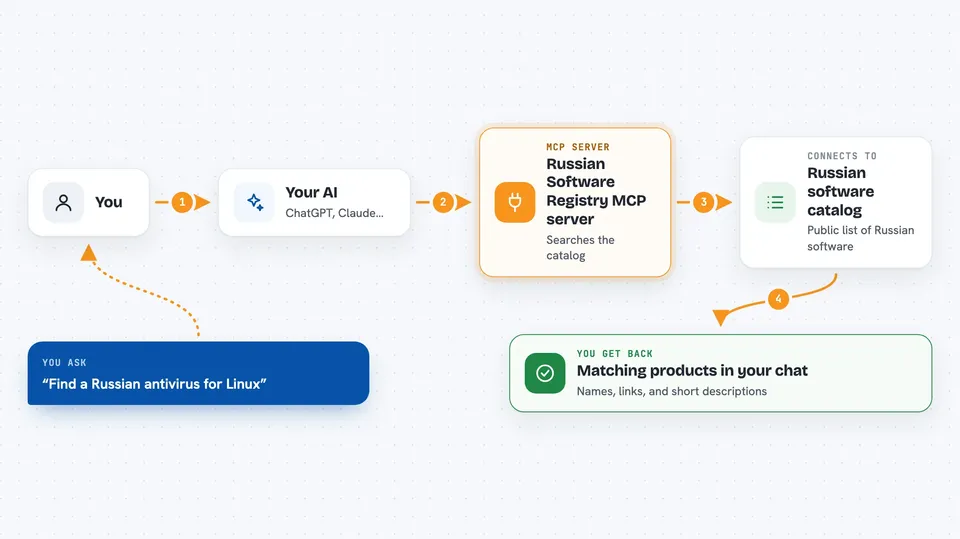
You ask your AI a question in plain words, like whether there is a Russian antivirus for Linux. The AI passes your question to this helper program. The helper then talks to the public catalog website and searches its product listings. It brings back matching products, their descriptions, and links. Your AI then shows you a short, readable answer right in the chat.
 Click to zoom
What you can do with it
- Search the catalog for Russian software by name or description
- Find local alternatives to foreign products you already use
- List manufacturers in the catalog with how many products each one has
- See featured or top products from the catalog homepage
- Check descriptions for mentions of FSTEC or FSB certificates
- Look for products compatible with Astra Linux or RED OS
Try asking your AI
- “Find a Russian antivirus for Linux”
- “Which Russian SIEM systems have an FSTEC certificate?”
- “Show me 10 top software manufacturers from the registry”
- “Is there a Russian replacement for Veeam?”
What it gives back to you
You get back a short list of matching products, each with a name, an ID number, a link, and a snippet of the description. Manufacturer searches return a list of company names with product counts. Featured searches return a handful of highlighted products. Everything appears as normal text in your chat, so you can read it or copy it into a document.
Before you start
What you need
- Python installed on your computer
- The Claude desktop app or Claude Code
- An internet connection
Good to know
This uses an unofficial public API that the website owner could change at any time, which would break the server until it is updated.
Install it with your AI
Add Russian Software Registry MCP server to your AI, no technical skills needed
You don't install anything by hand. You copy one prompt, paste it into an AI that can work on your computer, and it checks, installs and connects the server for you, asking you when it needs something.
Sign in to get the install prompt
Members get a ready-made prompt that lets the Claude desktop app check Russian Software Registry MCP server, install it and connect it for them, step by step. You don't need any technical skills: you copy, paste and answer a few questions. Your connected AI can also find and install any of the 4,361 MCP servers here for you.
Who it's for
IT, security, and compliance people in Russian organizations who need to find domestic software alternatives.