
MCP server · Developer tools · official
Verificate MCP server
by VerificateAI · official
Your AI checks its own code before you merge it, catching fake tests, made-up functions and placeholder stubs.
Verificate is a helper your AI assistant can call to check code it just wrote, before that code lands in your project. It looks for the things AI often gets wrong: stubbed-out functions, tests that always pass, claims that something works without proof, and calls to functions that do not exist. It is handy if you use an AI assistant to write code and you are not sure how much to trust the result.
What is an MCP server? The 30-second version
On its own, your AI assistant can only chat with you. An MCP server is a small helper program that gives your AI a new skill or a connection to another service. This one connects your AI to Verificate, a checking service that lives on the internet. When you ask your AI to check a piece of code, it sends the code to Verificate and gets back a verdict you can read in the chat.
What this MCP server does
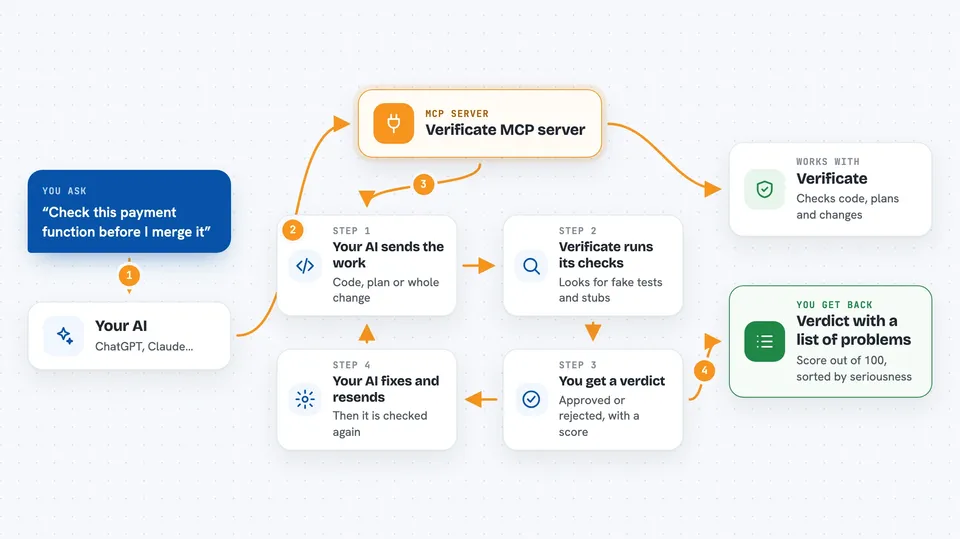
You ask your AI assistant to check a piece of code, a plan, or a whole change. The assistant passes it to Verificate through this connection. Verificate runs its checks: it looks for placeholder code, tests that cannot fail, made-up function calls, and claims that something is finished when it is not. Then it gives a verdict, either approved or rejected, with a score and a list of problems sorted by how serious they are. If it is rejected, your assistant can fix the problems and send it back for another check.
 Click to zoom
What you can do with it
- Check AI-written code before you merge it
- Catch tests that always pass no matter what
- Spot calls to functions or services that do not exist
- Review a plan or design before any code is written
- Get a plain list of problems sorted by seriousness
- Ask for code to be written and checked in one step
- See what each of the built-in checks looks for
Try asking your AI
- “Validate this payment function with verificate before I merge it”
- “Check my plan for the new signup flow and tell me if anything is missing”
- “This test always passes, can verificate tell me why that is a problem”
- “Analyze this file and show me the slow parts and failure risks”
What it gives back to you
You get a verdict in the chat: approved or rejected, a score out of 100, and a list of findings. Each finding says what is wrong and why it matters, so you can decide what to fix. If it is rejected, your assistant can go back, fix the issues, and check again. On the free plan, each answer also shows how many checks you have left.
Before you start
What you need
- An AI assistant that can use MCP servers, such as Claude Code, Cursor or Windsurf
- Nothing else for the first 25 checks, no account or card needed
- A Verificate account and token if you want to keep going after the free checks
Good to know
It sends your code to an online service to be checked, so do not use it on code you are not allowed to share outside your company.
Install it with your AI
Add Verificate MCP server to your AI, no technical skills needed
You don't install anything by hand. You copy one prompt, paste it into an AI that can work on your computer, and it checks, installs and connects the server for you, asking you when it needs something.
Sign in to get the install prompt
Members get a ready-made prompt that lets the Claude desktop app check Verificate MCP server, install it and connect it for them, step by step. You don't need any technical skills: you copy, paste and answer a few questions. Your connected AI can also find and install any of the 4,609 MCP servers here for you.
Who it's for
People who use AI assistants to write code and want a second pair of eyes before shipping, especially solo builders and small teams without a senior reviewer.




