MCP server · Analytics
MapSmith MCP server
by mapsmith-ai
Ask your AI to run map and terrain analysis on your own data, and get an answer plus a record of every step.
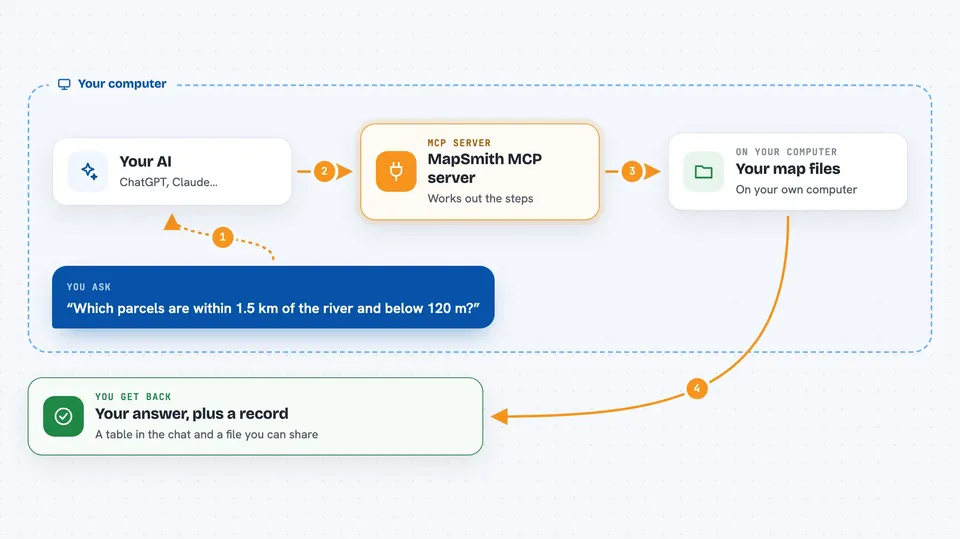
MapSmith is a helper for map and location data. You ask a question in plain words, and it works out the steps needed, runs them on your files, and hands back the result. It is handy if you work with parcels, rivers, elevation grids, or any kind of map data and want to skip the fiddly parts.
What is an MCP server? The 30-second version
On its own, your AI can only chat. It cannot open your map files or do calculations on them. An MCP server is a small helper program that gives your AI a new skill. MapSmith is that helper for map and location data: once it is connected, your AI can ask MapSmith to work with your files and bring the answer back into the chat.
What this MCP server does
You ask your AI a question about your map data, in your own words. Your AI passes the question to MapSmith. MapSmith figures out which operations are needed, checks the plan makes sense before touching anything, and then runs the steps on your files. When it is done, you get the answer in the chat, and a record is saved next to the output showing exactly what was done.
 Click to zoom
What you can do with it
- Find features within a certain distance of a river or road
- Measure the ground area of shapes on the map
- Look up elevation values under a set of points or parcels
- Filter features by a value, such as elevation below 120 metres
- Reproject data between coordinate systems when a calculation needs it
- Run terrain and hydrology steps on elevation grids
- Get a written record of every step, so someone else can check or rerun it
Try asking your AI
- “Which parcels lie within 1.5 km of the river and sit at 120 m or lower? Give me the mean elevation and the ground area of each.”
- “How high is the ground under each of these wells?”
- “Buffer this road layer by 500 metres and tell me which buildings fall inside.”
- “Measure the ground area of every polygon in this file.”
What it gives back to you
You get the answer in the chat: a table of features with the values you asked for, or a summary of what was found. MapSmith also writes the result to a file next to a record that lists the inputs, the settings used, and the checks that ran. That record is written in a shared format, so another person can read it and rerun the same steps.
Before you start
What you need
- The Claude desktop app, Claude Code, Cursor, or another app that supports MCP servers
- Your own map data files, such as shapefiles, GeoPackages, or GeoTIFFs
- Either uv (for the uvx option) or Docker, depending on which install you pick
Good to know
MapSmith writes new files to your disk next to your data, so point it at a folder you are happy for it to write into.
Install it with your AI
Add MapSmith MCP server to your AI, no technical skills needed
You don't install anything by hand. You copy one prompt, paste it into an AI that can work on your computer, and it checks, installs and connects the server for you, asking you when it needs something.
Sign in to get the install prompt
Members get a ready-made prompt that lets the Claude desktop app check MapSmith MCP server, install it and connect it for them, step by step. You don't need any technical skills: you copy, paste and answer a few questions. Your connected AI can also find and install any of the 4,361 MCP servers here for you.
Who it's for
People who work with maps and location data, like GIS analysts, planners, environmental researchers, and anyone who has map files but not the time to script every step.