MCP server · API
Swiss Open Data MCP server
by vikramgorla
Ask your AI about Swiss trains, weather, rivers, companies, parliament and more, with no setup or keys.
This is a helper that connects your AI assistant to lots of official Swiss open data. You can ask about trains, weather, river levels, companies, holidays, parliament and many other things, and get real answers instead of guesses. It is handy for anyone living in or curious about Switzerland, and you do not need any technical skills or accounts.
What is an MCP server? The 30-second version
On its own, your AI can only chat with you using what it already learned. An MCP server is a small helper program that gives your AI a new skill or a connection to a service. This one connects your AI to Swiss open data sources like SBB trains, MeteoSwiss weather and the ZEFIX company registry. Once it is connected, you just ask in normal words and the AI uses this helper to look things up for you.
What this MCP server does
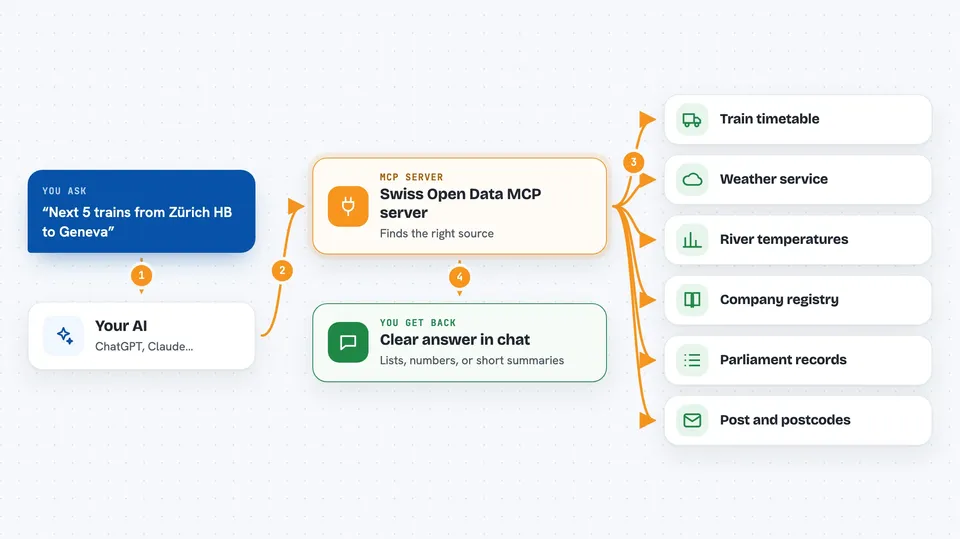
You ask your AI a question in plain language, like when the next train leaves or how warm the Aare is. The AI passes your request to this helper program. The helper then talks to the right Swiss data source, such as the train timetable, the weather service or the company registry. It brings the answer back to your AI, which explains it to you in the chat. You do not have to visit any website or fill in any forms yourself.
 Click to zoom
What you can do with it
- Check live train departures and plan journeys across Switzerland
- See current weather and river or lake temperatures
- Look up Swiss companies by name, canton or address
- Find public and school holidays by canton
- Search parliament bills, votes and members
- Get avalanche danger levels and hiking alerts
- Track Swiss Post parcels and look up postcodes
Try asking your AI
- “Next 5 trains from Zürich HB to Geneva”
- “Is the Aare in Bern warm enough to swim?”
- “Find blockchain companies registered in Zug”
- “Is next Monday a holiday in Zürich?”
What it gives back to you
You get clear answers in the chat, often with lists, numbers or short summaries. For example, you might see a list of train times, a temperature reading, or a company's details. Sometimes it gives you a link to a map or a PDF. It does not change anything on those websites; it only reads and reports.
Before you start
What you need
- An AI app that supports MCP servers, like Claude Desktop or Cursor
- Node.js installed on your computer (the free program that runs npx commands)
Good to know
It only reads public data, so it will not change or delete anything, but always double-check important details like train times or legal information.
Install it with your AI
Add Swiss Open Data MCP server to your AI, no technical skills needed
You don't install anything by hand. You copy one prompt, paste it into an AI that can work on your computer, and it checks, installs and connects the server for you, asking you when it needs something.
Sign in to get the install prompt
Members get a ready-made prompt that lets the Claude desktop app check Swiss Open Data MCP server, install it and connect it for them, step by step. You don't need any technical skills: you copy, paste and answer a few questions. Your connected AI can also find and install any of the 4,609 MCP servers here for you.
Who it's for
Anyone who lives in or visits Switzerland and wants quick answers about trains, weather, local rules or companies, without digging through websites.