MCP server · Notes
Midas memory server
by vornicx
Give your AI a private memory on your own computer so it remembers past sessions and checks before acting.
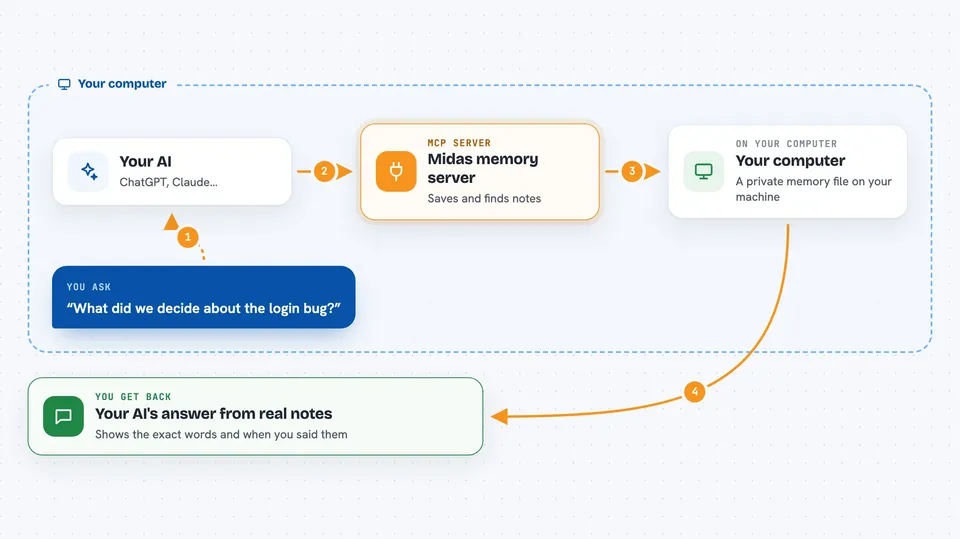
Midas is a memory helper that lives on your own computer and sits next to your AI assistant. It lets your AI remember decisions, bugs, and preferences from earlier chats, even days later. It is handy for anyone who uses an AI coding or chat assistant and is tired of repeating themselves.
What is an MCP server? The 30-second version
On its own, your AI can only chat with what is in front of it right now. An MCP server is a small helper program that gives your AI a new skill or a connection to something else. Midas is that helper, and its skill is memory: it stores what you and your AI talked about in a file on your machine. When you ask something later, your AI can look it up through Midas instead of guessing.
What this MCP server does
You talk to your AI like normal, and when something important comes up, the AI sends it to Midas to save. Midas keeps that note in a file on your computer, along with exactly where it came from. Later, when you ask about that topic, your AI asks Midas to look it up. Midas finds the original words and hands them back, so your AI answers from what was really said, not a rewritten summary. It also keeps things current by replacing old values with new ones and quietly dropping low value notes.
 Click to zoom
What you can do with it
- Remember decisions, preferences, and bugs across sessions
- Recall the exact original words behind a memory, with its source
- Show the current state of a project and what changed since last time
- Track promises or open tasks that should survive between sessions
- Block risky actions unless you clearly confirmed them before
- Forget a topic or clean up old notes on request
- Share one memory across several AI apps on the same computer
What it gives back to you
Midas gives back short lists of memories, each with the original sentence it came from and when it was said. For questions like what changed, it returns a small summary of new and updated beliefs. For safety checks, it returns a simple allowed or blocked answer with the reason. Everything shows up right in your chat as plain text.
Before you start
What you need
- Python installed on your computer (for the main version)
- Or Node.js if you prefer the no Python version
- A terminal or command prompt to run the setup command
Good to know
Midas can block actions it thinks are risky, so if something you expected to work is refused, check whether you confirmed it clearly before.
Install it with your AI
Add Midas memory server to your AI, no technical skills needed
You don't install anything by hand. You copy one prompt, paste it into an AI that can work on your computer, and it checks, installs and connects the server for you, asking you when it needs something.
Sign in to get the install prompt
Members get a ready-made prompt that lets the Claude desktop app check Midas memory server, install it and connect it for them, step by step. You don't need any technical skills: you copy, paste and answer a few questions. Your connected AI can also find and install any of the 4,066 MCP servers here for you.
Who it's for
People who use an AI coding assistant or chat app daily and want it to remember past work without sending data to a cloud service.