MCP server · Productivity
Excel Vision MCP server
by VOYAGER-Inc
Let your AI read Excel files fully, including the images and colors inside them.
This is a small helper that lets your AI actually read your Excel files, not just the text in the cells. It also picks up the pictures, colors, and crossed-out rows that other tools quietly skip. It is handy for anyone who reviews specs, reports, or plans that live in spreadsheets.
What is an MCP server? The 30-second version
On its own, your AI can only chat with you. An MCP server is a small helper program that gives your AI a new skill or a connection to an app, and here it connects your AI to Excel files on your computer. Once it is set up, you can ask your AI about a spreadsheet and it will open the file, look inside, and answer you. You do not need to know how it works under the hood.
What this MCP server does
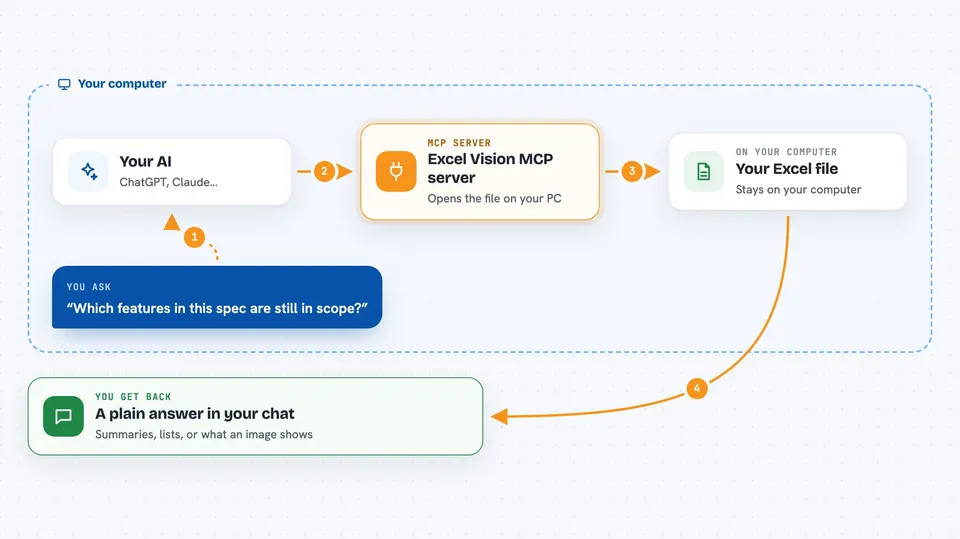
You ask your AI something about a spreadsheet, like what is in it or whether a row was cancelled. Your AI passes that request to this helper program on your computer. The helper opens the Excel file, reads the text, the formatting, and any pictures tucked into cells, then sends it all back. Your AI reads that and gives you an answer in the chat. Nothing is uploaded anywhere; the file stays on your machine.
 Click to zoom
What you can do with it
- Read all the text and images from a workbook in one go
- See which rows are highlighted, bold, or crossed out
- Find a word or number across every sheet
- List the sheets and how big each one is
- Create a new workbook or add a sheet
- Write values, formulas, or a block of rows into cells
- Insert an image into a cell and style a range
Try asking your AI
- “Review this spec and tell me which features are still in scope, and explain the flow in the diagram”
- “Search this workbook for the word revenue and tell me where it appears”
- “List all the sheets in this file and how many rows each one has”
- “Add a new sheet called Q3 and write these totals into it”
What it gives back to you
You get answers in plain chat: summaries, lists of matching cells, or descriptions of what is in the file. When it reads images, your AI can actually look at them and describe what they show. When it writes, it tells you what it changed, and the file is saved safely so a failed save cannot damage your original.
Before you start
What you need
- An AI app that supports MCP servers, like Claude Desktop, Cursor, or VS Code
- The uvx tool installed (a free helper that runs small programs; the README shows how)
Good to know
It can change or add things in your Excel files, so keep a backup of anything important before letting your AI write to it.
Install it with your AI
Add Excel Vision MCP server to your AI, no technical skills needed
You don't install anything by hand. You copy one prompt, paste it into an AI that can work on your computer, and it checks, installs and connects the server for you, asking you when it needs something.
Sign in to get the install prompt
Members get a ready-made prompt that lets the Claude desktop app check Excel Vision MCP server, install it and connect it for them, step by step. You don't need any technical skills: you copy, paste and answer a few questions. Your connected AI can also find and install any of the 4,361 MCP servers here for you.
Who it's for
Anyone who works with Excel files and wants their AI to understand the whole document, including pictures and formatting, such as analysts, project managers, and operations staff.