
MCP server · Developer tools
ADR Skills MCP server
by wooxogh
Turns your Claude Code chats into written architecture decisions, with quality scores and links between them.
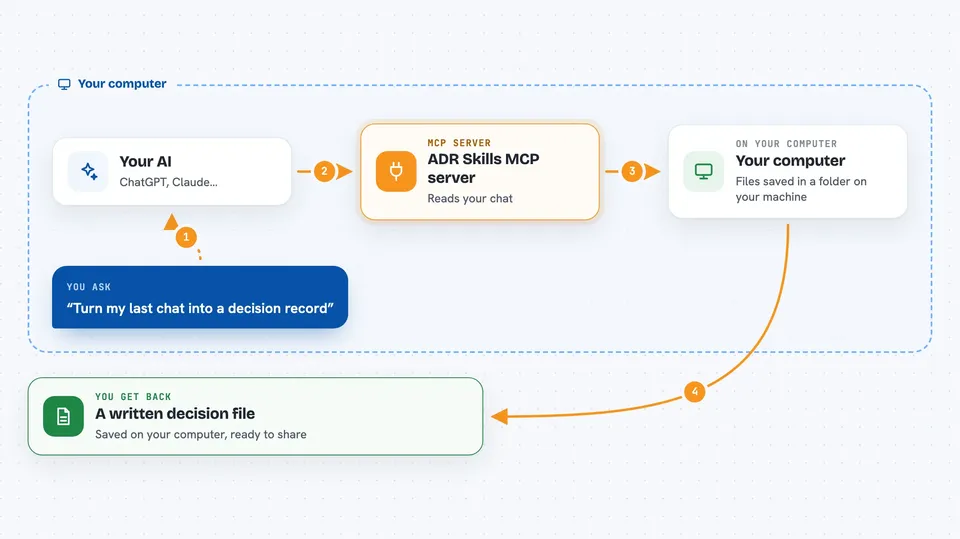
This is a helper for Claude Code that writes down the technical decisions you make while chatting. Every time a session ends, it turns the conversation into a short document called an ADR, which stands for Architecture Decision Record. It is handy for developers and tech leads who keep making choices like which database to use but never write the reasons down.
What is an MCP server? The 30-second version
On its own, your AI can only chat with you. An MCP server is a small helper program that gives your AI a new skill or a connection to another tool. This one connects Claude Code to a local store of decision records, so your AI can save, review, search, and link those records for you. You just ask in plain words, and the helper does the filing behind the scenes.
What this MCP server does
You have a normal development conversation in Claude Code. When the session ends, a small hook saves the transcript. Then Claude Opus reads it and pulls out the actual decision, the context around it, and the consequences. A tidy markdown file is saved to a folder on your computer, and you can ask for a quality score, a dependency map, or a list of old decisions that may need a fresh look.
 Click to zoom
What you can do with it
- Save a conversation so it can be turned into a decision record
- Generate a written ADR from a saved session
- Score an ADR out of 100 and get suggestions to improve it
- Move a decision through Proposed, Accepted, Deprecated, or Superseded
- Link two decisions as related, conflicting, or dependent
- See a graph of how your decisions connect
- Find old Accepted decisions that may be out of date
- Search past decisions by keyword like Redis or JWT
Try asking your AI
- “Generate an ADR from my last session”
- “Review ADR-1 and tell me what is missing”
- “Show me the dependency graph for my ADRs”
- “Which accepted decisions are older than six months?”
What it gives back to you
You get back structured markdown documents, quality scores with a list of issues and suggestions, a dependency graph showing how decisions relate, and lists of stale or matching decisions. In the chat, this usually appears as formatted text with headings and bullet points. The ADR files themselves are saved on your computer and can be committed with your code.
Before you start
What you need
- Node.js 18 or newer
- Claude Code CLI
- An Anthropic API key (optional, but needed for AI generation and quality review)
Good to know
It reads your Claude Code conversations and saves them to files on your computer, so keep that in mind if your chats contain private or sensitive details.
Install it with your AI
Add ADR Skills MCP server to your AI, no technical skills needed
You don't install anything by hand. You copy one prompt, paste it into an AI that can work on your computer, and it checks, installs and connects the server for you, asking you when it needs something.
Sign in to get the install prompt
Members get a ready-made prompt that lets the Claude desktop app check ADR Skills MCP server, install it and connect it for them, step by step. You don't need any technical skills: you copy, paste and answer a few questions. Your connected AI can also find and install any of the 4,361 MCP servers here for you.
Who it's for
Developers, tech leads, and engineering teams who use Claude Code and want a written record of their technical decisions without extra paperwork.



