
MCP server · Analytics
XiYan MCP server
Ask your AI questions in plain English and get real answers from your MySQL or PostgreSQL database.
This is a small helper that lets your AI talk to a database for you. Instead of writing database queries yourself, you just ask a question in normal words and it goes and fetches the answer. It is handy for anyone who has data in MySQL or PostgreSQL but does not want to learn query language.
What is an MCP server? The 30-second version
On its own, your AI can only chat. An MCP server is a small helper program that gives your AI a new skill or a connection to an app or service. This one connects your AI to a database, so when you ask a question, the AI can look things up there and bring back the answer. You do not need to know how it works inside. You just ask, and it handles the rest.
What this MCP server does
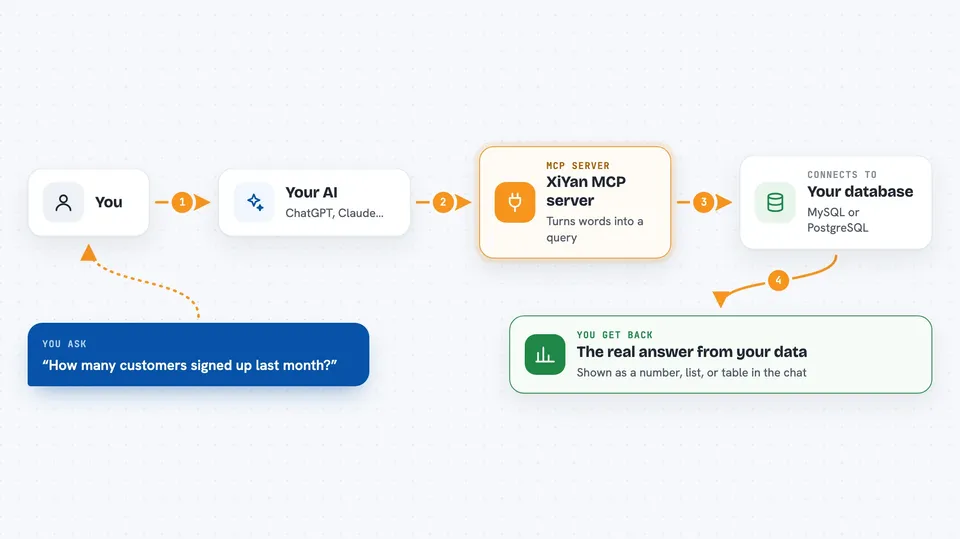
You type a question in everyday words, like how many orders came in last month. Your AI passes that question to this helper. The helper turns your words into a proper database query using a built-in model, then runs it against your MySQL or PostgreSQL database. The results come back and your AI shows them to you in the chat. It can also list the tables in your database so you know what is there.
 Click to zoom
What you can do with it
- Ask for numbers and totals from your database in plain words
- List the tables available in your database
- Look at sample rows from a specific table
- Get answers about customers, orders, or any data you have stored
- Query MySQL or PostgreSQL without writing any query language
Try asking your AI
- “How many customers signed up last month?”
- “Show me the top 5 products by total sales.”
- “List all tables in my database.”
- “What is the average order value for this year?”
What it gives back to you
You get back the actual data from your database, shown as a list, a table, or a short summary in the chat. If you asked for a count, you get a number. If you asked for rows, you get those rows. It does not change anything in your database, it only reads.
Before you start
What you need
- A MySQL or PostgreSQL database you can connect to (host, port, username, password, database name)
- A model API key (for example from Modelscope or OpenAI) unless you run the model locally
- Python 3.11 or newer installed on your computer
- A config file (YAML) with your database and model details
Good to know
This server only reads data, it does not change or delete anything, but be careful not to share your database password or API key with anyone.
Install it with your AI
Add XiYan MCP server to your AI, no technical skills needed
You don't install anything by hand. You copy one prompt, paste it into an AI that can work on your computer, and it checks, installs and connects the server for you, asking you when it needs something.
Sign in to get the install prompt
Members get a ready-made prompt that lets the Claude desktop app check XiYan MCP server, install it and connect it for them, step by step. You don't need any technical skills: you copy, paste and answer a few questions. Your connected AI can also find and install any of the 4,066 MCP servers here for you.
Who it's for
Anyone who has data in MySQL or PostgreSQL and wants quick answers without learning database query language, such as analysts, small business owners, or office workers who deal with reports.


