
MCP server · Productivity
AI HR Management Toolkit
by XJTLUmedia
Turn your AI into a hiring helper that reads resumes, scores candidates, and tracks your hiring pipeline.
This is a helper for your AI assistant that deals with hiring work. It can read resumes, pull out skills and experience, compare people to a job description, and keep track of jobs, interviews, and offers. It is handy if you screen candidates or run hiring and want your AI to do the boring reading and sorting for you.
What is an MCP server? The 30-second version
On its own, your AI can only chat. It cannot open a PDF resume or remember who is at which stage of your hiring process. An MCP server is a small helper program that gives your AI a new skill, and this one connects your AI to a resume parser and a hiring tracker. Once it is connected, you can ask your AI to read a resume or list your open jobs, and it will use this helper to do it.
What this MCP server does
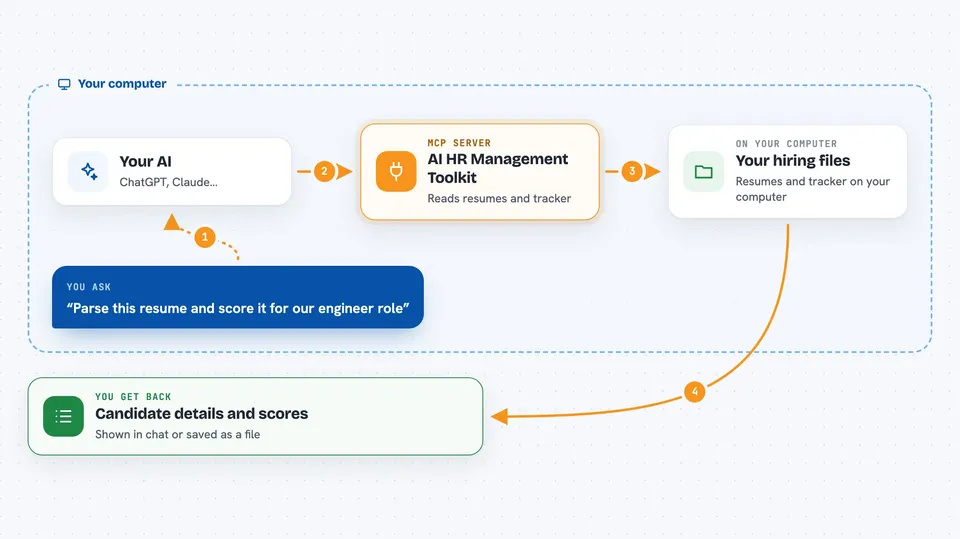
You ask your AI something like "parse this resume" or "who are my top candidates for the engineer role". Your AI then calls this helper, which reads the file or looks in the hiring tracker. The helper sends back clean, structured details like names, skills, dates, and scores. Your AI reads that and explains it to you in plain words, right in the chat.
 Click to zoom
What you can do with it
- Read a resume file and pull out contact details, skills, and work history
- Compare a candidate to a job description and give a match score
- Rank your candidates and suggest who to move forward
- Keep track of job postings, candidates, interviews, and offers
- Search across all your hiring notes and records
- Export parsed resume data as a spreadsheet or file
- Generate sample hiring data so you can try things out safely
Try asking your AI
- “Parse this resume and tell me if they fit our Senior Engineer role”
- “Show me all candidates in the interview stage for the designer job”
- “Rank my applicants for the marketing manager position”
- “What is our offer acceptance rate this month”
What it gives back to you
You get back structured details in the chat: contact info, a skills list, a work timeline, and match scores with a short explanation. For hiring tasks, it returns lists of candidates, pipeline counts, and suggested next steps. It can also hand you an export file like a spreadsheet or a PDF. Everything shows up as text or a downloadable file you can read right there.
Before you start
What you need
- The Claude desktop app or another AI app that supports MCP servers
- Node.js installed on your computer (the free program that runs these helpers)
- A folder with a package.json file if you use the npx setup
Good to know
It can change or delete records in your hiring tracker, so double check before you let your AI remove or move things.
Install it with your AI
Add AI HR Management Toolkit to your AI, no technical skills needed
You don't install anything by hand. You copy one prompt, paste it into an AI that can work on your computer, and it checks, installs and connects the server for you, asking you when it needs something.
Sign in to get the install prompt
Members get a ready-made prompt that lets the Claude desktop app check AI HR Management Toolkit, install it and connect it for them, step by step. You don't need any technical skills: you copy, paste and answer a few questions. Your connected AI can also find and install any of the 4,609 MCP servers here for you.
Who it's for
Recruiters, HR staff, hiring managers, and small teams who screen resumes and track candidates and want their AI to do the reading and sorting.





