MCP server · Design tools
DiagramZu MCP server
by yenchieh
Lets your AI create, update, and read Mermaid diagrams in your DiagramZu Space.
This is a helper for DiagramZu, a website where you keep Mermaid diagrams (simple text that draws flowcharts and other pictures). Once it is connected, you can ask your AI to make or change diagrams for you, and they show up in your team's shared Space. It is handy if you already draw diagrams at work and would rather describe them in plain words than click around.
What is an MCP server? The 30-second version
On its own, your AI can only chat. An MCP server is a small helper program that gives your AI a new skill or a connection to another app. This one connects your AI to DiagramZu, so it can look at your diagrams, make new ones, and update them when you ask. You do not need to understand how it works inside; you just paste a short setup once.
What this MCP server does
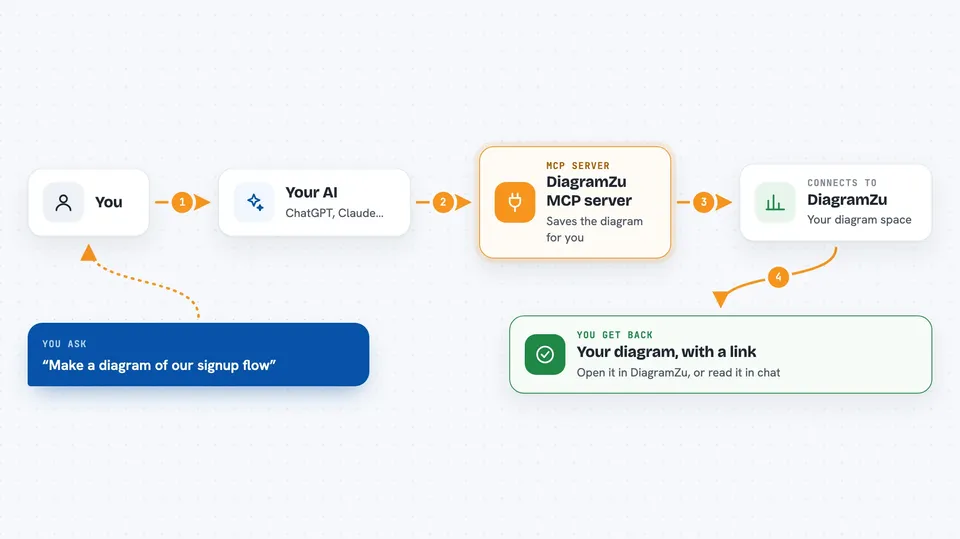
You ask your AI something like "make me a diagram of our signup flow." The AI writes the Mermaid text and uses this helper to save it into your DiagramZu Space. The helper talks to DiagramZu for you and hands back the diagram's id and a link inside the app. Later you can ask the AI to list your diagrams, read one back, or change its wording, and it will do that through the same helper.
 Click to zoom
What you can do with it
- Create a new Mermaid diagram from a description
- List the diagrams and folders in your Space
- Read a diagram's title, description, and Mermaid source
- Update a diagram's text, title, or description
- See a diagram's version history and older versions
- Read and post comments, including on a specific node
- Build a presentation deck out of existing diagrams
Try asking your AI
- “Make a Mermaid flowchart of our checkout process and save it to DiagramZu”
- “List my most recently updated diagrams”
- “Show me the Mermaid source of the diagram called Onboarding”
- “Add a comment on the Login node saying we should split this step”
What it gives back to you
You get back plain answers in the chat: a list of diagram names, the Mermaid text of one diagram, a short structural summary (how many nodes and connections), or a confirmation that something was created or changed. When it makes a diagram, it also gives you the in-app link so you can open it. Comments and version history come back as short lists you can read right there.
Before you start
What you need
- A DiagramZu account (sign up at diagramzu.ai)
- An API token from diagramzu.ai/app/settings/connections, which looks like dz_live_...
- An MCP-capable AI client such as Claude Desktop, Claude Code, Cursor, Windsurf, Cline, or a ChatGPT custom GPT
Good to know
It can create and change diagrams in your Space, so double-check anything it rewrites, and remember the links it gives you are members-only, not public.
Install it with your AI
Add DiagramZu MCP server to your AI, no technical skills needed
You don't install anything by hand. You copy one prompt, paste it into an AI that can work on your computer, and it checks, installs and connects the server for you, asking you when it needs something.
Sign in to get the install prompt
Members get a ready-made prompt that lets the Claude desktop app check DiagramZu MCP server, install it and connect it for them, step by step. You don't need any technical skills: you copy, paste and answer a few questions. Your connected AI can also find and install any of the 4,361 MCP servers here for you.
Who it's for
People who already draw diagrams at work, like product managers, engineers, and designers, and who would rather describe a diagram in words than build it by hand.