
MCP server · Developer tools
llm-router MCP server
by ypollak2
Send simple questions to free or local AI models first, so your paid Claude quota lasts longer.
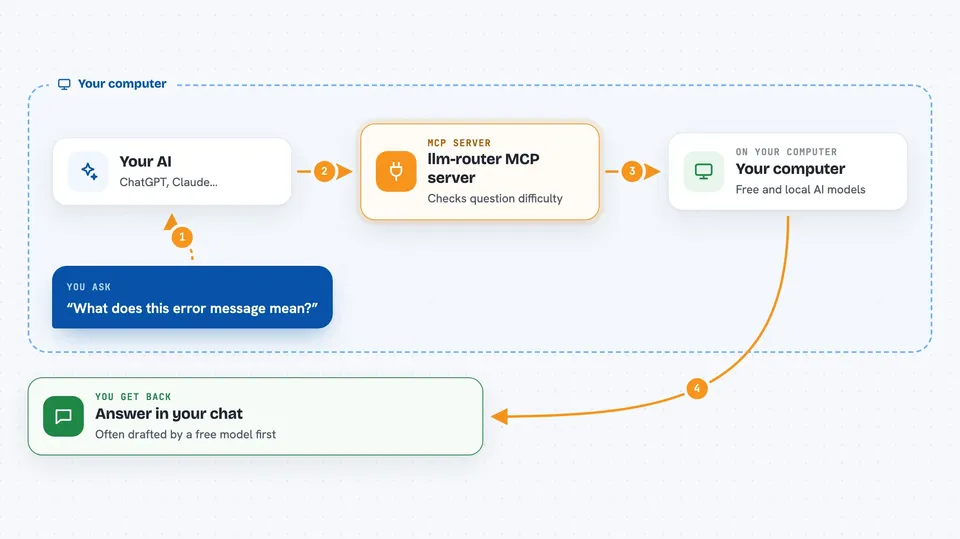
This is a helper that sits between you and your coding assistant. Before a prompt reaches Claude, it tries to answer it with a free or local model instead. It is handy if you pay for Claude Pro or Max and keep hitting your usage limit on small questions.
What is an MCP server? The 30-second version
On its own, your AI can only chat with you using the model you picked. An MCP server is a small helper program that gives your AI an extra skill or a connection to something else. This one gives your AI a way to send prompts to other model providers, like free or local ones, before Claude answers. So when you ask something simple, the helper can draft an answer somewhere cheaper first.
What this MCP server does
You type a prompt in your coding tool as usual. This helper reads it before Claude does and guesses how hard the question is. If it looks simple, the helper asks a free or local model to draft an answer. That draft is handed to Claude as a hint, not a final answer, unless you turn on a special setting. You still see the reply in your normal chat window.
 Click to zoom
What you can do with it
- Route simple prompts to free or local models first
- Keep your Claude Pro or Max quota for harder questions
- Show which model handled your last prompt
- Give you a savings summary at the end of a session
- Skip a provider that is failing or rate-limited
- Keep prompts containing secrets on local models only
- Handle image, video and audio tasks through the same setup
Try asking your AI
- “What does this error message mean?”
- “Reformat this JSON so it is easier to read”
- “Is this service up right now?”
- “Summarize what changed in this file”
What it gives back to you
You get the same kind of answer you would normally get in your chat, just often drafted by a cheaper model first. It can also show a status line with the last model used, estimated savings and provider health. At the end of a session you can ask for a summary with savings, model mix, cost per provider and timing numbers.
Before you start
What you need
- Python installed on your computer
- A coding tool it supports, like Claude Code, Cursor or VS Code
- Optional: API keys from providers like OpenAI, Gemini or Groq to widen the pool
- Optional: Ollama installed if you want to use local models
Good to know
By default a local model can write files and run commands on your machine, so turn that off with LLM_ROUTER_DIRECT_EXECUTION=false if you are not comfortable with it.
Install it with your AI
Add llm-router MCP server to your AI, no technical skills needed
You don't install anything by hand. You copy one prompt, paste it into an AI that can work on your computer, and it checks, installs and connects the server for you, asking you when it needs something.
Sign in to get the install prompt
Members get a ready-made prompt that lets the Claude desktop app check llm-router MCP server, install it and connect it for them, step by step. You don't need any technical skills: you copy, paste and answer a few questions. Your connected AI can also find and install any of the 4,609 MCP servers here for you.
Who it's for
Developers and anyone on a paid Claude plan who wants their subscription to last longer on everyday coding questions.



